


 Web Front-end
CSS Tutorial
Detailed explanation of comparison functions in CSS (example introduction)
Web Front-end
CSS Tutorial
Detailed explanation of comparison functions in CSS (example introduction)
Detailed explanation of comparison functions in CSS (example introduction)

CSS comparison functions have been supported since April 2020. I like to use these functions, but my favorite is clamp(), which is also the one I use most. In this lesson, we look at these comparison functions in detail.
Clamp(), Max(), and Min() functions
clamp() The function of Limit a value between an upper limit and a lower limit. When the value exceeds the range of the minimum and maximum values, select a value between the minimum and maximum values to use. It receives three parameters: minimum value, preferred value, maximum value. [Learning video sharing: css video tutorial, web front-end]
The size and positioning of fluid
is below In the example, there is a mobile phone style with two pictures placed on it at the same time, as shown below:
When the width of the container becomes smaller, we need to reduce the size of the picture. This way it won't deform. It is generally solved using percentage units, such as width: 20%, but this method does not give us much control.
We want to have a fluid size that requires a minimum and maximum value. This is where clamp comes in.
.section-image {
  width: clamp(70px, 80px + 15%, 180px);
}
Example address: codepen.io/shadeed/pen…
Decorative elements
Sometimes, we need to add some decorative elements to the corners of the page, which need to be responsive. For example, the PC side looks like this (black dot part):
Then it looks like this on the mobile side:
In order to do this, we can use media queries:
.decorative--1 {
  left: 0;
}

.decorative--2 {
  right: 0;
}

@media (max-width: 600px) {
  .decorative--1 {
    left: -8rem;
  }

  .decorative--2 {
    right: -8rem;
  }
Although this can be done, But we can use the clamp() function, which is more concise:
  .decorative--1 {
    left: clamp(-8rem, -10.909rem + 14.55vw, 0rem);
  }

  .decorative--2 {
    right: clamp(-8rem, -10.909rem + 14.55vw, 0rem);
  }
Example address: codepen.io/shadeed/pen…
fluid height
Sometimes, the height of the main area of our page needs to change according to the viewport size. In this scenario, we tend to change this situation through media queries or using viewport units.
.hero {
  min-height: 250px;
}

@media (min-width: 800px) {
  .hero {
    min-height: 500px;
  }
}
We can also mix fixed values and viewport units:
.hero {
  min-height: calc(350px + 20vh);
}

@media (min-width: 2000px) {
  .hero {
    min-height: 600px;
  }
}
But we need to pay attention to the height not being too high on larger viewports. So we need to set a maximum height. Using CSS clamp(), we can set the minimum, preferred and maximum height with just one CSS statement.
.hero {
  min-height: clamp(250px, 50vmax, 500px);
}
When the screen is resized, we will see that the height will gradually change according to the viewport width. In the above example, 50vmax represents 50% of the maximum viewport size.
Example address: codepen.io/shadeed/pen…
Loading Bar
The progress bar is generally a loading process from left to right. In CSS, we can position it on the left:
.loading-thumb {
  left: 0%;
}
In order to move the progress bar To position it to the far right, we can use left: 100%, but this will cause a problem. The progress bar will run outside the container:
.loading-thumb {
  left: 100%;
}
This is normal, 100% starts from the end of the progress bar, and the progress bar itself also has its own width, So the actual width will be greater than the width of the container.
We can use calc() to subtract the width of the progress bar, so that's it, but this is not 100% effective:
.loading-thumb {
  /* 40px represents the thumb width. */
  left: calc(100% - 40px);
}
Let's take a look , how to use CSS variables and comparison functions to achieve better implementation:
.loading-thumb {
  --loading: 0%;
  --loading-thumb-width: 40px;
  position: absolute;
  top: 4px;
  left: clamp(
    0%,
    var(--loading),
    var(--loading) - var(--loading-thumb-width)
  );
  width: var(--loading-thumb-width);
  height: 16px;
}
The above steps are as follows:
First, we set a minimum value as
0%The preferred value is the current value of the
--loadingCSS variable最大值代表当前的加载量减去进度条件的宽度
这里的CSS clamp()为我们提供了这个组件的三种不同的状态信息,这个方案很 nice:
不仅如此,我们还可以以相同的方式来处理不同UI
.loading-progress {
  width: clamp(10px, var(--loading), var(--loading) - 10px);
}
最小值等于圆圈宽度的一半,首选值是当前的加载百分比,最大值是当前百分比与圆圈一半的减去结果。
动态分割器
考虑下图,我们在两个区域之间有一个行分隔符。
在移动端上,这个分隔符应该变成水平的,如下图:
我的解决方案是使用一个边框和flex。思路是,边框作为伪元素,以填补垂直和水平状态的可用空间:
.section {
  display: flex;
  flex-direction: column;
  gap: 1rem;
}

.section:before {
  content: "";
  border: 1px solid #d3d3d3;
  align-self: stretch;
}

@media (min-width: 700px) {
  .section {
    align-items: center;
    flex-direction: row;
  }
}
我们也可以使用 clamp 而不需要媒体查询的解决方案:
.section {
  --breakpoint: 400px;
  display: flex;
  flex-wrap: wrap;
}

.section:before {
  content: "";
  border: 2px solid lightgrey;
  width: clamp(0px, (var(--breakpoint) - 100%) * 999, 100%);
}
来剖析一下上面的CSS:
- 0px:最小值,用于垂直分隔符。它的值是
0,因为我们使用的是一个CSS边框 (var(--breakpoint) - 100%) * 999是一个个切换器,根据视口宽度在0px或100%之间切换。
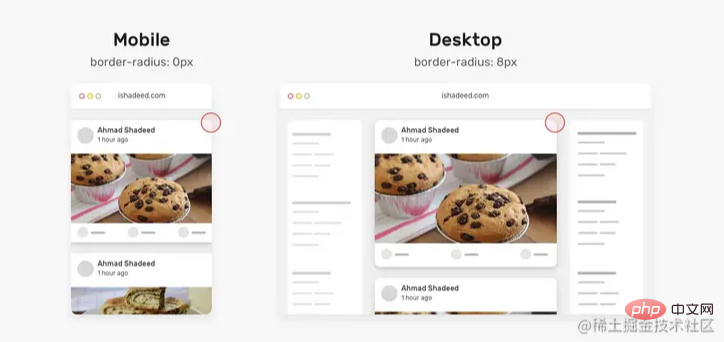
动态 border Radius
一年前,发现了一个巧妙的CSS技巧。使用CSS max()函数,根据视口宽度,将卡片的border-radius 从 0px 切换到 8px。
.card {
  border-radius: max(
    0px,
    min(8px, calc((100vw - 4px - 100%) * 9999))
  );
}
来剖析一下上面的CSS:
我们有一个
max()函数,在0px和min()的计算值之间进行比较,并选择较大的值。min()函数在8px和calc((100vw - 4px - 100%) * 9999的计算值之间进行比较,这会得到一个非常大的正数或负数。9999是一个很大的数字,这样min的值都是8px
间距

有时,我们可能需要根据视口宽度来改变一个组件或一个网格的间距。有了CS函数就不一样了,我们只需要设置一次。
.wrapper {
  display: grid;
  grid-template-columns: repeat(3, 1fr);
  grid-gap: min(2vmax, 32px);
}
原文地址:https://isdeed.com/article/use-cases-css-comparison-functions/
更多编程相关知识,请访问:编程视频!!
The above is the detailed content of Detailed explanation of comparison functions in CSS (example introduction). For more information, please follow other related articles on the PHP Chinese website!

Hot AI Tools

Undress AI Tool
Undress images for free

Undresser.AI Undress
AI-powered app for creating realistic nude photos

AI Clothes Remover
Online AI tool for removing clothes from photos.

Clothoff.io
AI clothes remover

Video Face Swap
Swap faces in any video effortlessly with our completely free AI face swap tool!

Hot Article
Hot Tools

Notepad++7.3.1
Easy-to-use and free code editor

SublimeText3 Chinese version
Chinese version, very easy to use

Zend Studio 13.0.1
Powerful PHP integrated development environment

Dreamweaver CS6
Visual web development tools

SublimeText3 Mac version
God-level code editing software (SublimeText3)


 How to use CSS gradients for backgrounds
Aug 17, 2025 am 08:39 AM
How to use CSS gradients for backgrounds
Aug 17, 2025 am 08:39 AM
CSSgradientsprovidesmoothcolortransitionswithoutimages.1.Lineargradientstransitioncolorsalongastraightlineusingdirectionsliketobottomorangleslike45deg,andsupportmultiplecolorstopsforcomplexeffects.2.Radialgradientsradiatefromacentralpointusingcircleo
 How to create a glassmorphism effect with CSS
Aug 22, 2025 am 07:54 AM
How to create a glassmorphism effect with CSS
Aug 22, 2025 am 07:54 AM
To create a glass mimicry effect of CSS, you need to use backdrop-filter to achieve background blur, set a translucent background such as rgba(255,255,255,0.1), add subtle borders and shadows to enhance the sense of hierarchy, and ensure that there is enough visual content behind the elements; 1. Use backdrop-filter:blur(10px) to blur the background content; 2. Use rgba or hsla to define the transparent background to control the degree of transparency; 3. Add 1pxsolidrgba(255,255,255,0.3) borders and box-shadow to enhance the three-dimensionality; 4. Ensure that the container has rich backgrounds such as pictures or textures to present a blurred penetration effect; 5. It is compatible with old browsers
 How to create a dotted border in CSS
Aug 15, 2025 am 04:56 AM
How to create a dotted border in CSS
Aug 15, 2025 am 04:56 AM
Use CSS to create dotted borders, just set the border attribute to dotted. For example, "border:3pxdotted#000" can add a 3-pixel-wide black dot border to the element. By adjusting the border-width, the size of the point can be changed. The wider borders produce larger points. You can set dotted borders for a certain side, such as "border-top:2pxdottedred". Dotted borders are suitable for block-level elements such as div and input. They are often used in focus states or editable areas to improve accessibility. Pay attention to color contrast. At the same time, different from dashed's short-line style, dotted presents a circular dot shape. This feature is widely used in all mainstream browsers.
 How to change the list style in CSS
Aug 17, 2025 am 10:04 AM
How to change the list style in CSS
Aug 17, 2025 am 10:04 AM
To change the CSS list style, first use list-style-type to change the bullet or numbering style. 1. Use list-style-type to set the bullet of ul to disc, circle or square, and the number of ol is decimal, lower-alpha, upper-alpha, lower-roman or upper-roman. 2. Remove the tag completely with list-style:none. 3. Use list-style-image:url('bullet.png') to replace it with a custom image. 4. Use list-style-position:in
 How to change the cursor in CSS
Aug 16, 2025 am 05:00 AM
How to change the cursor in CSS
Aug 16, 2025 am 05:00 AM
Usebuilt-incursortypeslikepointer,help,ornot-allowedtoprovideimmediatevisualfeedbackfordifferentinteractiveelements.2.ApplycustomcursorimageswiththecursorpropertyusingaURL,optionallyspecifyingahotspotandalwaysincludingafallbacklikeautoorpointer.3.Fol
 How to implement a dark mode theme with CSS
Aug 22, 2025 am 09:55 AM
How to implement a dark mode theme with CSS
Aug 22, 2025 am 09:55 AM
There are two main ways to implement dark mode: one is to use prefers-color-scheme media to query automatically to adapt system preferences, and the other is to add manual switching function through JavaScript. 1. Use prefers-color-scheme to automatically apply dark themes according to the user system. There is no need for JavaScript, just define the styles in the media query; 2. To achieve manual switching, you need to define light-theme and dark-themeCSS classes, add toggle buttons, and use JavaScript to manage the theme status and localStorage to save user preferences; 3. You can combine both to read localSt first when the page is loaded.
 How to use grid-template-areas in CSS
Aug 22, 2025 am 07:56 AM
How to use grid-template-areas in CSS
Aug 22, 2025 am 07:56 AM
Thegrid-template-areaspropertyallowsdeveloperstocreateintuitive,readablelayoutsbydefiningnamedgridareas;eachstringrepresentsarowandeachwordacolumncell,withgrid-areanamesonchildelementsmatchingthoseinthetemplate,suchas"headerheaderheader"for
 How to add a box shadow in CSS
Aug 18, 2025 am 11:39 AM
How to add a box shadow in CSS
Aug 18, 2025 am 11:39 AM
To add box shadows, use box-shadow attribute; 1. The basic syntax is box-shadow: horizontal offset vertical offset blur radius expansion radius shadows in color; 2. The first three values are required, the rest are optional; 3. Use rgba() or hsla() to achieve transparent effect; 4. The positive expansion radius expands shadows and the negative value is reduced; 5. Multiple shadows can be added by commas separation; 6. Overuse should be avoided to ensure that visibility is tested on different backgrounds; this attribute is well supported by the browser, and reasonable use can improve the design texture.
