


 Web Front-end
HTML Tutorial
The types and importance of implicit type conversion in programming
Web Front-end
HTML Tutorial
The types and importance of implicit type conversion in programming
The types and importance of implicit type conversion in programming


Types of implicit type conversions and their importance in programming
In programming, type conversion is a common operation used to change The data type of the variable or object. Whether it is explicit type conversion or implicit type conversion, it is to meet certain specific needs. In this article, we will focus on the types of implicit type conversions and its importance in programming.
Implicit type conversion means that under certain conditions, the compiler automatically converts one data type to another data type without explicitly specifying the conversion operation. This type conversion is automatically completed by the compiler according to rules without manual intervention by the programmer. Implicit type conversion is mainly divided into the following situations:
- Implicit type conversion between numerical types
In the program, there may be implicit conversions between different types of values. . For example, when an operation is performed between a variable of integer type and a variable of floating point type, the compiler will automatically convert the integer type to a floating point type in order to perform the operation. This implicit type conversion avoids data loss and provides a wider range of data processing capabilities.
int num1 = 10;
float num2 = 3.14;

float result = num1 + num2;

// 在上述代码中,整数类型的变量num1会被隐式转换为浮点类型,以便与浮点类型的变量num2相加
- Implicit type conversion between numerical type and Boolean type
In programming, in order to simplify the judgment logic, the compiler will automatically convert the numerical type to the Boolean type. When a numeric expression appears in a Boolean condition, it is considered true if the value of the expression is non-zero, otherwise it is considered false.
int num = 10;
bool isPositive = num;  // 将非零的整数转换为布尔类型

if (isPositive) {
    // 当num的值非零时,进入if语句块
    // ...
}- Implicit type conversion between classes
In object-oriented programming, implicit type conversion between classes is also a common situation. When a subclass object is assigned to a parent class object, the compiler will automatically perform type conversion. This implicit type conversion increases code flexibility and reusability.
class Animal {
public:
    virtual void speak() const {
        cout << "Animal Speaking" << endl;
    }
};

class Cat : public Animal {
public:
    void speak() const override {
        cout << "Cat Meowing" << endl;
    }
};

Cat cat;
Animal& animal = cat;  // 将子类对象隐式转换为父类对象

animal.speak();  // 输出:Cat Meowing

// 在上述代码中,子类Cat的对象被隐式转换为父类Animal的对象,保留了Cat类的特性,但调用的是父类的方法
// 这种隐式类型转换使得可以通过父类的引用或指针来操作子类的对象
Implicit type conversion plays an important role in programming. First, it improves code flexibility and readability. Through implicit type conversion, we can perform operations and comparisons between different types without manual type conversion, making the code more concise and easier to understand.
Secondly, implicit type conversion can reduce the programmer's workload. When performing a large number of operations or comparisons, if implicit type conversion is not used, a large amount of explicit type conversion code needs to be written, making the code verbose and difficult to maintain. Through implicit type conversion, we can save these cumbersome conversion operations.
However, implicit type conversion also has some potential risks and problems. First, implicit type conversions can lead to data loss. When assigning a higher-precision numeric type to a lower-precision type, precision may be lost and errors may occur. Second, implicit type conversions may throw exceptions or errors. When an object is implicitly converted to an incompatible type, it may cause the program to crash or produce unpredictable results.
In actual programming, we should use implicit type conversion reasonably to avoid abuse and incorrect use. At the same time, we should also understand when we should use explicit type conversion to clearly express our intentions, and how to deal with potential problems that type conversion may cause.
To sum up, implicit type conversion is a very common and important operation in programming. It can improve the flexibility and readability of the code and reduce the programmer's workload. However, we need to use it with caution to avoid data loss and potential anomaly problems. Only by understanding and mastering the rules and limitations of implicit type conversion can we better use it to improve code quality and development efficiency.
The above is the detailed content of The types and importance of implicit type conversion in programming. For more information, please follow other related articles on the PHP Chinese website!

Hot AI Tools

Undress AI Tool
Undress images for free

Undresser.AI Undress
AI-powered app for creating realistic nude photos

AI Clothes Remover
Online AI tool for removing clothes from photos.

Clothoff.io
AI clothes remover

Video Face Swap
Swap faces in any video effortlessly with our completely free AI face swap tool!

Hot Article
Hot Tools

Notepad++7.3.1
Easy-to-use and free code editor

SublimeText3 Chinese version
Chinese version, very easy to use

Zend Studio 13.0.1
Powerful PHP integrated development environment

Dreamweaver CS6
Visual web development tools

SublimeText3 Mac version
God-level code editing software (SublimeText3)


 How to make Google Maps the default map in iPhone
Apr 17, 2024 pm 07:34 PM
How to make Google Maps the default map in iPhone
Apr 17, 2024 pm 07:34 PM
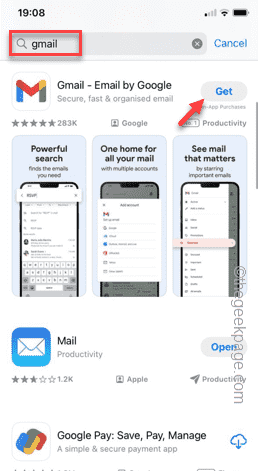
The default map on the iPhone is Maps, Apple's proprietary geolocation provider. Although the map is getting better, it doesn't work well outside the United States. It has nothing to offer compared to Google Maps. In this article, we discuss the feasible steps to use Google Maps to become the default map on your iPhone. How to Make Google Maps the Default Map in iPhone Setting Google Maps as the default map app on your phone is easier than you think. Follow the steps below – Prerequisite steps – You must have Gmail installed on your phone. Step 1 – Open the AppStore. Step 2 – Search for “Gmail”. Step 3 – Click next to Gmail app
 How to sort photos by face on Windows 10 and 11
Aug 08, 2023 pm 10:41 PM
How to sort photos by face on Windows 10 and 11
Aug 08, 2023 pm 10:41 PM
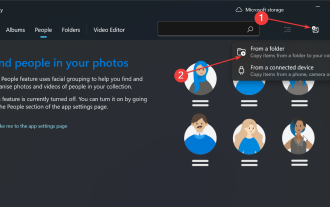
The operation of Windows is getting better and better with every version, with attractive features to improve the user experience. One feature users will want to explore on Windows 10 and 11 is the ability to sort photos by faces. This feature allows you to group photos of friends and family using facial recognition. Sounds fun, right? Read on to learn how to take advantage of this feature. Can I group photos by faces on Windows? Yes, you can use the Photos app to group pictures by faces on Windows 10 and 11. However, this feature is not available on the Photos app version. Additionally, you can link these photos to contacts using the People tab. Therefore, using this function you can
 Fix: Operator denied request error in Windows Task Scheduler
Aug 01, 2023 pm 08:43 PM
Fix: Operator denied request error in Windows Task Scheduler
Aug 01, 2023 pm 08:43 PM
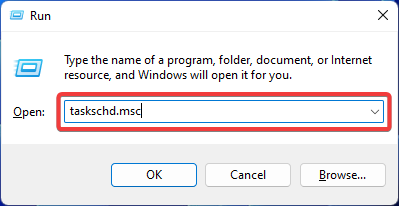
To automate tasks and manage multiple systems, mission planning software is a valuable tool in your arsenal, especially as a system administrator. Windows Task Scheduler does the job perfectly, but lately many people have reported operator rejected request errors. This problem exists in all iterations of the operating system, and even though it has been widely reported and covered, there is no effective solution. Keep reading to find out what might actually work for other people! What is the request in Task Scheduler 0x800710e0 that was denied by the operator or administrator? Task Scheduler allows automating various tasks and applications without user input. You can use it to schedule and organize specific applications, configure automatic notifications, help deliver messages, and more. it
 How to quickly uninstall apps from the Microsoft Store
Jul 12, 2023 pm 09:25 PM
How to quickly uninstall apps from the Microsoft Store
Jul 12, 2023 pm 09:25 PM
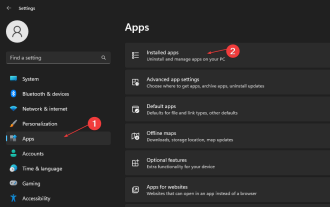
Microsoft Store is a built-in repository where users can download, update, and uninstall apps for Windows operating systems. Sadly, many users don't know how to uninstall apps on Microsoft Store. Therefore, this article will take you through how to uninstall apps from Microsoft Store quickly. Alternatively, if Microsoft Store apps are missing on your Windows 11 PC, we have a detailed guide on downloading and installing Store apps. Is it possible to uninstall an app directly from the Microsoft Store? No, the Microsoft Store does not provide the option to uninstall apps directly from the platform. You can only use Ping
 How to open a website using Task Scheduler
Oct 02, 2023 pm 11:13 PM
How to open a website using Task Scheduler
Oct 02, 2023 pm 11:13 PM
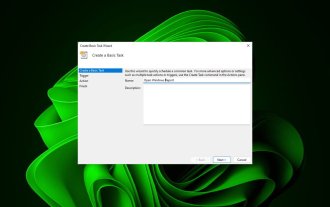
Do you frequently visit the same website at about the same time every day? This can lead to spending a lot of time with multiple browser tabs open and cluttering the browser while performing daily tasks. Well, how about opening it without having to launch the browser manually? It's very simple and doesn't require you to download any third-party apps, as shown below. How do I set up Task Scheduler to open a website? Press the key, type Task Scheduler in the search box, and then click Open. Windows On the right sidebar, click on the Create Basic Task option. In the Name field, enter the name of the website you want to open and click Next. Next, under Triggers, click Time Frequency and click Next. Select how long you want the event to repeat and click Next. Select enable
 How to write a simple countdown program in C++?
Nov 03, 2023 pm 01:39 PM
How to write a simple countdown program in C++?
Nov 03, 2023 pm 01:39 PM
C++ is a widely used programming language that is very convenient and practical in writing countdown programs. Countdown program is a common application that can provide us with very precise time calculation and countdown functions. This article will introduce how to use C++ to write a simple countdown program. The key to implementing a countdown program is to use a timer to calculate the passage of time. In C++, we can use the functions in the time.h header file to implement the timer function. The following is the code for a simple countdown program
 Clock app missing in iPhone: How to fix it
May 03, 2024 pm 09:19 PM
Clock app missing in iPhone: How to fix it
May 03, 2024 pm 09:19 PM
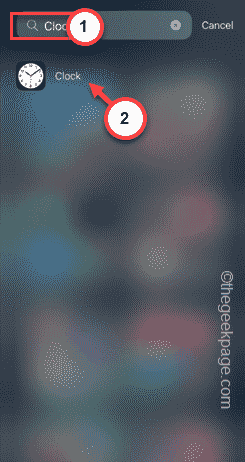
Is the clock app missing from your phone? The date and time will still appear on your iPhone's status bar. However, without the Clock app, you won’t be able to use world clock, stopwatch, alarm clock, and many other features. Therefore, fixing missing clock app should be at the top of your to-do list. These solutions can help you resolve this issue. Fix 1 – Place the Clock App If you mistakenly removed the Clock app from your home screen, you can put the Clock app back in its place. Step 1 – Unlock your iPhone and start swiping to the left until you reach the App Library page. Step 2 – Next, search for “clock” in the search box. Step 3 – When you see “Clock” below in the search results, press and hold it and
 Can't allow access to camera and microphone in iPhone
Apr 23, 2024 am 11:13 AM
Can't allow access to camera and microphone in iPhone
Apr 23, 2024 am 11:13 AM
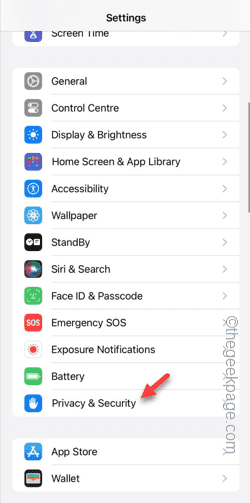
Are you getting "Unable to allow access to camera and microphone" when trying to use the app? Typically, you grant camera and microphone permissions to specific people on a need-to-provide basis. However, if you deny permission, the camera and microphone will not work and will display this error message instead. Solving this problem is very basic and you can do it in a minute or two. Fix 1 – Provide Camera, Microphone Permissions You can provide the necessary camera and microphone permissions directly in settings. Step 1 – Go to the Settings tab. Step 2 – Open the Privacy & Security panel. Step 3 – Turn on the “Camera” permission there. Step 4 – Inside, you will find a list of apps that have requested permission for your phone’s camera. Step 5 – Open the “Camera” of the specified app
