


How to set text italics in HTML5: 1. Use the "" tag, the syntax is "italic text content"; 2. Use "" Tag, syntax "italic text content"; 3. Use the style attribute to add the "font-style:italic;" style to the text element.

The operating environment of this tutorial: Windows 7 system, CSS3&&HTML5 version, Dell G3 computer.
Set text italics in html5
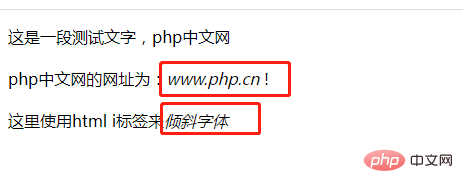
Method 1: Usetag
defines a portion of text that is different from the rest of the text and renders this portion of text in italics.
    字体倾斜
   这是一段测试文字,php中文网

 php中文网的网址为:m.sbmmt.com !

 这里使用html i标签来倾斜字体
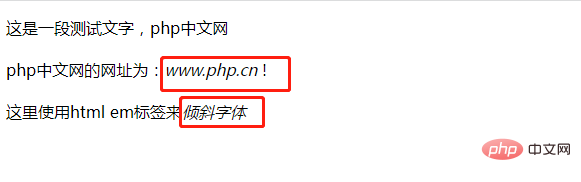
Method 2: Usetag
    字体倾斜
   这是一段测试文字,php中文网

 php中文网的网址为:m.sbmmt.com !

 这里使用html em标签来倾斜字体
Method 3: Use the style attribute to addfont-style: italic;style
##
    字体倾斜(斜体)样式
   这里是一段测试文字,文字设置了倾斜(斜体)样式

html video tutorial》
The above is the detailed content of How to set text italics in html5. For more information, please follow other related articles on the PHP Chinese website!
 What are the production methods of html5 animation production?
 The difference between HTML and HTML5
 unetbootin usage
 How to set automatic line wrapping in word
 How to check memory
 How to implement docker container technology in java
 Introduction to the usage of axis function in Matlab
 Delete redundant tables in the table























![[Web front-end] Node.js quick start](https://img.php.cn/upload/course/000/000/067/662b5d34ba7c0227.png)



