


Implementation method: 1. Use the padding attribute and the "%" unit; 2. Use the padding and calc() attributes; 3. Use the padding attribute and CSS variables; 4. Use the padding attribute and pseudo elements; 5. Directly use the window unit "vw"; 6. Use the window unit with CSS Grid layout.

The operating environment of this tutorial: Windows 7 system, CSS3&&HTML5 version, Dell G3 computer.
Aspect ratiois also calledaspect ratioin film and television production. Refers to the ratio of the width of a video divided by its height, usually expressed asx:yorx×y, where the colon and cross represent the Chinese " It means "comparison". Currently, the most commonly used ratio in the film industry is the anamorphic ratio (i.e.2.39:1). The traditional4:3is still used in many television screens today, and its successful successor specification16:9is used in high-definition television or digital television. Common ratios:
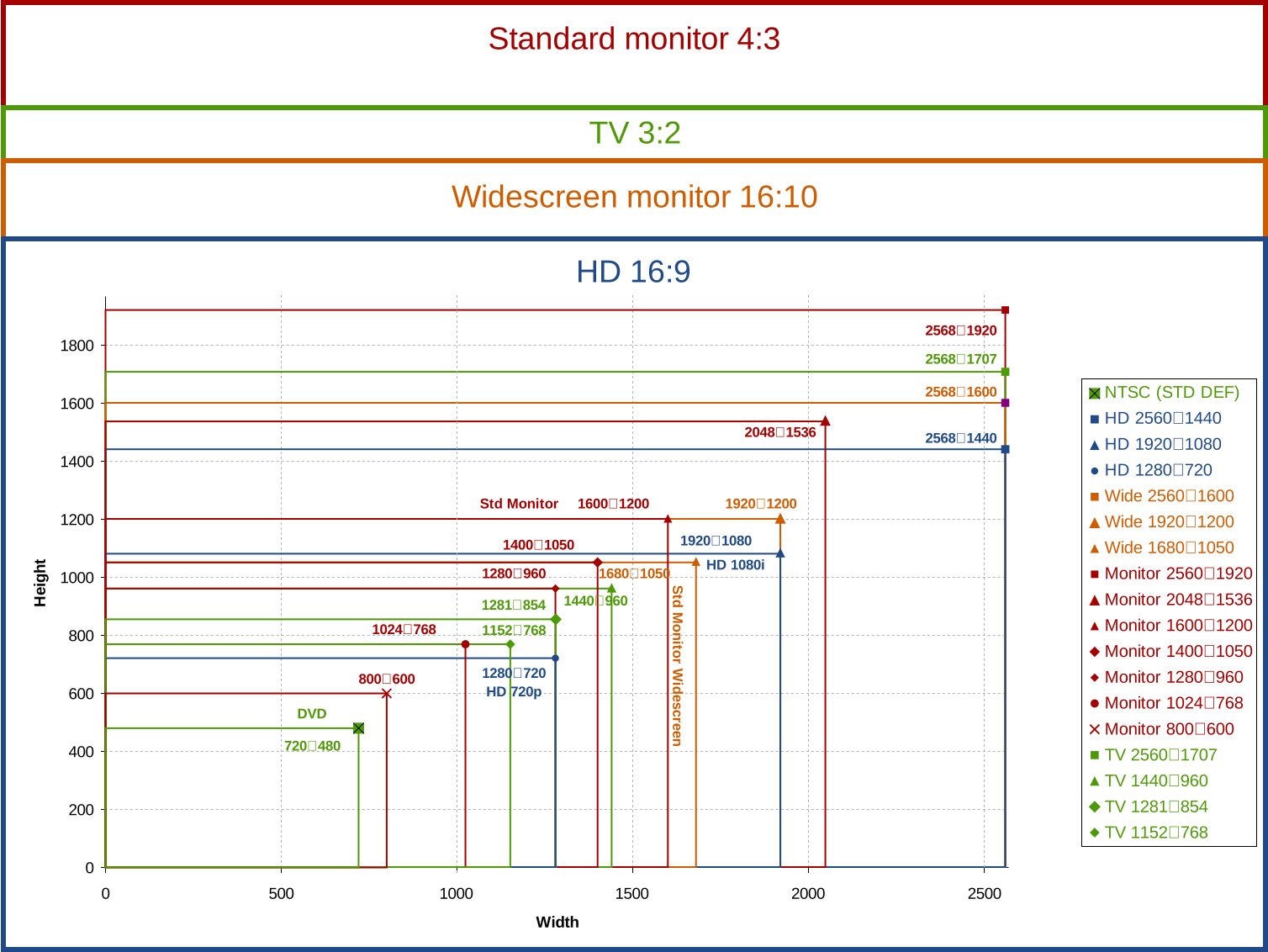
For more information about aspect ratio, you can read the Aspect ration article on Wiki.
Use CSS to implement the container aspect ratio. There are two common HTML template structures:
The other one The structure is:
When used specifically, different structures are adopted according to your own usage scenarios.
As mentioned before, there are many ways to use CSS to realize the aspect ratio. Here is a brief list of these schemes. However, each solution will not be introduced in detail, because the code is very simple, and you can understand the principle at a glance at the code.
This is one of the earliest implementation solutions proposed. The main principle is to usepadding-toporpadding-bottomPercentage value to achieve container aspect ratio. In CSS, the percentage value ofpadding-toporpadding-bottomis calculated based on thewidthof the container. In this way, the aspect ratio of the container is well achieved. To use this method, you need to set theheightof the container to0. All elements of the container content need to adoptposition:absolute, otherwise the content of the sub-elements will bepaddingsqueezed out of the container (causing content to overflow).
For example, the aspect ratio of our container is16:9, then according to the calculation:100% * 9 / 16we can get56.25%. If you want4:3, then the corresponding value is100% * 3 / 4.
The specific CSS code is as follows:
.aspectration { position: relative; /*因为容器所有子元素需要绝对定位*/ height: 0; /*容器高度是由padding来控制,盒模型原理告诉你一切*/ width: 100%; } .aspectration[data-ratio="16:9"] { padding-top: 56.25%; } .aspectration[data-ratio="4:3"]{ padding-top: 75%; }
Use the wildcard character*selector to make the width and height of its child elements the same as the container.aspectration:
.aspectration > * { position: absolute; left: 0; top: 0; width: 100%; height: 100%; }
This solution usespaddingandcalc()used together. In fact, the principle is the same as the first solution. It’s just that in the first solution, we need to calculate the value ofpaddingevery time. If we usecalc(), we can directly calculatepadding## through the browser. #Percentage value.
.aspectration[data-ratio="16:9"] { padding-top: calc(100% * 9 / 16); }
paddingprinciple, but it uses the CSS variable feature to make the previous solution more flexible. When using CSS variables, you can removedata-ratiofrom HTML. Replace it withstyle="--aspect-ratio:16/9", orstyle="--aspect-ratio:1.4;". At the same time, you can also usecalc()in the second solution. Because the combination of CSS variables and thecalc()function is a perfect combination.
.aspectration[style*="--aspect-ratio"] { padding-top: calc(100% / (var(--aspect-ratio))); }
paddingvalue on the.aspectrationelement. But in CSS, you can also use the CSS pseudo-element::beforeor::afterto open the container.
.aspectration { position: relative; } .aspectration:after { content: ""; display: block; width: 1px; margin-left: -1px; background-color: orange; } .aspectration[data-ratio="16:9"]:after { padding-top: 56.25%; } .content { width: 100%; height: 100%; position: absolute; top: 0; left: 0; }
vw. Students who have learned about this unit know that browser100vwrepresents the browser's window width (Viewport). For example, if your browser is1334px, then100vw = 1334px. At this time, it means1vw = 13.34px. The100vwhere also corresponds to the100%in the previous solution. In this way, we can replace the previous%unit with thevwunit. For example,16:9corresponds to100vw * 9 / 16 = 56.25vw. This value can be used inpadding-toporpadding-bottom. But what is demonstrated here is no longerpadding, but giving this value toheight.
.aspectration[data-ratio="16:9"] { width: 100vw; height: 56.25vw; }
上面的示例中width的值是30vw,那么对应的height值就是30vw * 9 / 16 = 16.875vw。
这是一个很有创意的解决方案,使用的都是CSS新特性:视窗单位和CSS Grid Layout。简单说一下其中的实现原理:将容器.aspectration通过display:grid声明为一个网格容器,并且利用repeat()将容器划分为横向比例,比如16,那么每一格的宽度对应的就是100vw * 9 / 16 = 6.25vw。同样使用grid-auto-rows,将其设置的值和横向的值一样。在子元素上通过grid-column和grid-row按比例合并单元格。
.aspectration { display: grid; grid-template-columns: repeat(16, 6.25vw); grid-auto-rows: 6.25vw; } .aspectration[data-ratio="16:9"] .content { grid-column: span 16; grid-row: span 9; }
(学习视频分享:css视频教程)
The above is the detailed content of How to achieve aspect ratio using css. For more information, please follow other related articles on the PHP Chinese website!































![[Web front-end] Node.js quick start](https://img.php.cn/upload/course/000/000/067/662b5d34ba7c0227.png)



