


The way to set non-clickable CSS is to use [pointer-events: none;] to disable mouse events. Events bound by other methods will still be triggered, such as keyboard events.
The operating environment of this tutorial: windows7 system, css3 version, DELL G3 computer.
How to set non-clickable css:
css code:
.disable {
pointer-events: none;
}Example:
const disabled = true;
<Button className={disabled ? 'disabled' : null}>点击</Button><style>
.disabled {
pointer-events: none;
// 设置pointer-events: none;再设置cursor是没有效果的
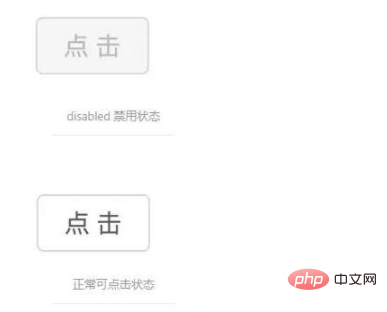
}</style>Rendering:
Note:
When the value of pointer-events is none, if the element is absolutely positioned, the element below it can Selected.
pointer-events: none; It is only used to disable mouse events. Events bound by other methods will still be triggered, such as keyboard events, etc.
If the pointer-events of a child element of an element is set to another value (for example: auto), then when the child element is clicked, the parent element will still be triggered by event bubbling. event.
Recommended related tutorials: CSS video tutorial
The above is the detailed content of How to set css to be non-clickable. For more information, please follow other related articles on the PHP Chinese website!


























![[Web front-end] Node.js quick start](https://img.php.cn/upload/course/000/000/067/662b5d34ba7c0227.png)



