


This article will introduce to you how to use Api proxy inAngular, and talk about using angualr to explain the topic of proxy api docking. I hope it will be helpful to everyone!

As a front-end developer, we often interface with the back-end. However, we always encounter cross-domain problems during the docking process. So how do we What's the solution?
This article usesangualrto explain the topic of agentapidocking. [Related tutorial recommendations: "angular tutorial"]
First of all, let's understand what cross-domain is.
Cross-domain
Simple understanding:When a request is made, theprotocol, domain name (ip address), portThree partsThe difference between anycurrent page’surlis cross-domain.
Take my sitehttps://jimmyarea.comas an example:
| Requested address | Whether it is cross-domain | Reason |
|---|---|---|
| jimmyarea.com | Yes | The protocols are different |
| jimmyarea.cn | is a different address from | |
| https://127.0.0.1:9000 | Yes | The address and port number are different |
##Agent
At this time, we can use the proxy to locally jointly debug theapiaddresses of different environments.
proxy.conf.jsonin the root directory of the project.
https://jimmyarea.com/api/public/article?page=-1as an example:
{ "/api": { "target": "https://jimmyarea.com/", "changeOrigin": true, "secure": false, "pathRewrite": { "^/api": "/api" } } }
targetis the address of the proxy,pathRewriteis the rewrite of the prefix of the proxy.
package.json, indicating that it is used for debugging in the development environment.
"script": { "dev": "ng serve --proxy-config=proxy.conf.json", }
npm run devStart the project and bring the agent. Every time the proxy file changes, you need to restart the command line~
Verification
We create a newarticleService, where thearticle.service.tsfile content is as follows:
import { Injectable } from '@angular/core'; // http 客户端 import { HttpClient } from '@angular/common/http' @Injectable({ providedIn: 'root' }) export class ArticleService { constructor( private http: HttpClient ) { } // 获取文章列表 getArticleList() { return this.http.get('/api/public/article', { // 返回类型 responseType: 'json', // 请求的参数 params: { page: -1 } }) } }
http://localhost:4200/api/public/article ?page=-1, actually accessing the addresshttps://jimmyarea.com/api/public/article?page=-1. We can call and verify it inuser-list.component.ts:
ngOnInit():void { this.articleService.getArticleList().subscribe({ next: (data: any) => { console.log(data) }, error: () => {} }) // ... }
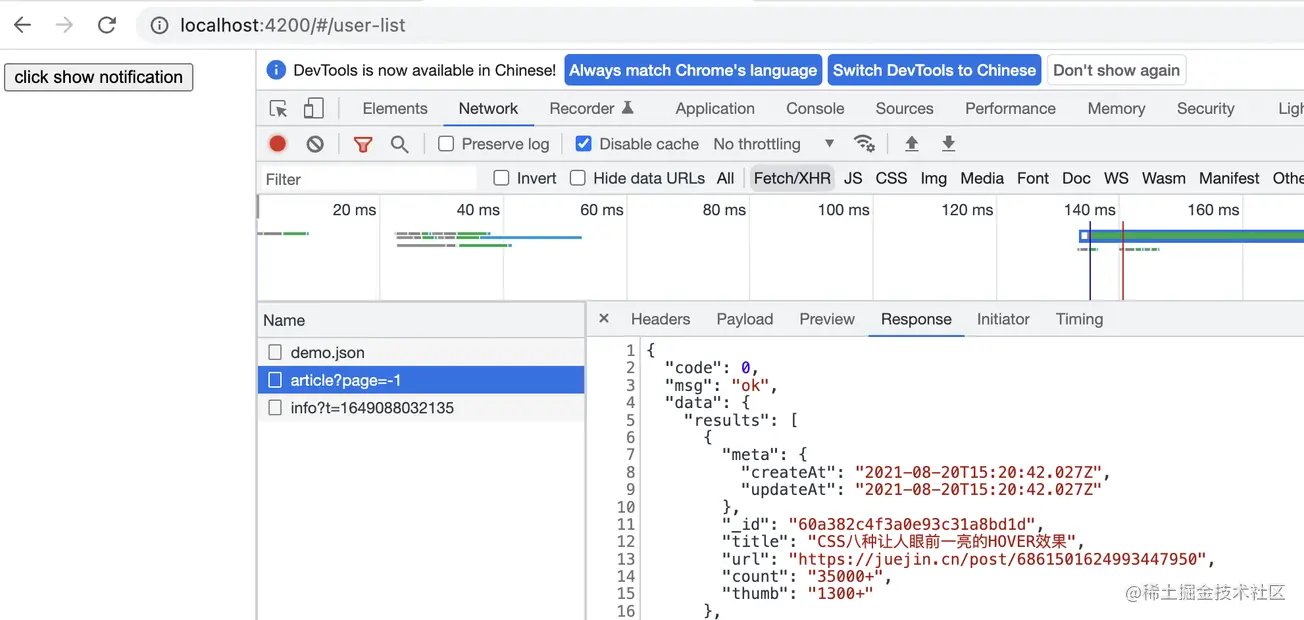
Good Job, Bro.We can perfectly proxy the address given by the backend and debug it, and the proxy can proxy more than one address. Readers can write multiple proxy addresses to verify~
[End] For more programming-related knowledge, please visit:Introduction to Programming! !
The above is the detailed content of A brief analysis of how to use Api proxy in Angular. For more information, please follow other related articles on the PHP Chinese website!




























![[Web front-end] Node.js quick start](https://img.php.cn/upload/course/000/000/067/662b5d34ba7c0227.png)



