


Usage of display attribute in css: 1. Convert elements from one type to another. For example, use the "display:inline;" statement to convert block elements into inline elements; 2. Hide elements , the syntax is "display:none;".
The operating environment of this tutorial: Windows 7 system, CSS3 version, Dell G3 computer.
display attribute: Convert elements from one type to another type
Value of display attribute:
inline: Inline element
block: block element
inline-block: inline block element
table: in the form of a table Display, similar to the table element
table-row: displayed in the form of a table, similar to the tr element
table-cell: displayed in the form of a table Displayed in the form, similar to td element
none: hidden element
Example:
<!DOCTYPE html>
<html>
<head>
    <meta charset="UTF-8">
    <style>
        img{
            display: block;/*使图片换行*/
        }
        div{
            width: 48%;
            border: 1px solid red;
            display: inline-block;/*使div分块*/
        }
    </style>
    <title>display</title>
</head>
<body>
<img src="../../img/coffee.jpg" alt="">
<img src="../../img/coffee.jpg" alt="">
<div>
    div1
</div>
<div >
    div2
</div>
</body>
</html>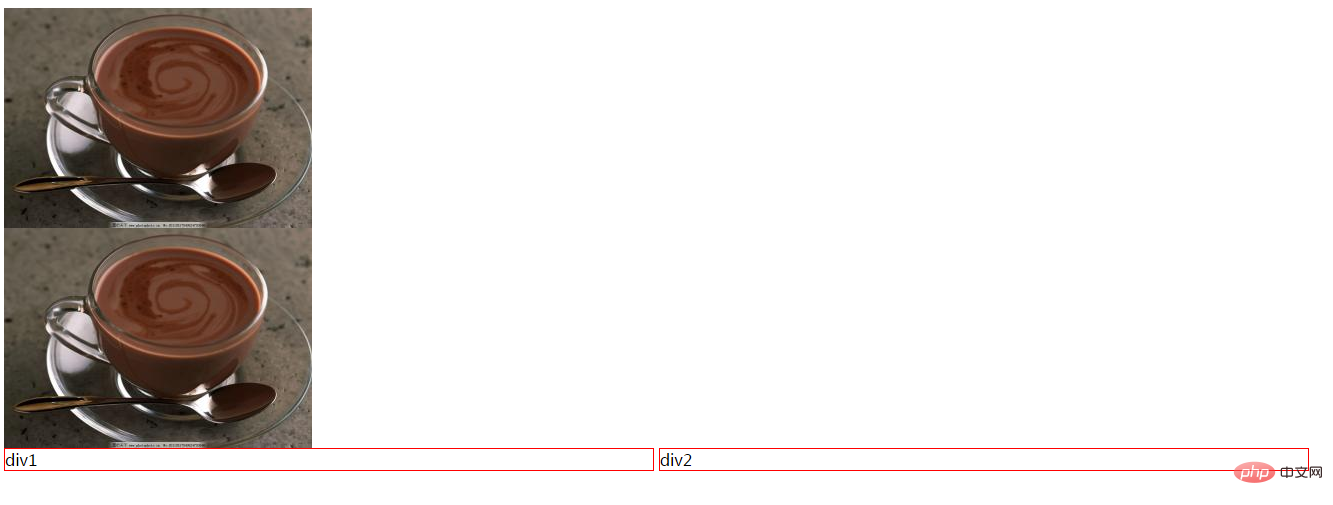
(Learning video sharing: css video tutorial)
The above is the detailed content of How to use display attribute in css. For more information, please follow other related articles on the PHP Chinese website!

























![[Web front-end] Node.js quick start](https://img.php.cn/upload/course/000/000/067/662b5d34ba7c0227.png)



