


 Operation and Maintenance
Linux Operation and Maintenance
What is the nginx restart command under linux?
Operation and Maintenance
Linux Operation and Maintenance
What is the nginx restart command under linux?
What is the nginx restart command under linux?

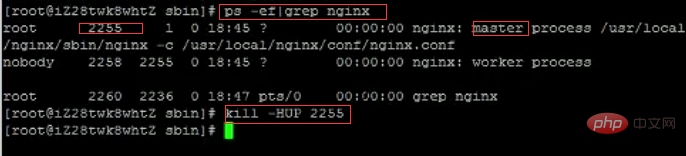
The nginx restart command under Linux is: "kill -HUP nginx process number". Restart method: First find the current nginx process number, and then enter the command "kill -HUP process number" to restart the nginx service.

Startup
Startup code format: nginx installation directory address -c nginx configuration file address
For example:
[root@LinuxServer sbin]# /usr/local/nginx/sbin/nginx -c /usr/local/nginx/conf/nginx.conf
Stop
There are three ways to stop nginx:
Stop calmly
[root@LinuxServer ~]# ps -ef|grep nginx

[root@LinuxServer ~]# kill -QUIT 2072

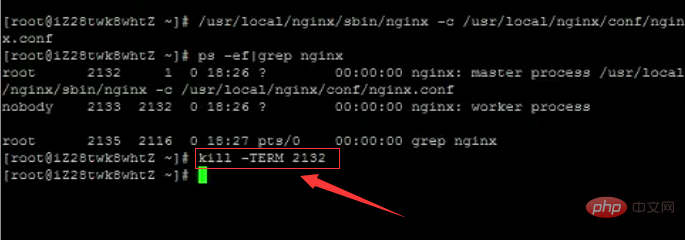
- Quick stop
[root@LinuxServer ~]# ps -ef|grep nginx

[root@LinuxServer ~]# kill -TERM 2132
或 [root@LinuxServer ~]# kill -INT 2132
- Force stop
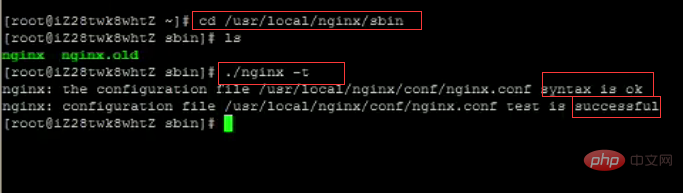
[root@LinuxServer ~]# pkill -9 nginxRestart1. Verify whether the nginx configuration file is correctMethod 1: Enter the nginx installation directory sbin, Enter the command ./nginx -t and see the following display: nginx.conf syntax is oknginx.conf test is successful, indicating that the configuration file is correct!

Method 1: Enter the nginx executable directory sbin and enter the command
./nginx -s reload

 ##Related recommendations: "
The above is the detailed content of What is the nginx restart command under linux?. For more information, please follow other related articles on the PHP Chinese website!

Hot AI Tools

Undress AI Tool
Undress images for free

Undresser.AI Undress
AI-powered app for creating realistic nude photos

AI Clothes Remover
Online AI tool for removing clothes from photos.

Clothoff.io
AI clothes remover

Video Face Swap
Swap faces in any video effortlessly with our completely free AI face swap tool!

Hot Article
Hot Tools

Notepad++7.3.1
Easy-to-use and free code editor

SublimeText3 Chinese version
Chinese version, very easy to use

Zend Studio 13.0.1
Powerful PHP integrated development environment

Dreamweaver CS6
Visual web development tools

SublimeText3 Mac version
God-level code editing software (SublimeText3)


 How to clean up your Linux system
Aug 22, 2025 am 07:42 AM
How to clean up your Linux system
Aug 22, 2025 am 07:42 AM
Removeunusedpackagesanddependencieswithsudoaptautoremove,cleanpackagecacheusingsudoaptcleanorautoclean,andremoveoldkernelsviasudoaptautoremove--purge.2.Clearsystemlogswithsudojournalctl--vacuum-time=7d,deletearchivedlogsin/var/log,andempty/tmpand/var
 Linux how to view the contents of a file
Aug 19, 2025 pm 06:44 PM
Linux how to view the contents of a file
Aug 19, 2025 pm 06:44 PM
ToviewfilecontentsinLinux,usedifferentcommandsbasedonyourneeds:1.Forsmallfiles,usecattodisplaytheentirecontentatonce,withcat-ntoshowlinenumbers.2.Forlargefiles,uselesstoscrollpagebypageorlinebyline,searchwith/search_term,andquitwithq.3.Usemoreforbasi
 how to create an alias in linux
Aug 19, 2025 pm 08:13 PM
how to create an alias in linux
Aug 19, 2025 pm 08:13 PM
The steps to set up alias in Linux are as follows: 1. Temporarily set the use of the alias command such as aliasll='ls-la'; 2. Permanently set the shell configuration file, such as ~/.bashrc, and then execute the source to take effect; 3. Be careful to avoid overwriting the original command and the different shell configurations are independent. Alias can simplify complex commands and improve efficiency, but only after the current shell environment takes effect and closes the terminal, it needs to be reasonably defined and regularly checked for configuration.
 192.168.10.1 login portal (Period routing/Asus management page)
Aug 12, 2025 pm 10:18 PM
192.168.10.1 login portal (Period routing/Asus management page)
Aug 12, 2025 pm 10:18 PM
First, confirm that the device is connected to the Wi-Fi of the target router or connected through a network cable; 2. Enter http://192.168.10.1 in the browser address bar and press Enter; 3. Enter the correct username and password (default is often admin/admin or view the back of the router); 4. If it cannot be opened, check whether it is connected to the wrong network, confirm the correct IP address (you can view the default gateway through ipconfig), restart the router, change the browser or turn off the firewall; 5. After logging in, you can modify the Wi-Fi name password, set security options, configure port forwarding, enable guest network, upgrade firmware, etc.; 6. If you forget your password, you can reset the factory settings by pressing and holding the router reset hole for 5-10 seconds, but all configurations will be cleared.
 Linux how to list installed packages
Aug 15, 2025 pm 12:58 PM
Linux how to list installed packages
Aug 15, 2025 pm 12:58 PM
ForDebian/Ubuntu,usedpkg-loraptlist--installedtolistinstalledpackages.2.ForRedHat/CentOS/Fedora,userpm-qaordnflistinstalled.3.ForopenSUSE,usezyppersearch--installed-onlyorrpm-qa.4.ForArchLinux,usepacman-Q,withpacman-Qeforexplicitlyinstalledpackages.A
 An In-Depth Guide to Systemd for modern Linux Systems
Aug 23, 2025 pm 12:02 PM
An In-Depth Guide to Systemd for modern Linux Systems
Aug 23, 2025 pm 12:02 PM
Systemdisthefirstprocess(PID1)inmodernLinuxsystems,replacingolderinitsystemslikeSysVinitandUpstart,responsibleforbooting,managingservices,devices,logs,andusersessionsthroughasuiteofintegratedtools.2.Itusesunitfiles(.service,.timer,.socket,etc.)todefi
 Linux how to edit a file in the terminal
Aug 17, 2025 pm 01:12 PM
Linux how to edit a file in the terminal
Aug 17, 2025 pm 01:12 PM
Usenanoforsimplicity,vimforadvancedediting,checkpermissions,andusesudoonlywhennecessary;1.Toeditwithnano,runnanofilename.txt,pressCtrl Otosave,andCtrl Xtoexit;2.Forvim,runvimfilename.txt,pressitoedit,Escthen:wqtosaveandquit;3.Tooverwriteafilequickly,
 How to Resize a Linux LVM Partition
Aug 08, 2025 pm 01:35 PM
How to Resize a Linux LVM Partition
Aug 08, 2025 pm 01:35 PM
To safely adjust the size of Linux LVM partition, you must first back up the data and ensure that the file system is not mounted (especially the root partition); 2. When expanding the logical volume, first use vgdisplay or vgs to check the free space of the volume group, then use the lvextend command to expand the LV, and finally use resize2fs (ext4) or xfs_growfs (XFS) to adjust the file system size; 3. Shrink logical volume only supports ext series file systems. You must first uninstall the file system, run e2fsck check, use resize2fs to shrink the file system, and then use lvreduce to reduce the LV, and finally select resize2fs to expand the file system to match the LV and remount it; 4. After the operation is completed, make it
