


How to number multiple choice questions in Word?
Number the multiple-choice questions in the Word document. In order not to number the questions, you can select the following option before numbering.
Recommendation: "Word Tutorial"
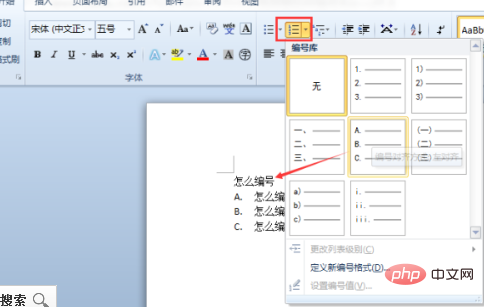
Specific (Word 2010):
Select the option under the multiple-choice question with the mouse and click on the "Start" menu Click the drop-down arrow of [Number] and select the number type of "A.B.C.D."
In this way, you can avoid the numbering of multiple-choice questions.
The above is the detailed content of How to number multiple choice questions in word. For more information, please follow other related articles on the PHP Chinese website!
 How to change word background color to white
 How to delete the last blank page in word
 Why can't I delete the last blank page in word?
 Word single page changes paper orientation
 word to ppt
 Word page number starts from the third page as 1 tutorial
 Tutorial on merging multiple words into one word
 word insert table









![[Web front-end] Node.js quick start](https://img.php.cn/upload/course/000/000/067/662b5d34ba7c0227.png)



