


jQuery cool pop-up plug-in-hsycmsAlert.js
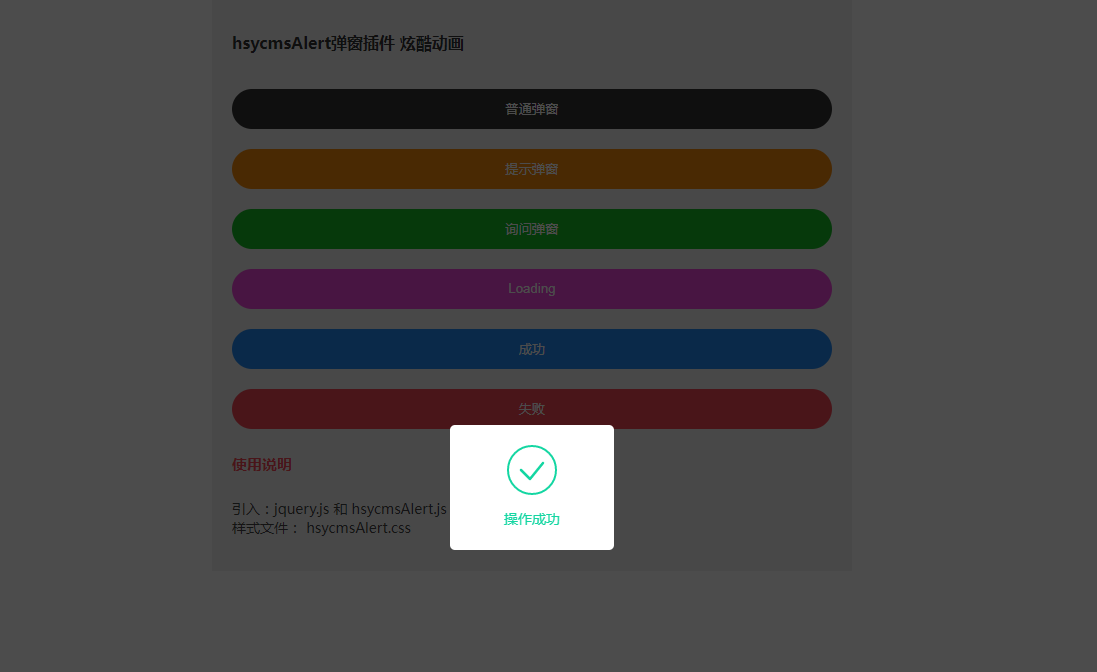
Share a cool jQuery pop-up plug-in-hsycmsAlert.js
Sharing a cool jQuery pop-up plug-in - hsycmsAlert.js, suitable for various pop-up windows: including loading, successful operation, failed operation, customized pop-up content, text prompts, etc.
All resources on this site are contributed by netizens or reprinted by major download sites. Please check the integrity of the software yourself! All resources on this site are for learning reference only. Please do not use them for commercial purposes. Otherwise, you will be responsible for all consequences! If there is any infringement, please contact us to delete it. Contact information: admin@php.cn

 How to create a modal window with HTML and CSS? (UI Design)
07 Jan 2026
A modal window is essentially an ordinary, non-special HTML element implemented through CSS and JavaScript; it uses z-index layering, background masking and aria attributes (such as aria-hidden, role="dialog") to achieve accessible interaction blocking effects.
 How to enable window animation in Win11_Windows 11 accessibility visual effects
21 Jan 2026
The solutions to the unsmooth Windows 11 window animation include: 1. Turn on the animation effect through Settings → Accessibility → Visual Effects; 2. Check various window animations in System Properties → Performance Options; 3. Create new WindowAnimations and MinAnimate under the Advanced path of the registry and set them to 1; 4. Confirm that the DWM service is running and the graphics card driver supports WDDM3.0.
 How to Make Windows Transparent in Windows 10
02 Dec 2025
Windows Aero has added a few nice effects to desktop windows over the years, but even to this day, there's no official way to make a window transparent. Fortunately, there are third-party tools that can help us achieve this goal. Let's explore how
 How to save MP4 format files in Camtasia
31 Dec 2025
Camtasia is an efficient tool that combines screen recording and professional video editing. After completing video production, exporting to MP4 format is one of the most commonly used output methods by users. The following is the complete operation process of exporting a project to an MP4 file in Camtasia: First, please open the Camtasia project file that you have completed editing. Please confirm that all content has been adjusted in place, such as clip editing, transition effects, sound effects, subtitles, annotations and other elements have been set up. Next, click the "File" menu in the upper left corner of the software window. In the expanded drop-down list, select the "Save As" option. A standard file save dialog box will pop up. In that window, navigate to "Save as type" (or "File format")
 How to Customize App Borders and Shadows on Windows 10
04 Jan 2026
Throughout the history of the Windows operating system, users have almost always been able to customize the appearance of applications. However, Insider Preview builds of Redstone 5, the next Windows update scheduled for release in fall 2018, indicate that Windows will automatically change the border color of all app windows to gray. Presumably, this change is to better match the new window shadow effects. Fortunately, you can still override these default settings and change the colors yourself. You can even turn window shadows on or off depending on your preference. Let’s take a closer look at how to do it. How to Customize App Borders and Window Shadows First, we'll cover how to
 Tutorial on dynamically changing icons while JavaFX application is running
12 Nov 2025
This tutorial details how to dynamically change window icons based on application state or user interaction after a JavaFX application has started. By managing the icons list of the Stage object, we can preload multiple icon resources and use the set() method of ObservableList to replace the currently displayed main icon at runtime, thereby achieving flexible icon switching effects.
 JavaScript regularly switches CSS classes to achieve dynamic interface effects
24 Nov 2025
This article will guide you on how to use JavaScript's setTimeout function, combined with CSS class operations, to automatically switch styles or states of page elements after a specific time, such as hiding or displaying a pop-up window at a scheduled time. This method can create dynamic and user-friendly interactive effects without refreshing the page, improving the responsiveness and user experience of the web page.
 Pandas rolling average edge processing and center alignment techniques
24 Dec 2025
This article aims to solve the common marginal data (NaN values) and output lag issues in Pandas rolling average calculations. By comparing the default rolling behavior of Pandas with the advantages of dynamically adjusting the window size of the MATLAB smooth function, this tutorial explains in detail how to achieve similar effects in Pandas. The core solution is to use the min_periods=1 parameter of the rolling method to allow the window to shrink at both ends of the data, and combine it with center=True to achieve center alignment, thereby generating a smooth data sequence with no NaN and no lag, ensuring effective processing of data from beginning to end.
 Smooth animated popup tutorial using CSS transitions and JavaScript
10 Nov 2025
This tutorial details how to create a modal pop-up window with smooth scaling and fade-in animation through HTML structure, CSS styles and transition effects, and JavaScript event handling. The article will focus on explaining how to use the opacity, visibility, and transform attributes to achieve professional opening and closing animations, and provide complete code examples and practical suggestions to help developers build user-friendly interactive interfaces.


Popular tool

Website functions guide users to prompt operation effects
Website functions guide users to prompt operation effects

19 kinds of html5+CSS3 gorgeous pop-up window animation transition effects
19 kinds of html5+CSS3 gorgeous pop-up window animation transition effects

Lightweight html5 WinBox.js page pop-up plug-in
A modern, lightweight html5 WinBox.js page pop-up plug-in

CSS3 login registration window interface sliding switching effect
CSS3 login registration window interface sliding switching effect

js web page click right-click menu effect
Gradient background color animation, web page mouse click right-click menu effect, right-click menu