


How to read desktop files in pycharm

要从 PyCharm 中读取桌面文件:获取桌面文件路径:macOS:/Users/<用户名>/Desktop;Windows:C:\Users\<用户名>\Desktop;Linux:~/Desktop导入 os 模块使用 os.listdir() 列出文件遍历文件列表,并根据需要读取文件(例如:对于 .txt 文件,使用 open() 函数打开文件并读取文件内容)

如何在 PyCharm 中读取桌面文件
为便于从 PyCharm 中读取桌面文件,只需遵循以下步骤:
步骤 1:获取桌面文件路径
- 在 macOS 上:
/Users/<用户名>/Desktop - 在 Windows 上:
C:\Users\<用户名>\Desktop - 在 Linux 上:
~/Desktop
步骤 2:导入 os 模块
在 PyCharm 脚本中导入 os 模块,用于文件操作。
import os
步骤 3:使用 os.listdir() 列出文件
使用 os.listdir() 函数列出桌面目录中的所有文件和文件夹。
files = os.listdir(desktop_path)
步骤 4:遍历文件列表
使用 for 循环遍历文件列表,并根据需要读取文件。
for file in files:
    if file.endswith(".txt"):  # 例如,要读取 .txt 文件
        # 使用 open() 函数打开文件
        with open(os.path.join(desktop_path, file), "r") as f:
            # 读取文件内容
            content = f.read()
            # 处理文件内容...
示例代码:
以下是读取桌面目录中所有 .txt 文件的示例代码:
import os

# 获取桌面文件路径
desktop_path = os.path.join(os.path.expanduser("~"), "Desktop")

# 导入 os 模块
import os

# 列出桌面目录中的文件
files = os.listdir(desktop_path)

# 遍历文件列表
for file in files:
    if file.endswith(".txt"):
        # 打开文件
        with open(os.path.join(desktop_path, file), "r") as f:
            # 读取文件内容
            content = f.read()
            print(content)
The above is the detailed content of How to read desktop files in pycharm. For more information, please follow other related articles on the PHP Chinese website!

Hot AI Tools

Undress AI Tool
Undress images for free

Undresser.AI Undress
AI-powered app for creating realistic nude photos

AI Clothes Remover
Online AI tool for removing clothes from photos.

Clothoff.io
AI clothes remover

Video Face Swap
Swap faces in any video effortlessly with our completely free AI face swap tool!

Hot Article
Hot Tools

Notepad++7.3.1
Easy-to-use and free code editor

SublimeText3 Chinese version
Chinese version, very easy to use

Zend Studio 13.0.1
Powerful PHP integrated development environment

Dreamweaver CS6
Visual web development tools

SublimeText3 Mac version
God-level code editing software (SublimeText3)


 How to call up the laptop without sound? Steps to restore the soundlessness of Apple laptop with one click
Aug 14, 2025 pm 06:48 PM
How to call up the laptop without sound? Steps to restore the soundlessness of Apple laptop with one click
Aug 14, 2025 pm 06:48 PM
Laptop silent? Easy troubleshooting and solving! Laptops are a must-have tool for daily work and study, but sometimes they encounter silent troubles. This article will analyze in detail the common causes and solutions for laptop silence. Method 1: Check the volume and audio equipment connection First, check whether the system volume setting is normal. Step 1: Click the taskbar volume icon to confirm that the volume slider is not muted and the volume is appropriate. Step 2: In the volume control panel, check the "Main Volume" and "Microphone" volume settings to ensure that the volume of all applications has been adjusted correctly. Step 3: If you are using headphones or external speakers, please check that the device is correctly connected and turned on. Method 2: Update or reset audio that is outdated or damaged by the audio driver
 Linux how to enable and disable services at boot
Aug 08, 2025 am 10:23 AM
Linux how to enable and disable services at boot
Aug 08, 2025 am 10:23 AM
To manage the startup of Linux services, use the systemctl command. 1. Check the service status: systemctlstatus can check whether the service is running, enabled or disabled. 2. Enable the service startup: sudosystemctlenable, such as sudosystemctlenablenginx. If it is started at the same time, use sudosystemctlenable--nownginx. 3. Disable the service startup: sudosystemctldisable, such as sudosystemctldisablecups. If it is stopped at the same time, use sudosystemctldisabl
 Linux how to list all running processes
Aug 08, 2025 am 06:42 AM
Linux how to list all running processes
Aug 08, 2025 am 06:42 AM
Usepsauxforacompletesnapshotofallrunningprocesses,showingdetailedinformationlikeUSER,PID,CPU,andmemoryusage.2.Usetoporhtopforreal-timemonitoringofprocesseswithdynamicupdates,wherehtopoffersamoreintuitiveinterface.3.UsepgreporpidoftoquicklyfindthePIDs
 How to clean up your Linux system
Aug 22, 2025 am 07:42 AM
How to clean up your Linux system
Aug 22, 2025 am 07:42 AM
Removeunusedpackagesanddependencieswithsudoaptautoremove,cleanpackagecacheusingsudoaptcleanorautoclean,andremoveoldkernelsviasudoaptautoremove--purge.2.Clearsystemlogswithsudojournalctl--vacuum-time=7d,deletearchivedlogsin/var/log,andempty/tmpand/var
 Linux how to view the contents of a file
Aug 19, 2025 pm 06:44 PM
Linux how to view the contents of a file
Aug 19, 2025 pm 06:44 PM
ToviewfilecontentsinLinux,usedifferentcommandsbasedonyourneeds:1.Forsmallfiles,usecattodisplaytheentirecontentatonce,withcat-ntoshowlinenumbers.2.Forlargefiles,uselesstoscrollpagebypageorlinebyline,searchwith/search_term,andquitwithq.3.Usemoreforbasi
 how to create an alias in linux
Aug 19, 2025 pm 08:13 PM
how to create an alias in linux
Aug 19, 2025 pm 08:13 PM
The steps to set up alias in Linux are as follows: 1. Temporarily set the use of the alias command such as aliasll='ls-la'; 2. Permanently set the shell configuration file, such as ~/.bashrc, and then execute the source to take effect; 3. Be careful to avoid overwriting the original command and the different shell configurations are independent. Alias can simplify complex commands and improve efficiency, but only after the current shell environment takes effect and closes the terminal, it needs to be reasonably defined and regularly checked for configuration.
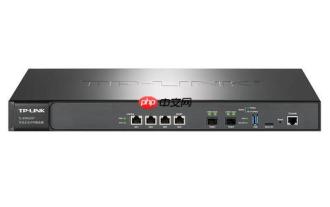 192.168.10.1 login portal (Period routing/Asus management page)
Aug 12, 2025 pm 10:18 PM
192.168.10.1 login portal (Period routing/Asus management page)
Aug 12, 2025 pm 10:18 PM
First, confirm that the device is connected to the Wi-Fi of the target router or connected through a network cable; 2. Enter http://192.168.10.1 in the browser address bar and press Enter; 3. Enter the correct username and password (default is often admin/admin or view the back of the router); 4. If it cannot be opened, check whether it is connected to the wrong network, confirm the correct IP address (you can view the default gateway through ipconfig), restart the router, change the browser or turn off the firewall; 5. After logging in, you can modify the Wi-Fi name password, set security options, configure port forwarding, enable guest network, upgrade firmware, etc.; 6. If you forget your password, you can reset the factory settings by pressing and holding the router reset hole for 5-10 seconds, but all configurations will be cleared.
 Linux how to list installed packages
Aug 15, 2025 pm 12:58 PM
Linux how to list installed packages
Aug 15, 2025 pm 12:58 PM
ForDebian/Ubuntu,usedpkg-loraptlist--installedtolistinstalledpackages.2.ForRedHat/CentOS/Fedora,userpm-qaordnflistinstalled.3.ForopenSUSE,usezyppersearch--installed-onlyorrpm-qa.4.ForArchLinux,usepacman-Q,withpacman-Qeforexplicitlyinstalledpackages.A
