


5 common pitfalls about variables in the Linux Bash Shell

The Bash scripting language supports operating variables in Linux. However, if you have development experience in other popular programming languages, using Bash to handle variables may be error-prone. This is because its syntax is different from other languages (and even a little strange to some developers).
This article will provide you with 5 practical tips based on my experience. After reading it, it can help you avoid unnecessary mistakes.
0. There cannot be spaces on both sides of the equal sign
For many languages, such as Python, adding spaces around the equal sign is a good practice because it improves the readability of the code.
But in Bash, no extra spaces should be added when defining variables.
For example, if I declare a variable named name like this:
name = "Yang"
There will be an error here:
-bash: name: command not found
As you can see above, Bash treats name as a command rather than a variable because I added unnecessary spaces.
Therefore, the correct way to define variables is as follows:
name="Yang"
1. Define the array correctly
Defining an array in Bash is not difficult. We just need to use a pair of brackets to enclose all elements, as shown in the following example:
names=("Yang" "Elon" "Bill")
As the saying goes, "Details determine success or failure." I made a critical mistake while writing a Bash script before. I habitually use commas (not spaces) to separate each element in the array.
names=("Yang","Elon","Bill")
Bash does not treat commas as separators, and there is only one element in the names array, Yang,Elon,Bill instead of the expected three.
2. Choose the quotation marks correctly
When we declare a variable in Bash, there are 3 options for using quotes:
- No quotes
- Use single quotes
- Use double quotes
By default, every value in Bash is a string. So if no spaces are required, we don't need to use any quotes. (Again, it's a bit different from other languages, where you can't define a string without quotes)
When you need to use quotes, please note the difference between single quotes and double quotes.
For example, let us declare 3 variables as shown below. So, what is the difference between truth1 and truth2?
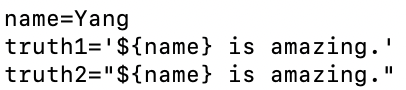
如果你打印它们,你会看到 truth1 是 ${name} is amazing.。而 truth2 是 Yang is amazing.。
总而言之,一对单引号内的字符串将始终被解释为它的本身。
3. 避免在命令中使用反引号
在 Bash 中,我们可以将命令的结果保存到变量中。有两种可能的方法来做到这一点:
-
variable=command“ -
variable=$(command)
例如,要保存 ls 命令的结果,我们可以这样写:
file_list=`ls`
或者
file_list=$(ls)
但是,这里的最佳实践始终是使用第二种方法,尤其是在编写较长的脚本时。因为反引号和单引号看起来很相似,有时你可能会混淆它们。
4. 避免使用特殊名称
一些名称在 Linux 中被预定义为环境变量,如 USER、HOME、PATH 等。我们可以使用 printenv 命令列出它们。
显然,我们不应该用与环境变量相同的名称来声明我们的变量。
好消息是 Linux 中所有的环境变量都是用大写字母写的,所以我们可以用小写字母来自定义变量,以区别环境变量。这是一个好习惯。
The above is the detailed content of 5 common pitfalls about variables in the Linux Bash Shell. For more information, please follow other related articles on the PHP Chinese website!

Hot AI Tools

Undress AI Tool
Undress images for free

Undresser.AI Undress
AI-powered app for creating realistic nude photos

AI Clothes Remover
Online AI tool for removing clothes from photos.

Clothoff.io
AI clothes remover

Video Face Swap
Swap faces in any video effortlessly with our completely free AI face swap tool!

Hot Article
Hot Tools

Notepad++7.3.1
Easy-to-use and free code editor

SublimeText3 Chinese version
Chinese version, very easy to use

Zend Studio 13.0.1
Powerful PHP integrated development environment

Dreamweaver CS6
Visual web development tools

SublimeText3 Mac version
God-level code editing software (SublimeText3)


 How to install software on Linux using the terminal?
Aug 02, 2025 pm 12:58 PM
How to install software on Linux using the terminal?
Aug 02, 2025 pm 12:58 PM
There are three main ways to install software on Linux: 1. Use a package manager, such as apt, dnf or pacman, and then execute the install command after updating the source, such as sudoaptininstallcurl; 2. For .deb or .rpm files, use dpkg or rpm commands to install, and repair dependencies when needed; 3. Use snap or flatpak to install applications across platforms, such as sudosnapinstall software name, which is suitable for users who are pursuing version updates. It is recommended to use the system's own package manager for better compatibility and performance.
 The Ultimate Guide to High-Performance Gaming on Linux
Aug 03, 2025 am 05:51 AM
The Ultimate Guide to High-Performance Gaming on Linux
Aug 03, 2025 am 05:51 AM
ChoosePop!_OS,Ubuntu,NobaraLinux,orArchLinuxforoptimalgamingperformancewithminimaloverhead.2.InstallofficialNVIDIAproprietarydriversforNVIDIAGPUs,ensureup-to-dateMesaandkernelversionsforAMDandIntelGPUs.3.EnabletheperformanceCPUgovernor,usealow-latenc
 What are the main pros and cons of Linux vs. Windows?
Aug 03, 2025 am 02:56 AM
What are the main pros and cons of Linux vs. Windows?
Aug 03, 2025 am 02:56 AM
Linux is suitable for old hardware, has high security and is customizable, but has weak software compatibility; Windows software is rich and easy to use, but has high resource utilization. 1. In terms of performance, Linux is lightweight and efficient, suitable for old devices; Windows has high hardware requirements. 2. In terms of software, Windows has wider compatibility, especially professional tools and games; Linux needs to use tools to run some software. 3. In terms of security, Linux permission management is stricter and updates are convenient; although Windows is protected, it is still vulnerable to attacks. 4. In terms of difficulty of use, the Linux learning curve is steep; Windows operation is intuitive. Choose according to requirements: choose Linux with performance and security, and choose Windows with compatibility and ease of use.
 Understanding RAID Configurations on a Linux Server
Aug 05, 2025 am 11:50 AM
Understanding RAID Configurations on a Linux Server
Aug 05, 2025 am 11:50 AM
RAIDimprovesstorageperformanceandreliabilityonLinuxserversthroughvariousconfigurations;RAID0offersspeedbutnoredundancy;RAID1providesmirroringforcriticaldatawith50�pacityloss;RAID5supportssingle-drivefailuretoleranceusingparityandrequiresatleastthre
 Linux how to enable and disable services at boot
Aug 08, 2025 am 10:23 AM
Linux how to enable and disable services at boot
Aug 08, 2025 am 10:23 AM
To manage the startup of Linux services, use the systemctl command. 1. Check the service status: systemctlstatus can check whether the service is running, enabled or disabled. 2. Enable the service startup: sudosystemctlenable, such as sudosystemctlenablenginx. If it is started at the same time, use sudosystemctlenable--nownginx. 3. Disable the service startup: sudosystemctldisable, such as sudosystemctldisablecups. If it is stopped at the same time, use sudosystemctldisabl
 Linux how to list all running processes
Aug 08, 2025 am 06:42 AM
Linux how to list all running processes
Aug 08, 2025 am 06:42 AM
Usepsauxforacompletesnapshotofallrunningprocesses,showingdetailedinformationlikeUSER,PID,CPU,andmemoryusage.2.Usetoporhtopforreal-timemonitoringofprocesseswithdynamicupdates,wherehtopoffersamoreintuitiveinterface.3.UsepgreporpidoftoquicklyfindthePIDs
 How to clean up your Linux system
Aug 22, 2025 am 07:42 AM
How to clean up your Linux system
Aug 22, 2025 am 07:42 AM
Removeunusedpackagesanddependencieswithsudoaptautoremove,cleanpackagecacheusingsudoaptcleanorautoclean,andremoveoldkernelsviasudoaptautoremove--purge.2.Clearsystemlogswithsudojournalctl--vacuum-time=7d,deletearchivedlogsin/var/log,andempty/tmpand/var
 Linux how to view the contents of a file
Aug 19, 2025 pm 06:44 PM
Linux how to view the contents of a file
Aug 19, 2025 pm 06:44 PM
ToviewfilecontentsinLinux,usedifferentcommandsbasedonyourneeds:1.Forsmallfiles,usecattodisplaytheentirecontentatonce,withcat-ntoshowlinenumbers.2.Forlargefiles,uselesstoscrollpagebypageorlinebyline,searchwith/search_term,andquitwithq.3.Usemoreforbasi
