


php editor Zimo will introduce to you how to solve the problem that the Win11 system browser cannot connect to the Internet. When using the Win11 system, sometimes the browser cannot connect to the Internet, which brings inconvenience to our online experience. But, don’t worry, we can fix this problem with some simple steps. Next, we will introduce you in detail how to solve the problem of Win11 browser being unable to connect to the Internet, so that you can browse various information and websites smoothly online.
What to do if the win11 system browser cannot connect to the Internet
1. Click Start in the taskbar in the lower left corner.
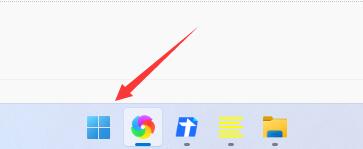
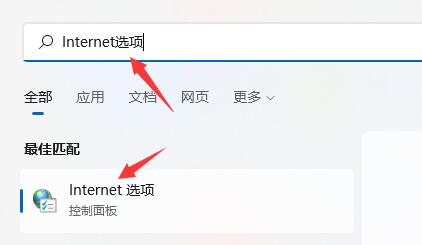
#2. Then enter "Internet Options" in the search box above to open it.
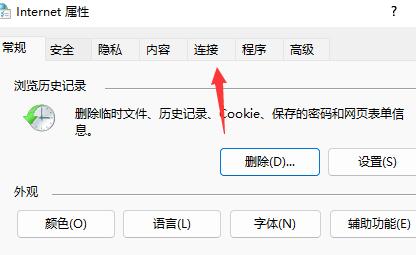
#3. In the opened window interface, switch to the "Connection" tab in the top.
4. Then click the "LAN Settings" option.
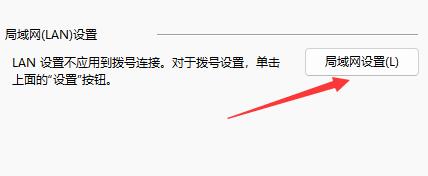
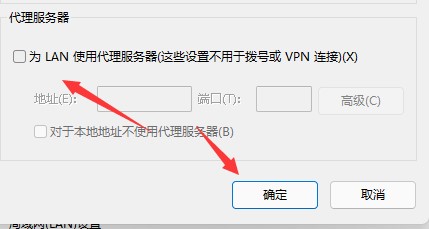
5. Finally, find "Use a proxy server for LAN" and uncheck the small box, then click "OK" to save.
The above is the detailed content of What should I do if my win11 system browser cannot connect to the Internet? Solution to the problem that win11 browser cannot connect to the Internet. For more information, please follow other related articles on the PHP Chinese website!
 There is no WLAN option in win11
 How to skip online activation in win11
 Win11 skips the tutorial to log in to Microsoft account
 How to open win11 control panel
 Introduction to win11 screenshot shortcut keys
 Windows 11 my computer transfer to the desktop tutorial
 Solution to the problem of downloading software and installing it in win11
 How to skip network connection during win11 installation




















![[Web front-end] Node.js quick start](https://img.php.cn/upload/course/000/000/067/662b5d34ba7c0227.png)



