


dat files exist in many daily situations. In order to better use them in offices, many users will convert dat files into excel, but many of them don’t know how to do it. Let’s take a look at the tutorial below.
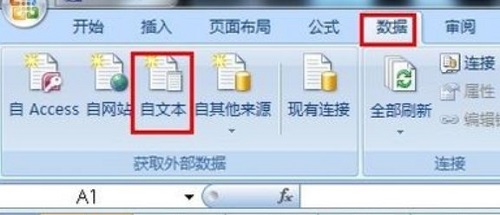
1. First open excel, then click "Data" above and then "From Text".
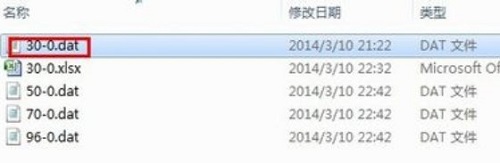
2. Then select the dat file you want to open.
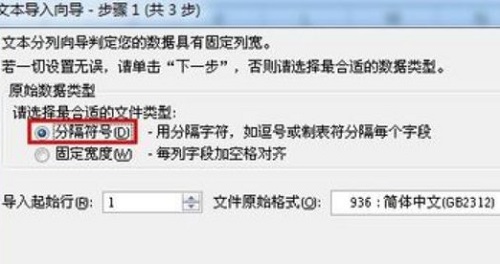
3. Then a page will appear where you can check "Delimiter".
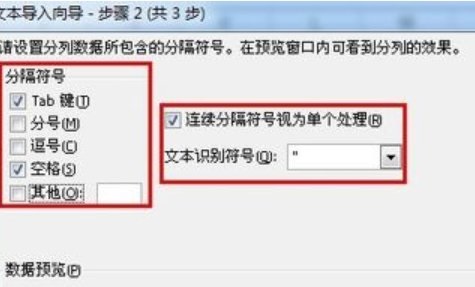
4. It is recommended to select spaces here.
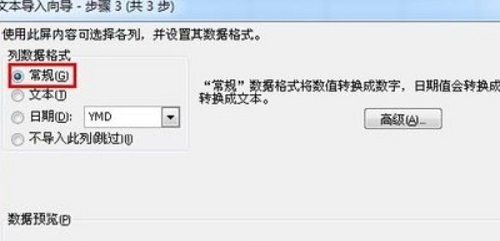
5. Finally, just check the "General" below and you're done.
The above is the detailed content of Learn how to convert dat files to Excel files. For more information, please follow other related articles on the PHP Chinese website!
 Can Microsoft Visual C++ be uninstalled?
 What java workflow engines are there?
 How to display two divs side by side
 How to uniformly replace ppt background images
 How to save files to USB drive
 How to define an array
 word to jpg
 How to solve the problem that the folder does not have security options









![[Web front-end] Node.js quick start](https://img.php.cn/upload/course/000/000/067/662b5d34ba7c0227.png)



