


 Common Problem
Microsoft Copilot is officially in preview (formerly Bing Chat and Bing Chat Enterprise)
Common Problem
Microsoft Copilot is officially in preview (formerly Bing Chat and Bing Chat Enterprise)
Microsoft Copilot is officially in preview (formerly Bing Chat and Bing Chat Enterprise)

Microsoft today announced the general availability of Microsoft Copilot (formerly Bing Chat and Bing Chat Enterprise). Microsoft announced the rebranding of Bing Chat and Bing Chat Enterprise at its Ignite conference last week.
General consumers can access Microsoft Copilot for free at copilot.microsoft.com.
For enterprise customers, Microsoft Copilot is now available as part of select Microsoft 365 licenses. Additionally, Microsoft will allow businesses to purchase Copilot as a standalone service for $5 per user per month. Microsoft Copilot is available for free as part of the following Microsoft 365 plans:
- Microsoft 365 E3, E5
- Microsoft 365 F3
- Microsoft 365 A3, A5 (faculty only Work)
- Business Standard Room
- Business Premium
Microsoft Copilot Enterprise Edition now offers business data protection supported by the General Business License Terms for Online Services. Additionally, these terms include Microsoft's Customer Copyright Commitment (CCC), which enables businesses to take advantage of Microsoft's Copilot services without worrying about copyright claims.
Going forward, Microsoft will expand the availability of Copilot with commercial data protection to all Entra ID users (excluding sovereign government cloud and student users).
The above is the detailed content of Microsoft Copilot is officially in preview (formerly Bing Chat and Bing Chat Enterprise). For more information, please follow other related articles on the PHP Chinese website!

Hot AI Tools

Undress AI Tool
Undress images for free

Undresser.AI Undress
AI-powered app for creating realistic nude photos

AI Clothes Remover
Online AI tool for removing clothes from photos.

Clothoff.io
AI clothes remover

Video Face Swap
Swap faces in any video effortlessly with our completely free AI face swap tool!

Hot Article
Hot Tools

Notepad++7.3.1
Easy-to-use and free code editor

SublimeText3 Chinese version
Chinese version, very easy to use

Zend Studio 13.0.1
Powerful PHP integrated development environment

Dreamweaver CS6
Visual web development tools

SublimeText3 Mac version
God-level code editing software (SublimeText3)


 How to easily use Microsoft Copilot on Mac
Feb 19, 2024 am 10:40 AM
How to easily use Microsoft Copilot on Mac
Feb 19, 2024 am 10:40 AM
Although it's not as deeply integrated with the operating system as it is on Windows, Microsoft Copilot is available as an application, allowing you to experience its capabilities. Method 1 of using Microsoft Copilot on macOS: Install the Microsoft Copilot application through the AppStore. For Mac users equipped with Apple Silicon, thanks to the built-in ARM architecture, we can natively run applications developed for iPad and iPhone on Mac, including Microsoft Copilot. Sign in to your Apple account on Mac and download the Microsoft Copilot app
 Easily remove borders in Microsoft Edge in three simplified steps
Sep 02, 2023 pm 02:57 PM
Easily remove borders in Microsoft Edge in three simplified steps
Sep 02, 2023 pm 02:57 PM
Many users are dissatisfied with the white border around web pages in Microsoft Edge. They think it's unnecessary and distracting, and they're asking Microsoft to remove Microsoft Edge's bezels entirely. This is similar to the saying "don't fix what's not broken", but Microsoft doesn't seem to have taken this into account. Of course, it's a popular web browser that offers a variety of features, including a built-in ad blocker, tracking prevention, and a password manager. However, some users may find that the browser has a border around web pages. This border can be distracting or unsightly, and there are several ways to remove it. In a lengthy conversation on r/Edge, some regular non-internal users discovered,
 How to use Windows Copilot to turn on dark mode, do not disturb, manage Bluetooth devices, and more
Aug 01, 2023 pm 09:58 PM
How to use Windows Copilot to turn on dark mode, do not disturb, manage Bluetooth devices, and more
Aug 01, 2023 pm 09:58 PM
Anyone who wants an early look at the future of AI on Windows needs to look no further than the Copilot preview. Copilot, which has very few features and appears to be little more than a BingAI taskbar on the side, is certainly a nudge in the right direction. Even now, users can switch between light and dark themes, turn Do Not Disturb and Bluetooth on and off, and jump directly to the Bluetooth device settings page to manage connections – all from Copilot. Here's how to get Windows 11 Copilot and do it all. How to enable Copilot on Windows 11 To start using Copilot on Windows 11,
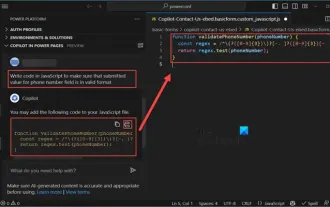 How to use Copilot to generate code
Mar 23, 2024 am 10:41 AM
How to use Copilot to generate code
Mar 23, 2024 am 10:41 AM
As a programmer, I get excited about tools that simplify the coding experience. With the help of artificial intelligence tools, we can generate demo code and make necessary modifications as per the requirement. The newly introduced Copilot tool in Visual Studio Code allows us to create AI-generated code with natural language chat interactions. By explaining functionality, we can better understand the meaning of existing code. How to use Copilot to generate code? To get started, we first need to get the latest PowerPlatformTools extension. To achieve this, you need to go to the extension page, search for "PowerPlatformTool" and click the Install button
 How to use win11 copilot in China
Nov 08, 2023 pm 01:37 PM
How to use win11 copilot in China
Nov 08, 2023 pm 01:37 PM
How to use: 1. Modify the regional language: set the Windows system regional language to the United States, then download and install Win11 Copilot; 2. Use VPN or proxy: bypass regional restrictions through VPN or proxy server, then download and install Win11 Copilot ; 3. Pay attention to Microsoft’s official updates: Pay attention to Microsoft’s official updates and wait for Win11 Copilot to officially enter the domestic market to download and experience it as soon as possible.
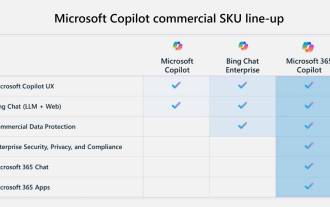 Key differences between Microsoft 365 Copilot, Bing Chat Enterprise, and Copilot in Windows
Sep 23, 2023 pm 03:57 PM
Key differences between Microsoft 365 Copilot, Bing Chat Enterprise, and Copilot in Windows
Sep 23, 2023 pm 03:57 PM
Currently, Microsoft offers three different AI assistants to enterprise customers: Microsoft365Copilot, BingChatEnterprise, and Copilot in Windows. We would like to explain the differences between these three options. CopilotinWindows: Copilot in Windows is a powerful tool that helps you complete tasks faster and easier. You can seamlessly access Copilot from the taskbar or by pressing Win+C, and it will provide help next to any application you use. Copilot in Windows features new icons, new user experience and BingChat. it will be 2
 Fix 'Your account is currently unavailable' error in OneDrive
Sep 13, 2023 am 08:33 AM
Fix 'Your account is currently unavailable' error in OneDrive
Sep 13, 2023 am 08:33 AM
Trying to log in in Windows doesn't work either. However, a check on the Microsoft account showed that there were no issues with it. I am able to log in and out of my Microsoft account on Windows and the web and am able to access all services. Only OneDrive appears to be affected. Microsoft's error message, like most of the time, isn't very helpful because it's too generic to be of much use. It starts with the following statement: "Your OneDrive or profile may be temporarily blocked because it is experiencing an unusually large amount of traffic. In this case, the block will be removed after 24 hours" This is followed by another sentence, Other possible reasons for temporary account suspension are listed: "
 How to set Copilot as the default assistant on Android
Mar 17, 2024 am 10:30 AM
How to set Copilot as the default assistant on Android
Mar 17, 2024 am 10:30 AM
Copilot is a chatbot developed by Microsoft that can help you complete various tasks. CoPilot is also available on Android. If you want to know how to set Copilot as the default assistant on Android, then this article is for you. How to set Copilot as the default assistant on Android Use the following instructions to set Copilot as the default assistant on Android: Install Microsoft Copilot from the Google Play Store Set Copilot as the default assistant on your Android device Get started 1] Install Microsoft Copilot from the Google Play Store Use the