


The command to add a new user in Linux is "useradd". The useradd command is used to create a new user. The account created is saved in the "/etc/passwd" text file; the creation syntax is "useradd [option] username". If there are no special requirements, there is no need to use any options. User created successfully.

#The operating environment of this tutorial: linux7.3 system, Dell G3 computer.
In Linux systems, you can use the useradd command to create a new user.
You can use theuseraddcommand to create a new user. After the account is created, use thepasswdcommand to set the account. password. Useuserdelto delete the account. In fact, the account created using theuseraddcommand is saved in the/etc/passwdtext file.
The syntax of this command is:
useradd [选项] 用户名
The options supported by this command are:
| Option | Description |
|---|---|
| -c
|
Add the remark text, remark The text will be saved in the comment field of thepasswdfile |
| -d
|
Specify the user’s home directory |
| -e
|
Specify the validity period of the account |
| Specify the number of days after the password expires to close the account | |
| Specify the group to which the user belongs | |
| Specify additional groups to which the user belongs | |
| Automatically create the user's home directory | |
| Cancel the creation of a group named after the user name | |
| Create a system account | |
|
|
|
# 语法 useradd 用户名 # 示例 useradd zhangsan
/etc/passwd file:
file:
zhangsan under the
directory, which is the user's home directory.When adding a new user, specify the corresponding user group【★★★★★】
# 语法 useradd -g 用户组名 用户名 # 示例,将 wangwu 用户添加到 root 用户组中 useradd -g root wangwu
Note: The user group must exist. If it does not exist, an error message will be reported.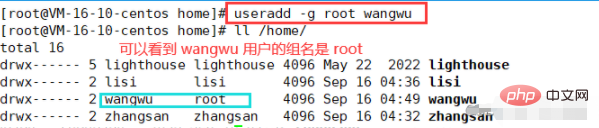

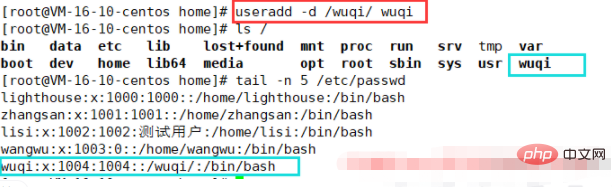
option can specify other directories as the user's home directory. The syntax is as follows:# 语法 useradd -d 指定家目录 用户名 # 例如,创建 wuqi 用户时指定家目录为 /wuqi/useradd -d /wuqi/ wuqi
Copy after login##Related recommendations: "Linux Video Tutorial
"
The above is the detailed content of What is the command to add a new user in Linux?. For more information, please follow other related articles on the PHP Chinese website!

































![[Web front-end] Node.js quick start](https://img.php.cn/upload/course/000/000/067/662b5d34ba7c0227.png)



