

The solution to the problem that the win7 computer does not have the NVIDIA control panel: 1. Turn on the computer; 2. Open the "Control Panel" and then find the "NVIDIA Control Panel"; 3. Open the "Add" in the "NVIDIA Control Panel" settings Desktop context menu" option.

The operating environment of this tutorial: Windows 7 system, Dell G3 computer.
What should I do if my win7 computer does not have an NVIDIA control panel?
There is no NVIDIA control panel in win7 system. Setting method:
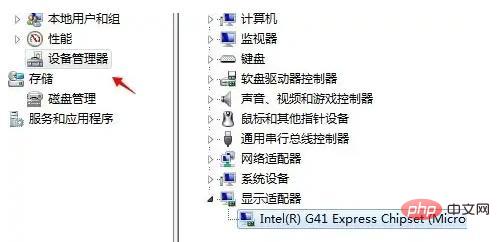
Determine the computer graphics card type: Right-click on "Computer"--"Management"--"Device Management" ”, you will see the graphics card model in “Display Adapter” or in “Unknown Device” with an exclamation mark.
If the driver is normal in step 1, the display in the graphics card settings menu is turned off, open the "Control Panel" and find the "NVIDIA Control Panel"
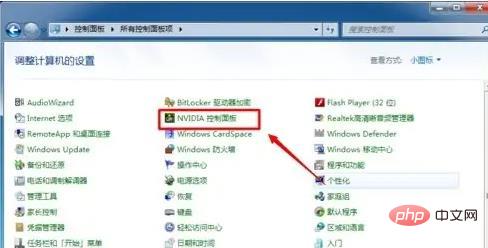
Open the "Add Desktop Context Menu" option in the "NVIDIA Control Panel" settings.

For more related knowledge, please visit theFAQcolumn!
The above is the detailed content of How to solve the problem that win7 computer does not have NVIDIA control panel. For more information, please follow other related articles on the PHP Chinese website!
 How to create virtual wifi in win7
 How to change file type in win7
 How to set up hibernation in Win7 system
 How to open Windows 7 Explorer
 How to solve the problem of not being able to create a new folder in Win7
 Solution to Win7 folder properties not sharing tab page
 Win7 prompts that application data cannot be accessed. Solution
 The difference between win7 32-bit and 64-bit





















![[Web front-end] Node.js quick start](https://img.php.cn/upload/course/000/000/067/662b5d34ba7c0227.png)



