



Because the Google browser folder was changed before, the Google browser cannot be opened through the shortcut button. Every time I try to open it, it prompts: "Windows cannot find chrome...".
Solution:
1. File——Settings
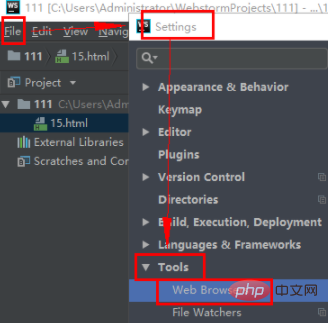
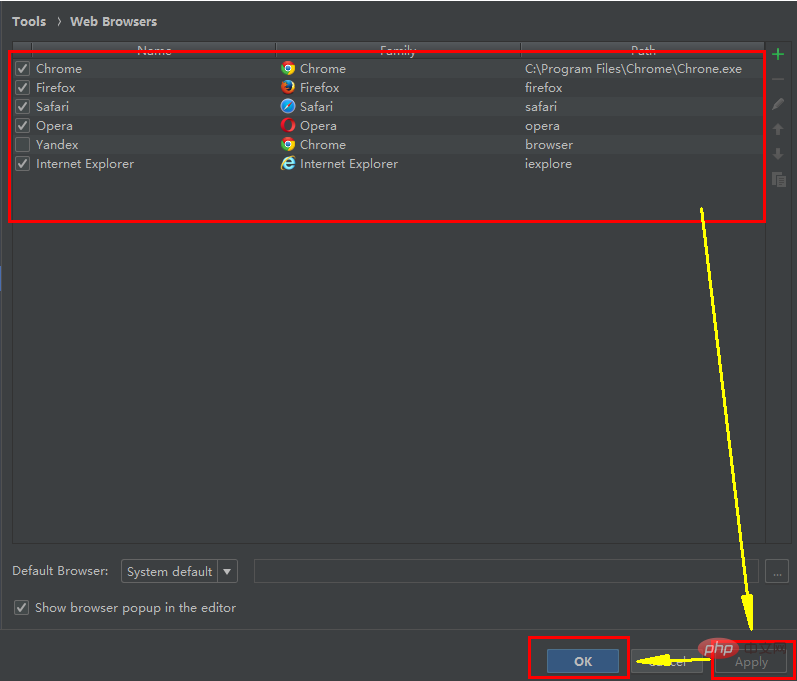
2. After opening the web Browser, the following interface appears
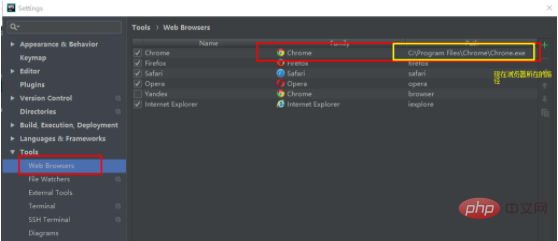
You can also enter browser in the search bar, then select the Web Browser option below, and the table on the right side of the picture will appear.
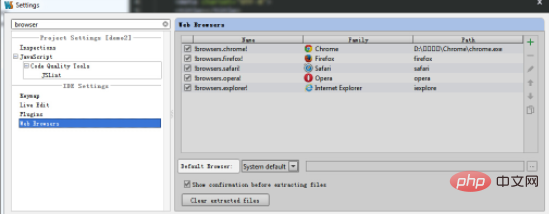
4. Then click the button with "..." behind path

.
5. Select the path of the .exe file
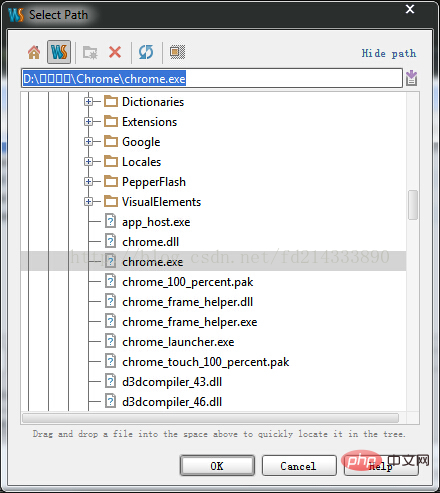
After setting the browser path, be sure to click Apply first, and then click OK:
Related recommendations:webstorm tutorial
The above is the detailed content of What to do if the browser cannot be opened in webstorm. For more information, please follow other related articles on the PHP Chinese website!
 The computer has Internet access but the browser cannot open the web page
 What does browser mean
 Browser compatibility
 How to solve the problem of garbled characters when opening a web page
 How to enlarge webstorm
 How to solve webstorm crash
 Why webstorm cannot run the file
 webstorm adjust font size



















![[Web front-end] Node.js quick start](https://img.php.cn/upload/course/000/000/067/662b5d34ba7c0227.png)



