



If you already have experience using JavaScript, you may already know these two seemingly identical methods:Array.prototype.map()andArray.prototype.forEach().So, what is the difference between them?
Let’s first take a look at the definitions of Map and ForEach on MDN:
forEach(): Execute a provided function once for each array element.map(): Creates a new array with the results of calling a provided function on every element in the calling array).What is the difference? TheforEach()method will not return the execution result, butundefined. In other words,forEach()will modify the original array. Themap()method will get a new array and return it.
An array is provided below, if we want to double each element in it, we can usemapandforEachto achieve the goal.
let arr = [1, 2, 3, 4, 5];
Note that forEach will not return a meaningful value.
We modify the value ofarrdirectly in the callback function.
arr.forEach((num, index) => { return arr[index] = num * 2;} );
The execution results are as follows:
// arr = [2, 4, 6, 8, 10]
let doubled = arr.map(num => { return num * 2; });
The execution results are as follows:
// doubled = [2, 4, 6, 8, 10]
jsPrefis a very good website for comparing the execution speed of different JavaScript functions.
Here are the test results offorEach()andmap():
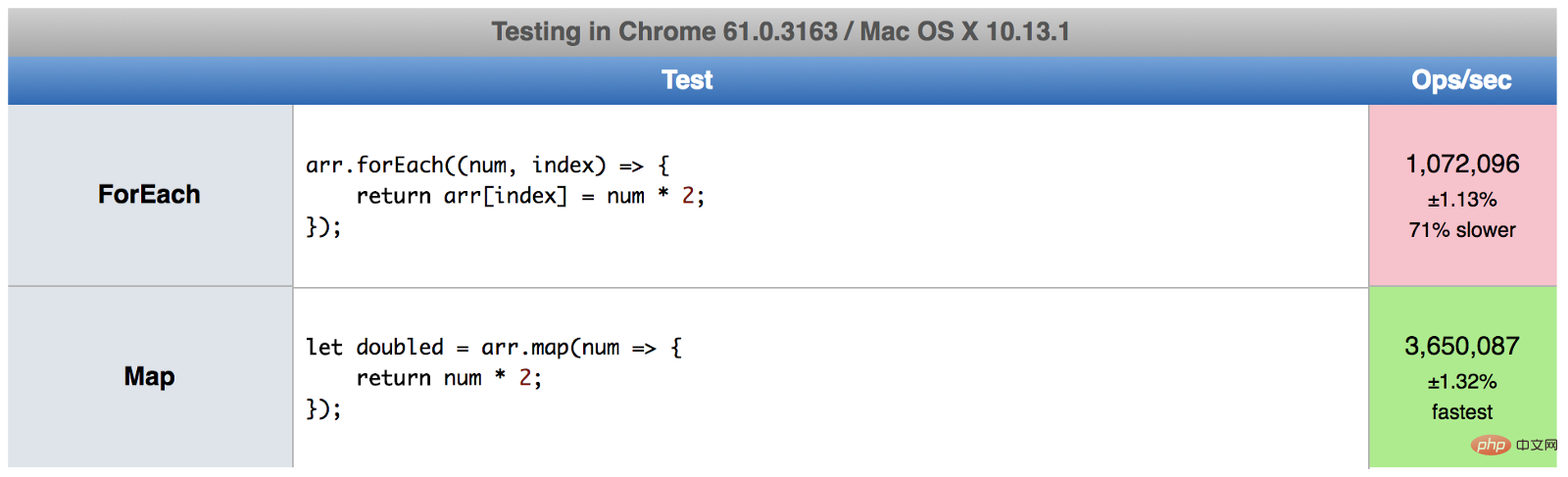
As you can see, On my computer, the execution speed offorEach()is 70% slower thanmap(). The execution results of everyone's browser will be different. You can use the following link to test it out:Map vs. forEach - jsPref.
If you are used to using functions for programming, then you will definitely like to usemap(). BecauseforEach()will change the value of the original array, andmap()will return a brand new array, and the original array will not be affected.
Depends on what you want to do.
forEachSuitable for when you don't plan to change the data, but just want to do something with the data - such as saving it to a database or printing it out.
let arr = ['a', 'b', 'c', 'd']; arr.forEach((letter) => { console.log(letter); }); // a // b // c // d
map()is suitable when you want to change the data value. Not only is it faster, but it returns a new array. The advantage of this is that you can use composition (combination of map(), filter(), reduce(), etc.) to create more tricks.
let arr = [1, 2, 3, 4, 5]; let arr2 = arr.map(num => num * 2).filter(num => num > 5); // arr2 = [6, 8, 10]
We first use map to multiply each element by 2, and then filter out those elements greater than 5. The final result is assigned toarr2.
forEach(),map()can also be used. The reverse is also true.map()will allocate memory space to store the new array and return it,forEach()will not return data.forEach()Allowscallbackto change elements of the original array.map()Return the new array.Related free learning recommendations:js video tutorial
More programming For related knowledge, please visit:Introduction to Programming! !
The above is the detailed content of Detailed explanation of the differences between Map and ForEach in JS. For more information, please follow other related articles on the PHP Chinese website!

































![[Web front-end] Node.js quick start](https://img.php.cn/upload/course/000/000/067/662b5d34ba7c0227.png)



