


First click the WINKEY R key combination, enter sysdm.cpl and press Enter.

(Recommended study:html Getting Started Tutorial)
Now, select the tab labeled "System Protection".
Then select the "System Restore" button.
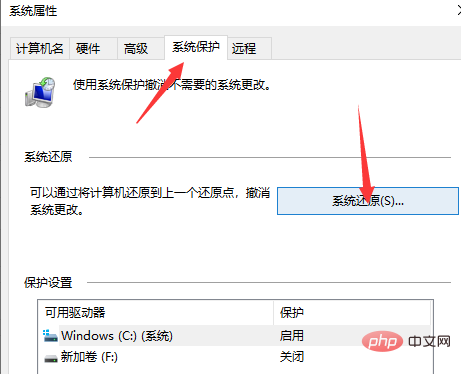
#It will now open a new window and you need to select the desired system restore point. After selecting the desired system restore point, follow the on-screen instructions to complete the process. Now restart your computer and check if this method resolves your issue.
Recommended related tutorials:windows tutorial
The above is the detailed content of win10 system stuck in preparing security options interface. For more information, please follow other related articles on the PHP Chinese website!
 win10 bluetooth switch is missing
 Why do all the icons in the lower right corner of win10 show up?
 The difference between win10 sleep and hibernation
 Win10 pauses updates
 What to do if the Bluetooth switch is missing in Windows 10
 win10 connect to shared printer
 Clean up junk in win10
 How to share printer in win10





















![[Web front-end] Node.js quick start](https://img.php.cn/upload/course/000/000/067/662b5d34ba7c0227.png)



