


 Operation and Maintenance
Linux Operation and Maintenance
What is load balancing? A brief introduction to load balancing
Operation and Maintenance
Linux Operation and Maintenance
What is load balancing? A brief introduction to load balancing
What is load balancing? A brief introduction to load balancing

The content of this article is to introduce load balancing, understand what load balancing is, the advantages of load balancing, etc. It has certain reference value. Friends in need can refer to it. I hope it will be helpful to you.
1. What is load balancing
Load Balance means to allocate execution to multiple operating units, such as Web servers, FTP servers, enterprise key application servers and other mission-critical servers, etc., to complete work tasks together.
If you understand it literally, it can explain that N servers share the load evenly, and a certain server will not be idle because of a high load on a certain server. Then the premise of load balancing is that it can be achieved by multiple servers, that is, more than two servers are enough.
Load balancing is built on the existing network structure. It provides a cheap, effective and transparent method to expand the bandwidth of network devices and servers, increase throughput, strengthen network data processing capabilities, and improve network flexibility. and availability.
2. Advantages of load balancing
Reduce the pressure on the server and distribute the traffic originally required by one server to multiple servers. And improve the availability of the project. When a server hangs up, the project will not be paralyzed.
Three and four-layer load balancing and seven-layer load balancing
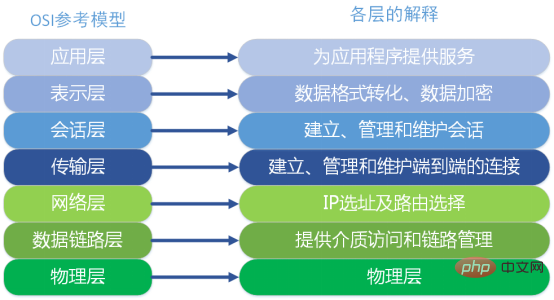
Four-layer load Balance works in the transport layer of the OSI model, and its main job is forwarding. After receiving the client's traffic, it forwards the traffic to the application server by modifying the address information of the data packet.
Seven-layer load balancing works in the application layer of the OSI model, because it needs to parse application layer traffic, so after receiving the client's traffic, the seven-layer load balancing also needs a complete TCP/IP protocol stack. Seven-layer load balancing will establish a complete connection with the client and parse the application layer request traffic, then select an application server according to the scheduling algorithm, and establish another connection with the application server to send the request. Therefore, seven-layer load balancing The main job is to act as an agent. Seven-layer load balancing is also called "content switching", which mainly determines the final selected internal server through the truly meaningful application layer content in the message, coupled with the server selection method set by the load balancing device.
Advantages of seven-layer load balancing: This method can modify the client's request and the server's response in any sense, which greatly improves the flexibility of the application system at the network layer. sex; high safety.
Seven-layer load balancing mainly focuses on the widely used HTTP protocol, so its application scope is mainly systems developed based on B/S such as numerous websites or internal information platforms. Layer 4 load balancing corresponds to other TCP applications, such as ERP and other systems developed based on C/S.
4. Load balancing software
Load balancing software including Nginx, LVS, HaProxy, etc. are currently in use The three most widespread load balancing software.
5. Load balancing algorithm
1. Round Robin: It is the simplest way to send requests to all backends in turn. It is also the default allocation method;
2. Least Connections (least_conn): Track and backend the current number of active connections. The smallest number of connections indicates that the backend has the lightest load. Allocate requests to him. This method will Taking into account the weight information assigned to each upstream in the configuration;
3. Least Time (least_time): The request will be assigned to the backend with the fastest response and the smallest number of active connections;
4 , IP Hash (ip_hash): Calculate the hash value for the request source IP address. IPv4 will consider the first 3 octets, and IPv6 will consider all address bits, and then assign it to the backend through some mapping based on the obtained hash value;
5. Generic Hash (hash): Calculate the hash value to complete the distribution based on user-defined resources (such as URL). Its optional consistent keyword supports consistent hash features;
6. Load balancing based on DNS
Usually a modern network server domain name will be associated with multiple hosts. When performing a DNS query, by default the DNS server will use round The -robin mode returns the list of IP addresses in a different order, so client requests are naturally distributed to different hosts. However, this method has inherent flaws: DNS does not check the accessibility of the host and IP address, so the IP assigned to the client is not guaranteed to be available (Google 404); the DNS resolution results will vary between the client and multiple intermediate DNS servers are constantly caching, so the allocation of backends will not be ideal.
Recommended video tutorials: "Linux Tutorial"
The above is the entire content of this article, I hope it will be helpful to everyone's study. For more exciting content, you can pay attention to the relevant tutorial columns of the PHP Chinese website! ! !
The above is the detailed content of What is load balancing? A brief introduction to load balancing. For more information, please follow other related articles on the PHP Chinese website!

Hot AI Tools

Undress AI Tool
Undress images for free

Undresser.AI Undress
AI-powered app for creating realistic nude photos

AI Clothes Remover
Online AI tool for removing clothes from photos.

Clothoff.io
AI clothes remover

Video Face Swap
Swap faces in any video effortlessly with our completely free AI face swap tool!

Hot Article
Hot Tools

Notepad++7.3.1
Easy-to-use and free code editor

SublimeText3 Chinese version
Chinese version, very easy to use

Zend Studio 13.0.1
Powerful PHP integrated development environment

Dreamweaver CS6
Visual web development tools

SublimeText3 Mac version
God-level code editing software (SublimeText3)


 How to install software on Linux using the terminal?
Aug 02, 2025 pm 12:58 PM
How to install software on Linux using the terminal?
Aug 02, 2025 pm 12:58 PM
There are three main ways to install software on Linux: 1. Use a package manager, such as apt, dnf or pacman, and then execute the install command after updating the source, such as sudoaptininstallcurl; 2. For .deb or .rpm files, use dpkg or rpm commands to install, and repair dependencies when needed; 3. Use snap or flatpak to install applications across platforms, such as sudosnapinstall software name, which is suitable for users who are pursuing version updates. It is recommended to use the system's own package manager for better compatibility and performance.
 The Ultimate Guide to High-Performance Gaming on Linux
Aug 03, 2025 am 05:51 AM
The Ultimate Guide to High-Performance Gaming on Linux
Aug 03, 2025 am 05:51 AM
ChoosePop!_OS,Ubuntu,NobaraLinux,orArchLinuxforoptimalgamingperformancewithminimaloverhead.2.InstallofficialNVIDIAproprietarydriversforNVIDIAGPUs,ensureup-to-dateMesaandkernelversionsforAMDandIntelGPUs.3.EnabletheperformanceCPUgovernor,usealow-latenc
 What are the main pros and cons of Linux vs. Windows?
Aug 03, 2025 am 02:56 AM
What are the main pros and cons of Linux vs. Windows?
Aug 03, 2025 am 02:56 AM
Linux is suitable for old hardware, has high security and is customizable, but has weak software compatibility; Windows software is rich and easy to use, but has high resource utilization. 1. In terms of performance, Linux is lightweight and efficient, suitable for old devices; Windows has high hardware requirements. 2. In terms of software, Windows has wider compatibility, especially professional tools and games; Linux needs to use tools to run some software. 3. In terms of security, Linux permission management is stricter and updates are convenient; although Windows is protected, it is still vulnerable to attacks. 4. In terms of difficulty of use, the Linux learning curve is steep; Windows operation is intuitive. Choose according to requirements: choose Linux with performance and security, and choose Windows with compatibility and ease of use.
 Understanding RAID Configurations on a Linux Server
Aug 05, 2025 am 11:50 AM
Understanding RAID Configurations on a Linux Server
Aug 05, 2025 am 11:50 AM
RAIDimprovesstorageperformanceandreliabilityonLinuxserversthroughvariousconfigurations;RAID0offersspeedbutnoredundancy;RAID1providesmirroringforcriticaldatawith50�pacityloss;RAID5supportssingle-drivefailuretoleranceusingparityandrequiresatleastthre
 Linux how to enable and disable services at boot
Aug 08, 2025 am 10:23 AM
Linux how to enable and disable services at boot
Aug 08, 2025 am 10:23 AM
To manage the startup of Linux services, use the systemctl command. 1. Check the service status: systemctlstatus can check whether the service is running, enabled or disabled. 2. Enable the service startup: sudosystemctlenable, such as sudosystemctlenablenginx. If it is started at the same time, use sudosystemctlenable--nownginx. 3. Disable the service startup: sudosystemctldisable, such as sudosystemctldisablecups. If it is stopped at the same time, use sudosystemctldisabl
 Linux how to list all running processes
Aug 08, 2025 am 06:42 AM
Linux how to list all running processes
Aug 08, 2025 am 06:42 AM
Usepsauxforacompletesnapshotofallrunningprocesses,showingdetailedinformationlikeUSER,PID,CPU,andmemoryusage.2.Usetoporhtopforreal-timemonitoringofprocesseswithdynamicupdates,wherehtopoffersamoreintuitiveinterface.3.UsepgreporpidoftoquicklyfindthePIDs
 How to clean up your Linux system
Aug 22, 2025 am 07:42 AM
How to clean up your Linux system
Aug 22, 2025 am 07:42 AM
Removeunusedpackagesanddependencieswithsudoaptautoremove,cleanpackagecacheusingsudoaptcleanorautoclean,andremoveoldkernelsviasudoaptautoremove--purge.2.Clearsystemlogswithsudojournalctl--vacuum-time=7d,deletearchivedlogsin/var/log,andempty/tmpand/var
 Linux how to view the contents of a file
Aug 19, 2025 pm 06:44 PM
Linux how to view the contents of a file
Aug 19, 2025 pm 06:44 PM
ToviewfilecontentsinLinux,usedifferentcommandsbasedonyourneeds:1.Forsmallfiles,usecattodisplaytheentirecontentatonce,withcat-ntoshowlinenumbers.2.Forlargefiles,uselesstoscrollpagebypageorlinebyline,searchwith/search_term,andquitwithq.3.Usemoreforbasi
