


To solve the problem of insufficient computer disk space, you need to clean up useless folders. For users using Windows 11 systems, you may encounter a situation where you cannot delete a folder. The reason may be that the folder permissions are turned off. In order to solve this problem, PHP editor Yuzai compiled detailed steps to help you easily delete stubborn folders and free up disk space.
The solution is as follows:
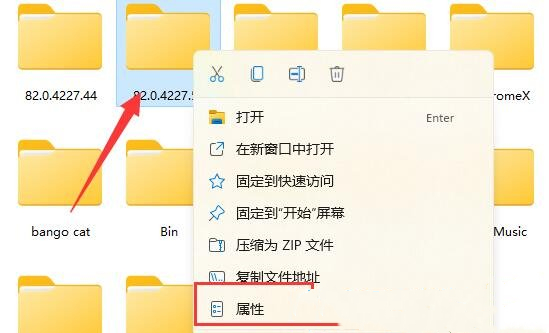
1. Find the folder that cannot be deleted, right-click and select "Properties" in the option list.
2. In the window that opens, click the "Security" tab in the top.

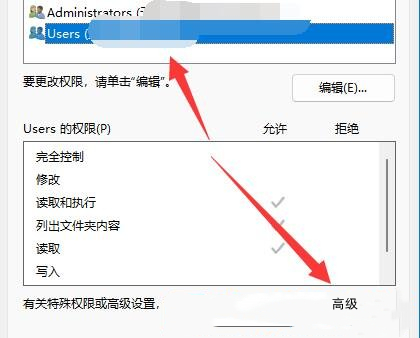
3. Then select the account currently in use and click "Advanced" below.
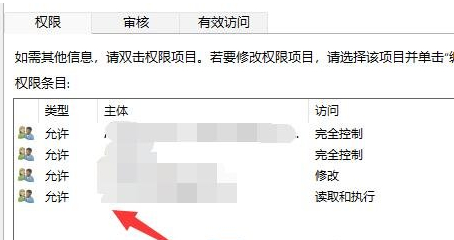
4. Then double-click to open the account you are using.
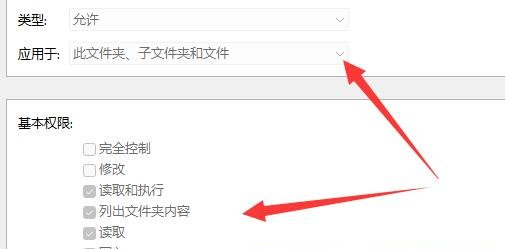
5. Then set the "Type" to "Allow", check all the permissions below, and finally click OK to save.
The above is the detailed content of What should I do if I cannot delete a folder in Win11? What should I do if I cannot delete a folder in Win11?. For more information, please follow other related articles on the PHP Chinese website!
 The difference between i5 and i7
 nginx restart
 Characteristics of relational databases
 Implementation method of js barrage function
 linear-gradient usage
 How to solve the problem of not being able to create a new folder in Win7
 What are the commonly used functions of informix?
 How about Ouyi Exchange?





















![[Web front-end] Node.js quick start](https://img.php.cn/upload/course/000/000/067/662b5d34ba7c0227.png)



