The following is an article about setting tips for HTML table borders. The content is quite good, I would like to share it with you now and give it as a reference
For many people who are new to HTML, table
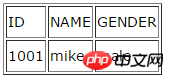
Generally when we use a table, we always give it a border attribute, such as:
is the most commonly used tag, but for the control of table borders, Many beginners don’t understand it very well.
, the effect is as follows:##For many people who are new to HTML, table
is the most commonly used tag, but many beginners do not understand the control of table borders.Generally when we use a table, we always give it a border attribute, such as:
##However, it seems that the width is still not as we imagined: only one pixel wide. In fact, what you see in the above picture is actually two pixels wide. Why? This is because there is no border between
, the effect is as follows:
Caused by overlap. Just modify the border-collapse attribute of the table,
that is,
Copy after login
and then add a color to the table,
Copy after login
The above is the entire content of this article. I hope it will be helpful to everyone's study. For more related content, please pay attention to the PHP Chinese website!
Related recommendations:
Make the background image adapt to the browser size in HTML
Detailed example of html word interaction in PHP How to transfer
The above is the detailed content of Tips on setting HTML table borders. For more information, please follow other related articles on the PHP Chinese website!
The content of this article is voluntarily contributed by netizens, and the copyright belongs to the original author. This site does not assume corresponding legal responsibility. If you find any content suspected of plagiarism or infringement, please contact admin@php.cn



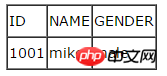 ##However, it seems that the width is still not as we imagined: only one pixel wide. In fact, what you see in the above picture is actually two pixels wide. Why? This is because there is no border between













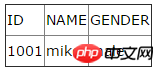 and then add a color to the table,
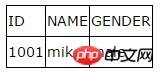 The above is the entire content of this article. I hope it will be helpful to everyone's study. For more related content, please pay attention to the PHP Chinese website!











![[Web front-end] Node.js quick start](https://img.php.cn/upload/course/000/000/067/662b5d34ba7c0227.png)



