

Course9851
Course Introduction:The course content covers common PHP security vulnerabilities in web development, vulnerabilities in common PHP functions, and PHP file system security. At the same time, the security issues of server software are introduced.

Course9465
Course Introduction:Composer is a tool used by PHP to manage dependency relationships. You can declare the external libraries (libraries) you depend on in your project, and Composer will install these dependent library files for you.

Course2564
Course Introduction:A firewall is a system used to control access to a computer network. Firewalls can isolate risk areas from safe access areas and prevent unpredictable or unauthorized external access from invading the internal network. Learning firewalls under Linux is not only for these reasons. The most important thing is that during the learning stage, through the use of firewalls, you can better master the principles of network communication, become familiar with the operation of Linux, and master network services and network protocols. It is also important for learning Linux operation and maintenance or Cybersecurity is helpful. There are many firewalls under Linux, including iptables, firewalld, selinux, tcp_warppers, etc. This course summarizes these firewall-related technologies.

Course1936
Course Introduction:This case uses the fullpage full-screen scrolling plug-in to allow you to quickly and efficiently develop full-screen scrolling pages. Material download address: https://gitee.com/xiaoqiang001/full_screen_plugin.git

Course2857
Course Introduction:Course introduction: 1. Cross-domain processing, token management, route interception; 2. Real interface debugging, API layer encapsulation; 3. Secondary encapsulation of Echarts and paging components; 4. Vue packaging optimization and answers to common problems.
Can't modify max_input_vars in PHP
2023-11-10 11:49:31 0 1 277
Laravel Space/laravel-backup cannot be installed
2023-11-10 08:57:17 0 2 224
Send email using Symfony Mailer
2023-11-09 21:03:31 0 1 262
Symfony installation error "Archives may contain the same filename with different case"
2023-11-09 16:47:54 0 1 267
PHP Installed and using MAMP but encountering "zsh: command not found: php" error
2023-11-09 09:34:56 0 1 281
Course Introduction:The prediction and analysis of software security vulnerabilities is one of the important research topics in the current field of information security. With the popularization of the Internet and the widespread use of software applications, software security vulnerabilities have posed a huge threat to the information security of enterprises and individuals. In order to promptly discover and repair security vulnerabilities in software and improve software security, many researchers have begun to use technologies such as machine learning and data mining to predict and analyze software security vulnerabilities. This article will introduce how to use Python to implement software security vulnerability prediction and analysis. 1. Data collection and preprocessing data
2023-06-30 comment 01122

Course Introduction:With the popularity and development of the Internet, network security has become one of the focuses of people's attention. As one of the important means of network security, security software plays an increasingly important role. In this article, we will analyze the role of security software in network security in order to better understand its importance. 1. Provide basic protection Security software is a key tool to prevent network attacks and malware intrusions such as viruses. Among other things, antivirus software scans and detects viruses, malware, and spam on your computer. For different types of threats, security
2023-06-11 comment 0872
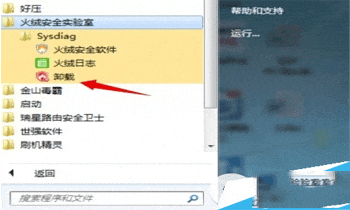
Course Introduction:1、大多数的软件都会带上一个卸载的工具火绒互联网安全软件也不例外,点击开始菜单---【火绒安全实验室】-----【Sysdiag】----【卸载】。2、在出现卸载界面下点击【立即卸载】。3、卸载成功。方法二:1、进入系统的控制面板中找到【程序和功能】点击进入。2、进入卸载和更改程序下找到【火绒互联网安全软件】点击右键选择【卸载/更改】。3、在出现卸载界面下点击【立即卸载】4、卸载成功。方法三:找到软件的根目录,使用360或者其他软件,直接粉碎掉文件方法四:进入安全模式删除文件夹,删除注册表里的服
2024-05-15 comment 0860
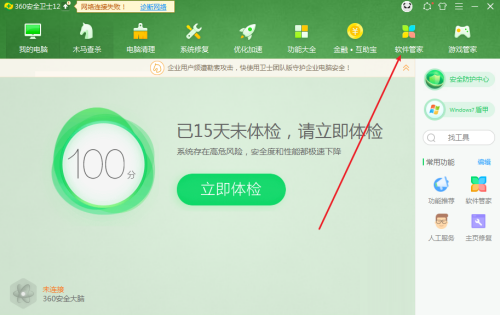
Course Introduction:Recently, some friends asked the editor how to uninstall the software of 360 Security Guard. The following will bring you the method of uninstalling the software of 360 Security Guard. Friends in need can come and learn more. 1. Open 360 Security Guard and click [Software Management] at the top, as shown in the figure below. 2. Find and click [Uninstall], as shown in the figure below. 3. Find the 360 Security Guard software and click [Uninstall] on the right, as shown in the figure below.
2024-03-04 comment929

Course Introduction:火绒安全是一款杀毒防护软件,界面简洁、功能齐全,可以给用户带来很好的体验感,越来越多的小伙伴选择使用。有小伙伴知道火绒安全软件怎么禁止软件启用吗,下面小编就给大家详细介绍一下火绒安全软件禁止软件启用的方法,大家感兴趣的话可以来看一看。操作方法:1、双击打开软件,点击页面下方中的"安全工具"选项。2、在打开的窗口界面中,点击"系统工具"中的"启动项管理"。3、然后想要需要禁止的启动项,点击右侧"允许启用"的选项框下拉按钮,选择列表中的"禁止启用"就可以了。
2024-08-15 comment146