


This article mainly introduces relevant information about the detailed examples of encapsulating input components in Vue. I hope this article can help everyone. Friends in need can refer to
Encapsulating input components in Vue
I've been a little busy lately and took it off for a long time, so sorry for the lack of updates. Today we are going to post a simple template on how to customize the encapsulation of the input component. Code friends can add the required parameters to their actual projects
UI diagram in my project It’s like this
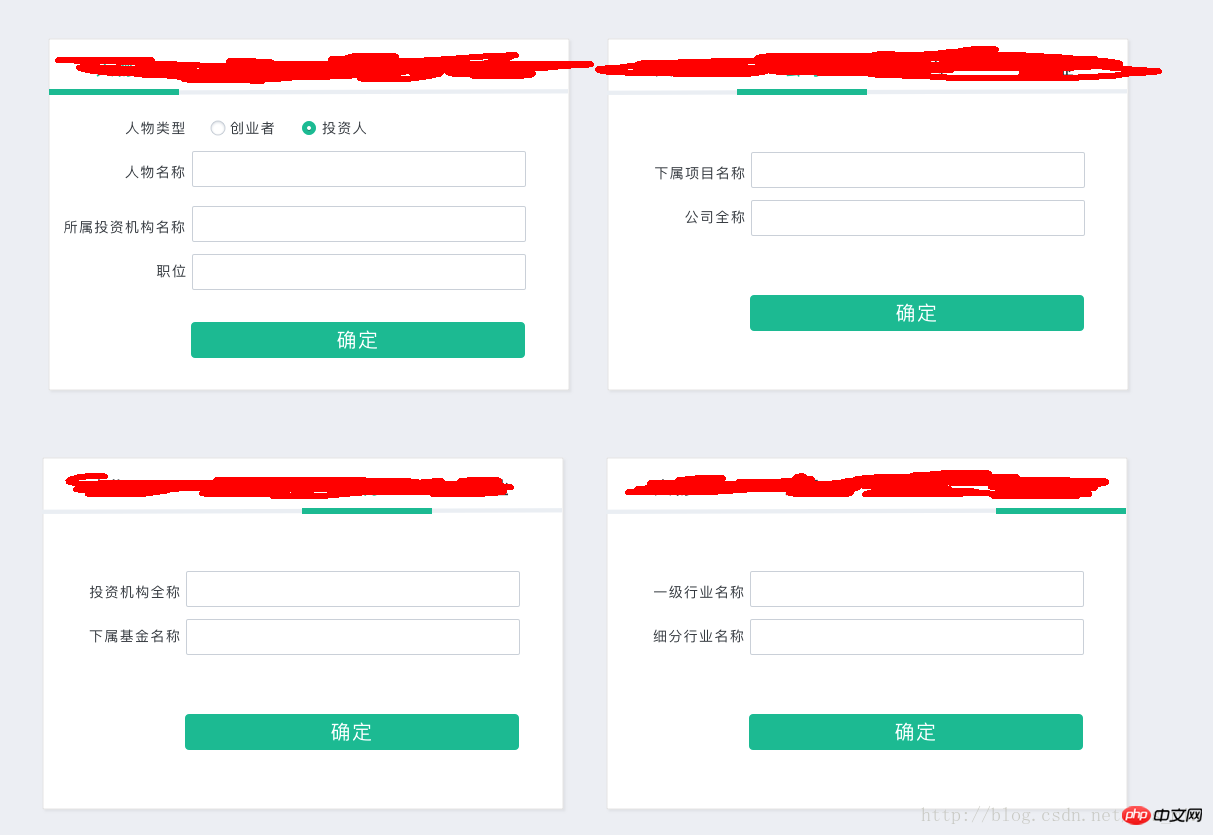
The code is as follows
Template settings for sub-components
{{text}}
Parent component template
The above is the entire content of this article, I hope it will be helpful to everyone’s study, For more related content, please pay attention to the PHP Chinese website!
Related recommendations:
Introduction to Vue component communication practice
##Introduction to the encapsulation of Vue2.0 multi-Tab switching components
Introduction to the development of Vue drag and drop components
##
The above is the detailed content of Introduction to encapsulating input components in Vue. For more information, please follow other related articles on the PHP Chinese website!
 What is the command to delete a column in sql
 The difference between export and export default
 The difference between c drive and d drive
 What are the main differences between linux and windows
 How to install linux system
 The function of span tag
 What does frame rate mean?
 How to configure web server




















![[Web front-end] Node.js quick start](https://img.php.cn/upload/course/000/000/067/662b5d34ba7c0227.png)



