


This article mainly introduces the example of vue2.0 vue-dplayer to implement hls playback. Now I will share it with you and give you a reference.
Cause
I wrote an article before "vue2.0 vue-video-player implements hls playback", which mentioned that before using vue-video-player , I tried to use vue-dplayer to implement hls playback, but time was tight at the time and before it was completed, I changed the plan. Take the time to complete it now.
Start
Install dependencies
npm install vue-dplayer -S
Write component HelloWorld.vue
<template>
<p class="hello">
<d-player ref="player" @play="play" :video="video" :contextmenu="contextmenu"></d-player>
</p>
</template>
<script>
import VueDPlayer from './VueDPlayerHls';
export default {
name: 'HelloWorld',
data () {
return {
msg: 'Welcome to Your Vue.js App',
video: {
url: 'https://logos-channel.scaleengine.net/logos-channel/live/biblescreen-ad-free/chunklist_w630020335.m3u8',
pic: 'http://static.smartisanos.cn/pr/img/video/video_03_cc87ce5bdb.jpg',
type: 'hls'
},
autoplay: false,
player: null,
contextmenu: [
{
text: 'GitHub',
link: 'https://github.com/MoePlayer/vue-dplayer'
}
]
}
},
components: {
'd-player': VueDPlayer
},
methods: {
play() {
console.log('play callback')
}
},
mounted() {
this.player = this.$refs.player.dp;
// console.log(this.player);
var hls = new Hls();
hls.loadSource('https://logos-channel.scaleengine.net/logos-channel/live/biblescreen-ad-free/chunklist_w630020335.m3u8');
hls.attachMedia(this.player);
}
}
</script>
<!-- Add "scoped" attribute to limit CSS to this component only -->
<style scoped>
</style>Introducing hls.js
It was originally introduced using import, but an error was reported during execution. So first introduce it using the script tag in index.html.
<!DOCTYPE html>
<html>
 <head>
  <meta charset="utf-8">
  <meta name="viewport" content="width=device-width,initial-scale=1.0">
  <title>vue-dplayer-hls</title>
 </head>
 <body>
  <p id="app"></p>
  <!-- built files will be auto injected -->
  <script src="https://cdn.jsdelivr.net/npm/hls.js@latest"></script>
 </body>
</html>
Note:
According to the DPlayer Demo page code, if you want to support hls, you need to add video. The type is set to "hls", but after I modified it, I found that it couldn't be played. So I went to look at the source code and found that there is this place in the source code:
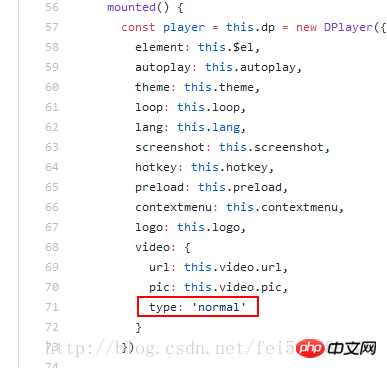
That is to say, no matter what you fill in in your component, it is actually Use 'normal' to new the Dplayer instance.
Modify the source code
Customize a component VueDPlayerHls.vue, then copy the source code, and modify the problem to: type: this.video.type
<template>
<p class="dplayer"></p>
</template>
<script>
require('../../node_modules/dplayer/dist/DPlayer.min.css');
import DPlayer from 'DPlayer'
export default {
props: {
autoplay: {
type: Boolean,
default: false
},
theme: {
type: String,
default: '#FADFA3'
},
loop: {
type: Boolean,
default: true
},
lang: {
type: String,
default: 'zh'
},
screenshot: {
type: Boolean,
default: false
},
hotkey: {
type: Boolean,
default: true
},
preload: {
type: String,
default: 'auto'
},
contextmenu: {
type: Array
},
logo: {
type: String
},
video: {
type: Object,
required: true,
validator(value) {
return typeof value.url === 'string'
}
}
},
data() {
return {
dp: null
}
},
mounted() {
const player = this.dp = new DPlayer({
element: this.$el,
autoplay: this.autoplay,
theme: this.theme,
loop: this.loop,
lang: this.lang,
screenshot: this.screenshot,
hotkey: this.hotkey,
preload: this.preload,
contextmenu: this.contextmenu,
logo: this.logo,
video: {
url: this.video.url,
pic: this.video.pic,
type: this.video.type
}
})
player.on('play', () => {
this.$emit('play')
})
player.on('pause', () => {
this.$emit('pause')
})
player.on('canplay', () => {
this.$emit('canplay')
})
player.on('playing', () => {
this.$emit('playing')
})
player.on('ended', () => {
this.$emit('ended')
})
player.on('error', () => {
this.$emit('error')
})
}
}
</script>Import the new component in the original component (HelloWorld.vue)
import VueDPlayer from './VueDPlayerHls';
Realize playback
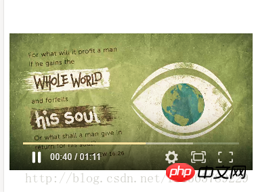
The above is what I compiled for everyone. I hope it will be helpful to everyone in the future.
Related articles:
How to solve the problem of red reporting and warning when using v-for in vue (detailed tutorial)
How to implement the search matching function method in Vuejs (detailed tutorial)
Use the select drop-down box to implement binding and value methods in vue.js
The above is the detailed content of Examples of how to implement hls playback using vue2.0+vue-dplayer technologies. For more information, please follow other related articles on the PHP Chinese website!











![[Web front-end] Node.js quick start](https://img.php.cn/upload/course/000/000/067/662b5d34ba7c0227.png)



