


 Tools Tags

 directory

 Tools Tags
Place coupons


Update log
| ##Version number | Update content | Update time |
|---|---|---|
| V1.1 | 1. Added a new card and coupon shelf creation interface, which supports developers to call the interface to create a card and coupon shelf for card and coupon investment 2. Newly added Import code interface to support custom code developers to distribute cards and coupons through mass distribution, customer service and other channels by importing code | 2015-8-12 |
| V1.2 | New scan QR code batch collection interface, users can receive multiple cards and coupons at the same time by scanning the QR code | 2015-8-31 |
##1 Create a QR code interface
Developers can call this interface to generate a card coupon 2 The QR code allows users to scan the code and add coupons to the card package.
After obtaining the QR code ticket, developers can use to exchange the ticket for the QR code interface. Interface call request description Parameter description ##POST data Parameter Description ##outer_str For the QR code of the membership card, every time the user scans the code to open the membership card and clicks any URL, the value will be spelled into the URL, which is convenient for developers Locate the source of the scan code #Return data Parameters illustrate ##Notes: , you must first import the custom code into ; WeChat provides the addCard interface for merchants to call the front-end webpage to add one or more cards and coupons to the user's card package. For details, see Batch Add Cards and Vouchers Interface. Introduction to the card and coupon shelf #The card and coupon shelf supports developers to generate a card and coupon collection H5 page by calling the interface , and obtain the page link to perform the action of placing cards and coupons. Currently, the card and coupon shelf only supports cards and coupons with non-custom codes. Cards and coupons with custom codes must first call the Import code interface to import the code can be used normally. Interface Description Developers need to call this interface to create shelf links for placing cards and coupons. When creating a shelf, you need to fill in the scene field of the delivery path. ##Request parameter description ##POST data SCENE_NEAR_BY nearby SCENE_MENU custom menu SCENE_QRCODE QR code SCENE_ARTICLE public account article SCENE_H5 h5 page SCENE_IVR automatic reply SCENE_CARD_CUSTOM_CELL card custom cell Field description Please developers Please note that the current group issuance of cards and coupons interface only supports the issuance of cards and coupons with non-custom code codes. If merchants with custom codes want to use this function, they need to call the import code interface to import the custom code into the WeChat server first. Interface Introduction This module is only for custom code merchants, non-custom code developers should automatically ignore it. Developers can import custom codes into the WeChat server in advance to obtain the same delivery capabilities as non-custom code merchants, such as group distribution, issuance of cards and coupons through customer service messages, etc. The cards and coupons after the imported code are equivalent to the non-custom code cards and coupons when issued Newly created card If the developer plans to create a new card that supports import code mode, which is different from the previous creation method, it is recommended to develop Please use the following process to create pre-stored code mode coupons, otherwise an error will be reported. Step 1: Create a pre-stored mode coupon, set the initial value of inventory quantity to 0, and fill in the get_custom_code_mode field ; Step 2: After the cards and coupons pass the review, call the import code interface and verify the code; Step 3: Call the modify inventory interface, and the card and coupon inventory must be less than or equal to the imported code number. (In order to avoid confusion, it is recommended to set it to equal) ##Non-newly created card If the developer already has a card and coupon and wants to change it to pre-saved code mode, it is recommended that the developer follow the following process to update the card and coupon. Interface Description Cards and coupons with custom codes only support API creation. When creating, be sure to add the following fields to base_info (see the interface document CreateCard to create card and coupon interface for details). Only after adding the following two specified fields can the code be called. Import interface for code import Notes: When creating/updating the get_custom_code_mode, you must check the relationship between the inventory number and the number of imported codes. When the number of imported codes is less than the inventory number, an error will be reported. is successfully created and passes the review, the custom code must be imported into the WeChat backend by calling the import code interface according to the number agreed with the coupon issuer. Interface Description Developers can call this interface to import the custom code into the WeChat card and coupon backend, and the WeChat agent will store and issue the code. #Note: 1) The upper limit of the number of incoming codes for a single call to the interface is 100. #2) Each code cannot be an empty string. #3) After the import is completed, the system will automatically determine whether the inventory set by the provider is consistent with the actual amount of imported code. #4) If the import fails, repeated import is supported until the prompt is successful. Interface call request description Request parameter description ##POST data ##Return data description Field description Interface description Supports developers to call this interface to query the number of successful code imports into the WeChat backend. Interface call request description Request parameter description #POST data Field description #Return data description Field description In order to avoid import errors, developers are strongly recommended After querying the code number, check the code interface to verify that the code is imported into the WeChat backend. Interface description Supports developers to call this interface to query the status of code import into the WeChat backend. Interface call request description 请求参数说明 #POST data Field description ##Return data description Field description Developers are supported to call this interface to obtain the standard format code for embedded card and coupon embedded graphic messages, and fill in the return code into the content field in the Upload graphic and text material interface to obtain the embedded card and coupon graphic message material. Special note: Currently, this interface only supports cards and coupons with non-custom codes. Cards and coupons with custom codes need to be imported first and then called. Interface call request description Parameter description #POST data ##Return data supports calling this interface to users in specified groups Mass-send card and coupon messages. For details, see Group-based group sending interface Currently, this interface only supports cards and coupons with non-custom codes. Cards and coupons with custom codes must be coded first. Called after import. Supports group issuance of native cards and coupons based on OpenID. The subscription account is unavailable. The service account has interface permissions after authentication. For details, see Group sending interface based on OpenID list Currently, this interface only supports cards and coupons with non-custom codes. Cards and coupons with custom codes must be coded first. Called after import. Supports developers to call this interface to issue cards Vouchers. The subscription account is unavailable and will be available after the service account is authenticated. For details, please see Customer Service Interface-Send Message Currently, this interface only supports filling in cards and coupons with non-custom codes. Cards and coupons with custom codes need to be imported first and then called. supports developers to call this interface to issue cards and coupons. The subscription account is unavailable and will be available after the service account is authenticated. For details, see Preview interface # #In order to facilitate developers to count the card and coupon delivery data of each channel, a new field outer_str (former outer_id) is added. Fill the outer_str (original outer_id) with different values into the json structure of card_ext. When the user receives the card coupon, the outer_id with the corresponding value will be brought into the receipt event and pushed to the developer server. Example: Set outer_str to 12b in the QR code delivery method Receive the event XML file Interface description Since cards and coupons have audit requirements, in order to facilitate official account debugging, you can set up some test accounts. These accounts can receive cards and coupons that have not passed the review and experience the entire process. Developer Notes #1. Supports both "openid" and "username" Field setting whitelist, the total number is capped at 10. 2. Set the test whitelist interface to full setting, that is, when the test list changes, you need to call this interface to re-input the IDs of all testers. 3. Whitelist users will ignore the invalid status of the card when receiving the card. Developers please note. Interface call request description Parameter description #POST data Parameter description Undress images for free Online AI tool for removing clothes from photos. AI-powered app for creating realistic nude photos AI image generator for creative art from text prompts. AI powered investment research for smarter decisions Easy-to-use and free code editor Chinese version, very easy to use Powerful PHP integrated development environment Visual web development tools God-level code editing software (SublimeText3)HTTP请求方式: POST
URL:https://api.weixin.qq.com/card/qrcode/create?access_token=TOKEN
Parameter Is it required Description POST data is JSON data access_token is the calling interface credential
 {
"action_name": "QR_CARD",
"expire_seconds": 1800,
"action_info": {
"card": {
"card_id": "pFS7Fjg8kV1IdDz01r4SQwMkuCKc",
"code": "198374613512",
"openid": "oFS7Fjl0WsZ9AMZqrI80nbIq8xrA",
"is_unique_code": false ,
"outer_str":"12b"
  }
 }
}{
"action_name": "QR_MULTIPLE_CARD",
"action_info": {
"multiple_card": {
"card_list": [
{
"card_id": "p1Pj9jgj3BcomSgtuW8B1wl-wo88",
"code":"2392583481",
"outer_str":"12b"
},
{
"card_id": "p1Pj9jgj3BcomSgtuW8B1wl-wo98",
"code":"2392583482",
"outer_str":"12b"
}
]
}
}
}Parameter name Required Type Example value Description ##code is string(20) ##110201201245Card and coupon code, cards and coupons whose use_custom_code field is true must be filled in, and cards and coupons with non-custom code and imported code mode do not need to be filled in. card_id No string(32) pFS7Fjg8kV1IdD
z01r4SQwMkuCKcCoupon ID. openid No string(32) oXch-jkrxp42VQu8ld
weCwDt97qoSpecify the openid of the recipient, and only this user can receive it. Cards and coupons whose bind_openid field is true must be filled in, and non-specified openid does not need to be filled in. expire_seconds No unsigned int 60 Specify the validity time of the QR code, the range is 60 ~ 1800 seconds. If left blank, it will be valid for 365 days by default is_unique_code No bool false Specify the QR code to be issued. The generated QR code is randomly assigned a code and cannot be scanned again after receiving it. Fill in true or false. The default is false. Note that when filling in this field, the card must pass the review and the inventory is not 0. outer_id No int 12 Receive scene value, used for data statistics of the receiving channel, the default value is 0, the field type is integer, and the length is limited to 60 digits.This custom scene value will be included in the event push triggered after the user receives the coupon. string(128) 13b outer_id field upgraded version, string type, when the user receives the card for the first time, he will receive it through The event is pushed to the merchant;
{
 "errcode": 0,
 "errmsg": "ok",
 "ticket":      "gQHB8DoAAAAAAAAAASxodHRwOi8vd2VpeGluLnFxLmNvbS9xL0JIV3lhX3psZmlvSDZmWGVMMTZvAAIEsNnKVQMEIAMAAA==",//获取ticket后需调用换取二维码接口获取二维码图片,详情见字段说明。
 "expire_seconds": 1800,
 "url": "http://weixin.qq.com/q/BHWya_zlfioH6fXeL16o ",
 "show_qrcode_url": " https://mp.weixin.qq.com/cgi-bin/showqrcode?  ticket=gQH98DoAAAAAAAAAASxodHRwOi8vd2VpeGluLnFxLmNvbS9xL0czVzRlSWpsamlyM2plWTNKVktvAAIE6SfgVQMEgDPhAQ%3D%3D"
}Parameter name Description errcode Error code errmsg Error message ticket The QR code ticket obtained, use this ticket to call and exchange the ticket for the QR code Interface can exchange for QR code within the valid time. url The address after parsing the QR code image, developers can generate the required QR code picture show_qrcode_url QR code displays the address, click to jump to the QR code page 2 HTML5 online coupon issuance (JS-SDK interface)
WeChat JS -SDK only supports use in WeChat's built-in browser, and calls from other browsers are invalid. 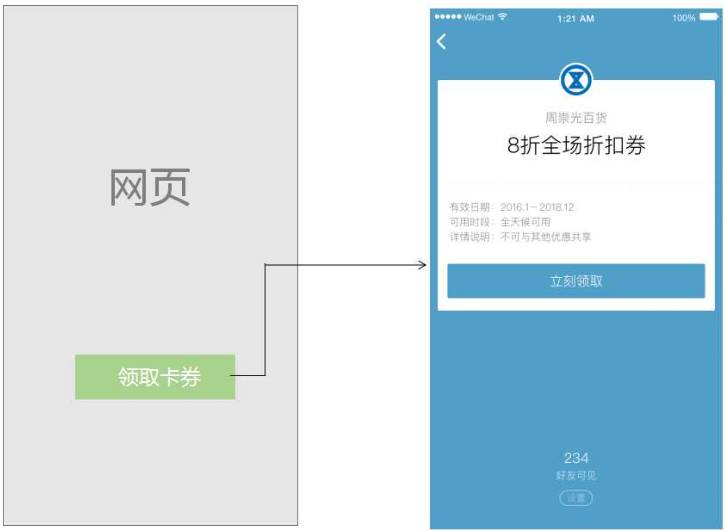
#3 Place coupons through the coupon shelf
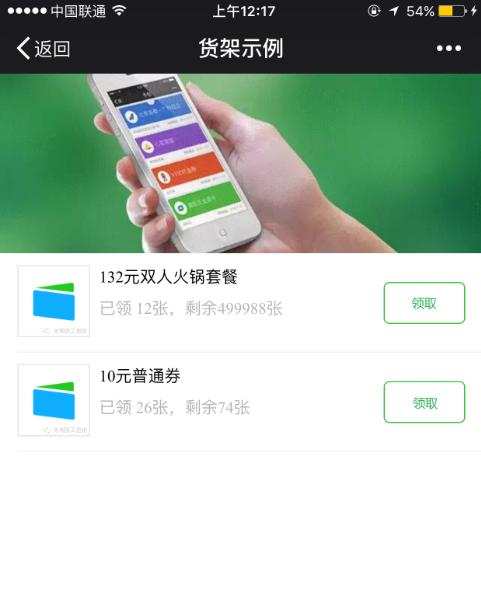
3.1 Create shelf interface
Interface call request descriptionHTTP请求方式: POST
URL:https://api.weixin.qq.com/card/landingpage/create?access_token=$TOKEN
Parameter Is it required Description access_token is the calling interface credential buffer is the data stream of the file
{
"banner":"http://mmbiz.qpic.cn/mmbiz/iaL1LJM1mF9aRKPZJkmG8xXhiaHqkKSVMMWeN3hLut7X7h  icFN",
   "page_title": "惠城优惠大派送",
   "can_share": true,
   "scene": "SCENE_NEAR_BY",
   "card_list": [
       {
           "card_id": "pXch-jnOlGtbuWwIO2NDftZeynRE",
           "thumb_url": "www.qq.com/a.jpg"
       },
       {
           "card_id": "pXch-jnAN-ZBoRbiwgqBZ1RV60fI",
           "thumb_url": "www.qq.com/b.jpg"
       }
   ]
}Field Description Is it required? banner The banner image link on the page must be called. The recommended size is 640*300. is the title of the title page. is can_share If the page can be shared, fill in Enter true/false is ##scene delivery page Scene value; is the card_list card and coupon list, each item has two The field is card_id to be placed on the page The card_id is thumb_url thumbnail url yes
{
     "errcode":0,
     "errmsg":"ok",
     "url":"www.test.url",
     "page_id":1
 }
Field Description errcode Error code, 0 means normal. errmsg Error message. url ## Shelf link. page_id Shelf ID. The unique identifier of the shelf. #4 Group issuance of coupons
4.1 Import custom code (only for custom code merchants)
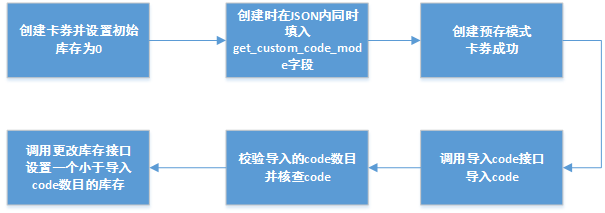

##4.1.1 Fill in/update the import code required fields
Field Example Description base_info ##get_custom_code_mode GET_CUSTOM_CODE_MODE_DEPOSIT After filling in this field, the custom code coupon can be imported and released. use_custom_code true Set the coupon to custom Definition code {
"card": {
"card_type": "GROUPON",
"groupon": {
"base_info": {
··········
"use_custom_code":true,
"get_custom_code_mode":"GET_CUSTOM_CODE_MODE_DEPOSIT",
},
"advanced_info": {
··········
},
"deal_detail": "示例"
}
}
}JSON example when updating a card {
"card_id":"ph_gmt7cUVrlRk8swPwx7aDyF-pg",
"groupon": {
"base_info": {
·········
"get_custom_code_mode":"GET_CUSTOM_CODE_MODE_DEPOSIT",
·········
}
}
}##4.1.2 Import code interface
In the custom code card After the couponHTTP请求方式: POST
URL:http://api.weixin.qq.com/card/code/deposit?access_token=ACCESS_TOKEN
Parameter Is it required Description access_token is the calling interface credential buffer is the data stream of the file
{
   "card_id": "pDF3iY0_dVjb_Pua96MMewA96qvA",
   "code": [
       "11111",
       "22222",
       "33333",
       "44444",
       "55555"
   ]
}
Field descriptionField Description Is it required? card_id The card ID that needs to be imported into the code. is code needs to be imported into the WeChat card and coupon backend Custom codes, the upper limit is 100. yes {
"errcode":0,
"errmsg":"ok"
}Field Description errcode Error code, 0 is normal; 40109: The number of codes exceeds 100 errmsg error message. succ_code Number of successes duplicate_code Duplicate imported codes will be automatically filtered. fail_code Number of failures. 4.1.3 Query the number of imported codes interface
HTTP请求方式: POST
URL:http://api.weixin.qq.com/card/code/getdepositcount?access_token=ACCESS_TOKEN
Parameter Is it required Description access_token is the calling interface credential
{
"card_id" : " pDF3iY0_dVjb_Pua96MMewA96qvA "
}Field Description Is it required? card_id The card ID of the imported code. yes
{
"errcode":0,
"errmsg":"ok",
"count":123
}Field Description errcode Error code, 0 means normal. errmsg Error message. count The number of codes that have been successfully deposited. #4.1.4 Verification code interface
HTTP请求方式: POST
URL:http://api.weixin.qq.com/card/code/checkcode?access_token=ACCESS_TOKEN
Parameter Is it required Description access_token is the calling interface credential
{
"card_id": "pDF3iY0_dVjb_Pua96MMewA96qvA",
"code": [
"11111",
"22222",
"33333",
"44444",
"55555"
]
}Field Description Is it required? card_id The card ID of the imported code. is code is already in the WeChat card and coupon backend Custom codes, the upper limit is 100. yes
{
"errcode":0,
"errmsg":"ok"
"exist_code":["11111","22222","33333"],
"not_exist_code":["44444","55555"]
}Field Description errcode Error code, 0 is normal; 40109: The number of codes exceeds 100 errmsg error message. exist_code The code that has been successfully deposited. not_exist_code There is no stored code. 4.2 Group issuance of cards and coupons through graphic messages
HTTP请求方式: POST
URL:https://api.weixin.qq.com/card/mpnews/gethtml?access_token=TOKEN
Parameter Is it required Description POST data is JSON data access_token is the calling interface credential {
"card_id":"p1Pj9jr90_SQRaVqYI239Ka1erkI"
}Parameter name Required Type Example value Description ##card_id No string(32) pFS7Fjg8kV1IdDz01r4SQwMkuCKc Coupon ID. {
"errcode":0,
"errmsg":"ok",
"content":"<iframeclass=\"res_iframecard_iframejs_editor_card\"data-src=\"http: \/\/mp.weixin.qq.com\/bizmall\/appmsgcard?action=show&biz=MjM5OTAwODk4MA%3D%3D&cardid=p1Pj9jnXTLf2nF7lccYScFUYqJ0&wechat_card_js=1#wechat_redirect\">"
}Parameter name Description ##errcode Error code ##errmsg ##contentError message Returns a piece of html code, which can be directly embedded into the body of the graphic message. That is, you can embed this code into the content field in the Upload graphic message material interface. #4.3 Issuing group coupon messages based on groups
4.4 Group issuance of card and coupon messages based on the OpenID list
4.5 Issuance of cards through customer service messages
4.6 Preview interface
5 Distribution channel data statistics
{
"action_name": "QR_CARD",
"action_info": {
"card": {
"card_id": "pFS7Fjg8kV1IdDz01r4SQwMkuCKc",
"code": "198374613512",
"openid": "oFS7Fjl0WsZ9AMZqrI80nbIq8xrA",
"expire_seconds": "1800",
"is_unique_code": false ,
"outer_str" : "12b"
}
}
}<xml> <ToUserName><![CDATA[toUser]]></ToUserName>
<FromUserName><![CDATA[FromUser]]></FromUserName>
<FriendUserName><![CDATA[FriendUser]]></FriendUserName>
<CreateTime>123456789</CreateTime>
<MsgType><![CDATA[event]]></MsgType>
<Event><![CDATA[user_get_card]]></Event>
<CardId><![CDATA[cardid]]></CardId>
<IsGiveByFriend>1</IsGiveByFriend>
<UserCardCode><![CDATA[12312312]]></UserCardCode>
<OuterStr>12b</OuterStr>
</xml>
6 Set test whitelist
HTTP请求方式: POST
URL:https://api.weixin.qq.com/card/testwhitelist/set?access_token=TOKEN
Parameter Is it required Description access_token is the calling interface credential POST data is Json data {
"openid": [
"o1Pj9jmZvwSyyyyyyBa4aULW2mA",
"o1Pj9jmZvxxxxxxxxxULW2mA"
],
"username": [
"afdvvf",
"abcd"
]
}Parameter name Required Type Example value Description ##openid No string(20) ##o1Pj9jmZvwSyyyyyyBa4aULW2mA List of openids to test. username No string(32) eddy Tested WeChat ID list.
{
  "errcode":0,
  "errmsg":"ok"
}Parameter name Description ##errcode Error code, 0 means normal. errmsg Error message.

Related videos
 Hot AI Tools


 Hot Article
 Hot Topics
 20516
20516
 7
13629
4
7
13629
4
 Popular tool









![Getting Started with PHP Practical Development: PHP Quick Creation [Small Business Forum]](https://img.php.cn/upload/course/000/000/035/5d27fb58823dc974.jpg)