


How to create subclips cleverly? For video editing enthusiasts, this is a problem that worries many people. In Vegas Pro, creating subclips is an essential skill for working with large video projects. In this tutorial, PHP editor Zimo will teach you step by step how to use Vegas Pro to create sub-clips, making it easier to manage and edit complex videos. Keep following us and master this practical skill quickly!
1. First, after opening the Vegas Pro software interface, click the import media button in the upper left corner

2. Then, after importing the material, right-click the mouse to open from the trimmer Button

3. Next, after editing the screen content, right-click the timeline and click the Create Sub-Clip button
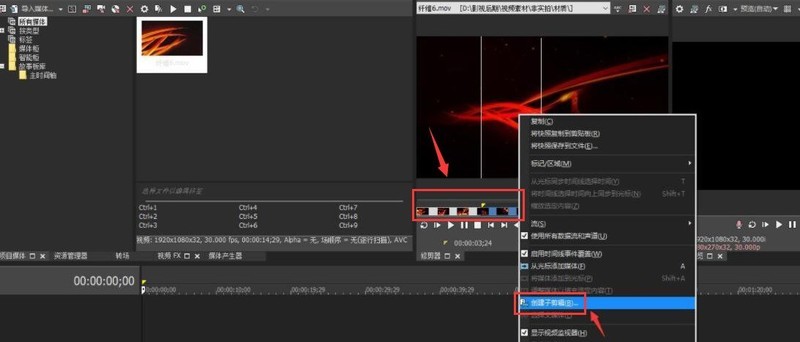
4. Finally, in Modify the name in the prompt window and click OK to save

The above is the detailed content of How to create sub-clips in Vegas Pro Tutorial on creating sub-clips in Vegas Pro. For more information, please follow other related articles on the PHP Chinese website!
 Is there a big difference between c language and Python?
 What is independent direct connection?
 Common encryption methods for data encryption storage
 What is the mobile service password?
 Introduction to javascript special effects code
 How to solve Java large file read exception
 What are the SEO keyword ranking tools?
 Modify file name in linux





















![[Web front-end] Node.js quick start](https://img.php.cn/upload/course/000/000/067/662b5d34ba7c0227.png)



