


php editor Xigua brings you a tutorial on how to set up night mode in Win10 system. Night mode is an eye protection function that can effectively reduce screen irritation to the eyes and make using the computer more comfortable. If you want to enable night mode in Windows 10, you can do it in just a few simple steps. Next, let’s learn more about how to set up the night mode of Win10 system so that your computer can protect your eyes at night.
1. Open the device and enter the [System Settings] page; as shown in the figure:
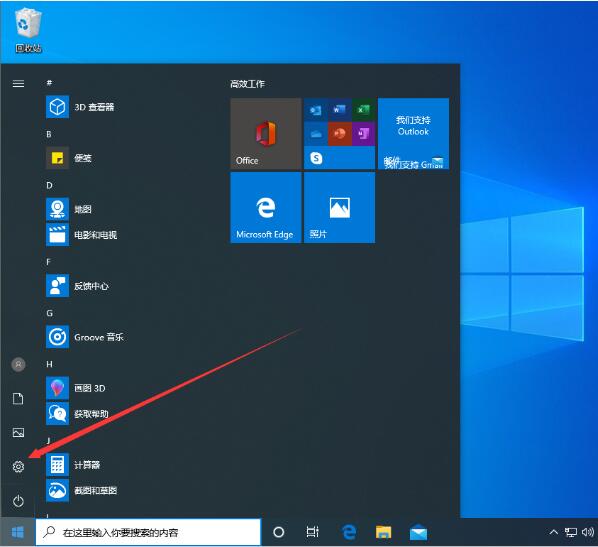
2. Select [System] in the setting page; as shown in the figure :

3. Then, find the [Night Mode Settings] option and turn it on; as shown in the picture:
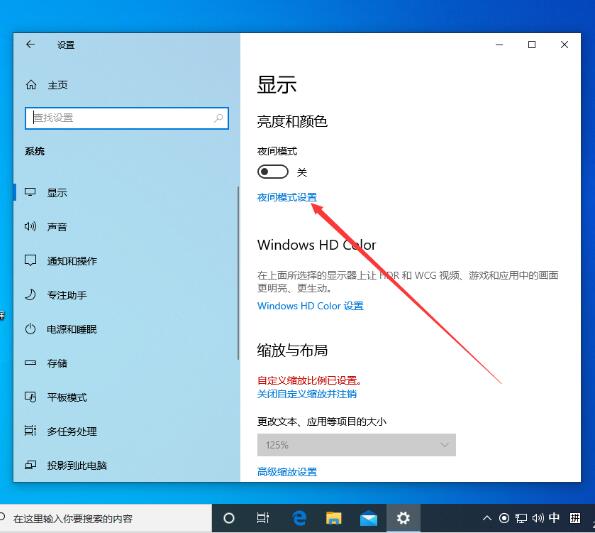
4. Then , you can slide to adjust the intensity of the mode on the night mode settings page; as shown in the figure:

5. After turning on the [Turn on night mode within the specified time] function, the user can also adjust Adjust the time or use the system default time point. as the picture shows:

The above is the detailed content of Tutorial on how to set up night mode in Windows 10 system. For more information, please follow other related articles on the PHP Chinese website!
 win10 bluetooth switch is missing
 Why do all the icons in the lower right corner of win10 show up?
 The difference between win10 sleep and hibernation
 Win10 pauses updates
 What to do if the Bluetooth switch is missing in Windows 10
 win10 connect to shared printer
 Clean up junk in win10
 How to share printer in win10





















![[Web front-end] Node.js quick start](https://img.php.cn/upload/course/000/000/067/662b5d34ba7c0227.png)



