


Git installation process on Ubuntu

Git is a fast, reliable, and adaptable distributed version control system. It is designed to support distributed, non-linear workflows, making it ideal for software development teams of all sizes. Each Git working directory is an independent repository with a complete history of all changes and the ability to track versions even without network access or a central server.
GitHub is a Git repository hosted on the cloud that provides all the features of distributed revision control. GitHub is a Git repository hosted on the cloud. Unlike Git which is a CLI tool, GitHub has a web-based graphical user interface. It is used for version control, which involves collaborating with other developers and tracking changes made to scripts and code over time. With GitHub, every team member can create a central cloud-based repository and make changes to data, enabling project collaboration.
This article demonstrates how to get Git on an Ubuntu system.
Git installation on Ubuntu
There are three main ways to install Git on Ubuntu:
- Using Ubuntu Package Manager (APT)
- Using Git Maintainers PPA
- Source: Git
Method 1: Install GIT using the default APT repository on Ubuntu 22.04
Step 1: Update the system
When installing Git on an Ubuntu system, it is crucial to use updated packages. Doing so can help mitigate package conflicts that may arise during the installation process and ensure a smooth installation process.
You can use the "Update" command in the "Advanced Packaging Tool" to update the system's software package.
Sudoku APT update
Output:

It is recommended to upgrade any outdated packages after the update is complete. Use this command to perform this upgrade:
sudo apt upgrade
Output:

Step 2: Check if Git exists on Ubuntu
It is recommended to confirm whether Git already exists on your computer before proceeding with the installation. This allows us to avoid repeated installations and keep the system clean.
Use the "git" command and --version to check whether Git already exists in the system. If Git is installed, the previously installed version is displayed:
git——version
Output:

Step 3: Use APT command
If the previous command returns nothing, it will verify that Git is not installed on your machine. Now it's time to set up Git.
Because it provides an easy-to-use process, we install Git using Ubuntu's repository. Run the "Install" command using sudo apt to install Git.
Sudo apt install git
Output:

Step 4: Verify that Ubuntu’s GIT installation is successful
After the installation is complete, you should ensure that Git is installed correctly.
Once again, we can use -version to verify the installation. At this point, the following command should return the most recently installed Git version:
Git-version
When the command runs, you should see something like this:

Method 2: Install GIT on Ubuntu via Git Maintainer PPA
It is sometimes better to use the latest Git version, especially when new features or critical bug fixes are needed. The Ubuntu Git maintenance team maintains the Personal Package Archive (PPA), which is usually the source of the latest stable version of Git. Depending on your specific needs and your work environment, this approach may have a number of major benefits.
Step 1: Import Git Maintainer PPA
We need to add the Git PPA to the system's repository list. Access to the latest stable Git version is guaranteed by this PPA. Even though your system may already have the following packages installed, it's not a bad thing to recheck.
SUDO add-apt-repository-ppa:git-core/ppa
Output:

Step 2: Refresh package index after PPA import
After importing a Git PPA into the system's repository list, the package index must be refreshed. Now that the repository has been added, your system is able to recognize recently downloaded packages.
To update the package index, do the following:
Sudoku APT update
Step 3: Install git using apt ppa command
Step 3: Install git using apt ppa command
You can upgrade or install Git once the PPA is set up. This command performs this task:
Sudo apt install git-y
Output:
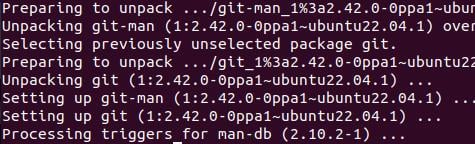
If you have installed GIT from the Ubuntu repository, you can upgrade Git from the additional PPA to the latest version by running this command.
After the upgrade or installation is completed, confirm the installed Git version:
git——version
Output:
You should see something like this:

This indicates that the latest version of Git is installed correctly on your computer.
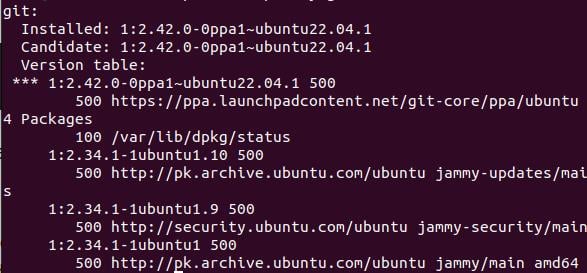
Checking the repository your Git installation came from can give you more information. Because PPAs usually contain a newer version of Git, using the following command should reflect the latest PPA additions:
APT-Cache Strategy Git
Output:
Method 3: Install Git from source
This method gives the user more control over the installation process and grants access to specific features that may not be included in the prepackaged distribution.
Step 1: Configure Ubuntu using GIT Build Predencies
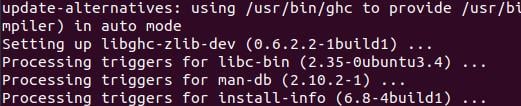
First, you need to install the necessary build dependencies on your Ubuntu system. These requirements are required for Git compilation. To configure these, use the following commands:
Sudo apt install make libssl-dev libghc-zlib-dev libcurl4-Gnutls-dev libexpat1-dev gettext decompression-y
Output:
Step 2: Get the GIT source code
Go to the Git release page to get the source code. To download the required version, use the following command. Don't forget to replace {version} with the desired Git version.
curl—o git.tar.gz www.example.com
Output:

Step 3: Extract and install GIT source code
Now, now compile and install git. To start compilation, use the following command:
sudo tar—xf git.tar.gz
Find and open the unzipped directory:
cd git—2.37.1
Output:

Now, compile and install git. Start compilation using the following command:
sudo make prefix =/usr/local all

This command instructs the build system to install in the "/usr/local" folder at the end of the compilation process. The "all" flag ensures a complete build including all components.
After compilation is completed, start the installation:
sudo make prefix =/usr/local install
Output:
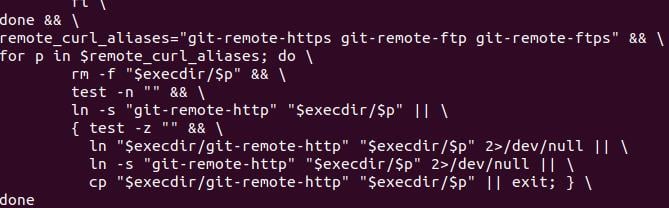
Git is now installed in the "/usr/local" directory. The process involves copying the necessary files and granting the necessary permissions to make Git accessible on your machine.
Verify that the build is accurate and the installation was successful.
git——version
Output:

This command should confirm that Git is properly integrated into your system by returning your installed version.
in conclusion
Git is a widely used and powerful distributed version control system. This article demonstrates how to install Git on Ubuntu 22.04 and earlier. We discussed three methods: using the Ubuntu Package Manager (apt), using the Git Maintainer PPA, and using Git source code. You can find many online resources, such as the official Git manual, to help you learn how to use Git.
The above is the detailed content of Git installation process on Ubuntu. For more information, please follow other related articles on the PHP Chinese website!

Hot AI Tools

Undress AI Tool
Undress images for free

Undresser.AI Undress
AI-powered app for creating realistic nude photos

AI Clothes Remover
Online AI tool for removing clothes from photos.

Clothoff.io
AI clothes remover

Video Face Swap
Swap faces in any video effortlessly with our completely free AI face swap tool!

Hot Article
Hot Tools

Notepad++7.3.1
Easy-to-use and free code editor

SublimeText3 Chinese version
Chinese version, very easy to use

Zend Studio 13.0.1
Powerful PHP integrated development environment

Dreamweaver CS6
Visual web development tools

SublimeText3 Mac version
God-level code editing software (SublimeText3)


 Ethena treasury strategy: the rise of the third empire of stablecoin
Jul 30, 2025 pm 08:12 PM
Ethena treasury strategy: the rise of the third empire of stablecoin
Jul 30, 2025 pm 08:12 PM
The real use of battle royale in the dual currency system has not yet happened. Conclusion In August 2023, the MakerDAO ecological lending protocol Spark gave an annualized return of $DAI8%. Then Sun Chi entered in batches, investing a total of 230,000 $stETH, accounting for more than 15% of Spark's deposits, forcing MakerDAO to make an emergency proposal to lower the interest rate to 5%. MakerDAO's original intention was to "subsidize" the usage rate of $DAI, almost becoming Justin Sun's Solo Yield. July 2025, Ethe
 How to use 5,000 yuan to earn 500,000 yuan in the currency circle?
Aug 07, 2025 pm 08:42 PM
How to use 5,000 yuan to earn 500,000 yuan in the currency circle?
Aug 07, 2025 pm 08:42 PM
In the field of digital currency, a full range of variables and opportunities, increasing the principal of 5,000 to 500,000 means that one hundred times the asset appreciation needs to be achieved. This is not a simple math game, but a comprehensive test involving cognition, strategy, mentality and execution. It requires participants not to rely solely on luck, but also to have keen market insight and extraordinary risk management capabilities.
 There is only one kind of person who makes money in the currency circle
Jul 29, 2025 pm 03:24 PM
There is only one kind of person who makes money in the currency circle
Jul 29, 2025 pm 03:24 PM
What can truly make money stably is countercyclical traders with anti-human characteristics. 1. They identify whales in the market FOMO by fighting emotional kidnapping, and capture wrongly killed assets when panic sell-offs; 2. Establish mechanized trading discipline and strictly implement stop-profit and stop-loss rules to fight greed and fear; 3. Use cognitive arbitrage thinking to discover institutional trends and trend opportunities in advance through on-chain data and code updates and other underlying information, and ultimately solidify emotional isolation, data decision-making and countercyclical operations into trading instincts, thereby continuing to make profits in the encrypted market with amplified human nature.
 How to Amend the Previous Git Commit Message
Aug 01, 2025 am 03:34 AM
How to Amend the Previous Git Commit Message
Aug 01, 2025 am 03:34 AM
Toamendthemostrecentcommitmessage,usegitcommit--amend-m"Yournewcommitmessage"ifthecommithasn’tbeenpushed;thisrewritesthelocalcommithistorywiththenewmessage.2.Toeditthemessageinyourdefaulteditor,rungitcommit--amendwithoutthe-mflag,allowingyo
 Matrixport Market Observation: Bitcoin (BTC) giant whale shipments, Ethereum (ETH) continues to lead the rise, and capital flows become the focus of the market
Jul 30, 2025 pm 09:21 PM
Matrixport Market Observation: Bitcoin (BTC) giant whale shipments, Ethereum (ETH) continues to lead the rise, and capital flows become the focus of the market
Jul 30, 2025 pm 09:21 PM
Table of Contents Market Interpretation of the concentrated shipment of ancient giant whales, BTC prices quickly repair ETH close to $4,000 key position, polarization of pledge and fund demand, altcoin sector differentiation intensifies, Solana and XRP funds inflows highlight market hotspots pay attention to macro data and policy trends, and market fluctuations may intensify last week (July 22-July 28). BTC maintained a high-level oscillation pattern. The ETH capital inflow trend continues to improve, the ETH spot ETF has achieved net inflow for eight consecutive weeks, and the ETH market share has climbed to 11.8%. On July 25, affected by the massive selling of Galaxy Digital, BTC fell below $115,000 for a short time, reaching the lowest point
 What are stablecoins? What are the top 10 stablecoins in market value?
Aug 07, 2025 pm 10:57 PM
What are stablecoins? What are the top 10 stablecoins in market value?
Aug 07, 2025 pm 10:57 PM
Stable coins are cryptocurrencies whose value is linked to stable assets such as the US dollar or gold. They aim to solve the problem of large price fluctuations in currencies such as Bitcoin. They achieve price stability through an anchoring mechanism and are mainly divided into three categories: 1. Stable coins with legal currency collateral, such as USDT and USDC, are supported by US dollar reserves, and users can exchange 1:1; 2. Stable coins with crypto assets collateral, such as DAI and crvUSD, are generated by over-collateralized digital assets such as Ethereum, and have decentralized characteristics; 3. Algorithmic stable coins, such as USDD, rely on algorithms to adjust supply and demand to maintain currency value, and have no direct asset collateral, and are at a high risk. The top 10 stablecoins currently ranked in market capitalization include: 1. USDT, the earliest and most liquid dollar stablecoins; 2. USDC, to comply with and
 Wall Street Whale Devours Ethereum: Interpretation of the Pricing Power Battle Behind Purchase 830,000 ETH in 35 Days
Aug 22, 2025 pm 07:18 PM
Wall Street Whale Devours Ethereum: Interpretation of the Pricing Power Battle Behind Purchase 830,000 ETH in 35 Days
Aug 22, 2025 pm 07:18 PM
Table of Contents Two ancestry, two worldviews: The philosophical showdown between OG coins hoarding and Wall Street harvesting. Financial engineering dimensionality reduction strike: How BitMine reconstructs ETH pricing power in 35 days. New dealer spokesperson: TomLee and Wall Street narrative manipulation ecological reconstruction: How Wall Street Capital reshapes the ETH value chain. A small company that was originally unknown in Nasdaq increased its holdings from zero violence to 830,000 in just 35 days. Behind it is a survival philosophy showdown between the indigenous people in the currency circle and Wall Street Capital. On July 1, 2025, BitMine's ETH position was still zero. 35 days later, this family is unknown
 How do I undo a staging operation?
Aug 02, 2025 am 01:26 AM
How do I undo a staging operation?
Aug 02, 2025 am 01:26 AM
If you mistakenly add files to the temporary storage area in Git, you can use the gitrestore--staged or gitreset command to undo the operation. 1. To cancel the temporary storage of a single file, you can run gitrestore-staged file name or gitresetHEAD file name; 2. To cancel the temporary storage of all files at once, you can run gitrestore-staged. or gitreset; 3. If you have already submitted, you need to use gitreset-mixedHEAD~1 to undo the submission and keep the changes; 4. If you want to discard changes in the temporary storage and working directory at the same time, you can run gitrestore-staged-work
