


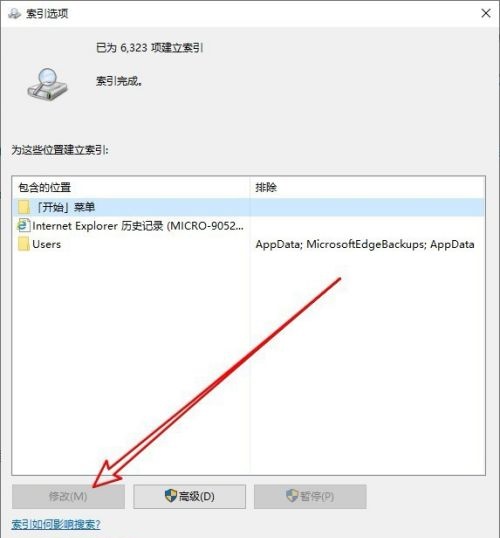
php editor Xinyi teaches you how to solve the problem that the Win10 index option modification button is not available. Sometimes, we want to modify the index options in Win10 system, but find that the modification button is gray and unclickable. At this time, you can try to solve this problem through some simple solutions and restore the modification function of index options. Next, we will introduce in detail the solution to the gray problem of the Win10 index option modification button, allowing you to easily solve this problem.
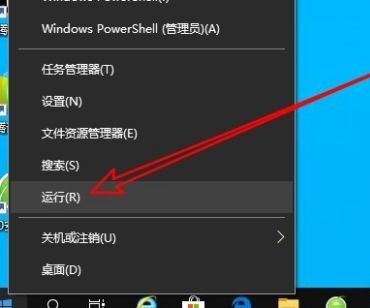
1. Right-click Start in the taskbar and open "Run" in the Options menu option .
#2. Enter "gpedit.msc" in the window and press Enter to open.

#3. After entering the new interface, click "Computer Configuration - Administrative Templates - Windows Components" and find the "Search" setting on the right.
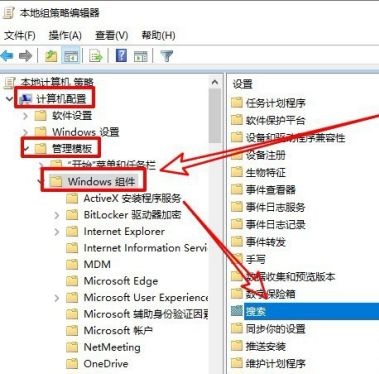
#4. Then double-click the "Prevent customizing index location in Control Panel" option.

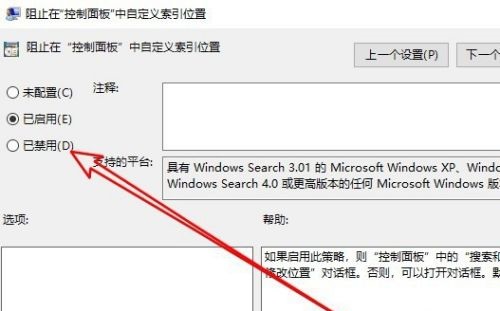
#5. In the window, check "Disabled" in the upper left corner.
#6. Finally, re-enter the index options window, and you will see that the "Modify" button can be used.
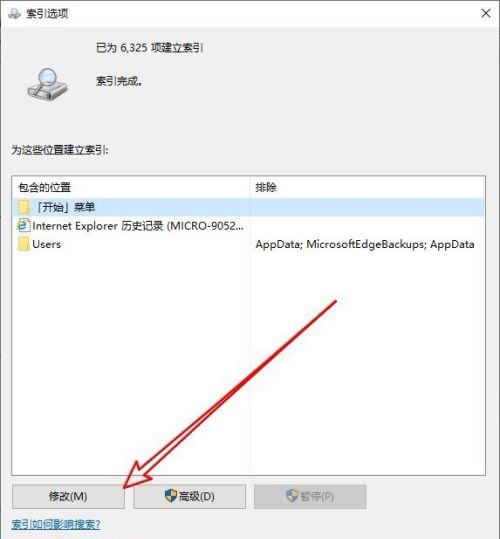
The above is the detailed content of What should I do if the Win10 index option modification button is not available? What should I do if the Win10 index option modification button is grayed out?. For more information, please follow other related articles on the PHP Chinese website!
 win10 bluetooth switch is missing
 Why do all the icons in the lower right corner of win10 show up?
 The difference between win10 sleep and hibernation
 Win10 pauses updates
 What to do if the Bluetooth switch is missing in Windows 10
 win10 connect to shared printer
 Clean up junk in win10
 How to share printer in win10





















![[Web front-end] Node.js quick start](https://img.php.cn/upload/course/000/000/067/662b5d34ba7c0227.png)



