


A new programming paradigm, when Spring Boot meets OpenAI

In 2023, AI technology has become a hot topic and has had a huge impact on various industries, especially in the programming field. People are increasingly aware of the importance of AI technology, and the Spring community is no exception.
With the continuous advancement of GenAI (General Artificial Intelligence) technology, it has become crucial and urgent to simplify the creation of applications with AI functions. Against this background, "Spring AI" emerged, aiming to simplify the process of developing AI functional applications, making it simple and intuitive and avoiding unnecessary complexity. Through "Spring AI", developers can more easily build applications with AI functions, making them easier to use and operate. This not only helps improve development efficiency, but also accelerates the popularization and application of AI technology. In short, "Spring AI" brings new possibilities to the development of AI applications, providing developers with simpler and more intuitive tools and frameworks.
This article will briefly introduce the Spring AI framework and some engineering tips for using the framework. Developers can use these tips to better structure prompt information and fully utilize the capabilities of Spring AI.
1 Introduction to Spring AI
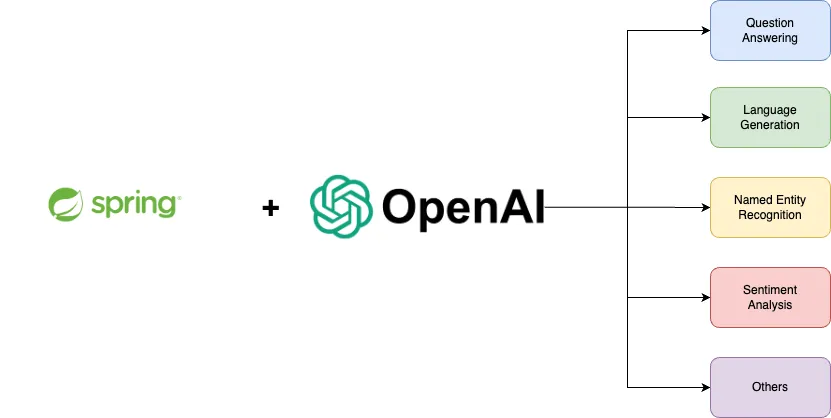 Spring AI is created and written by M K Pavan Kumar
Spring AI is a tool designed to simplify AI applications Developed project inspired by the Python projects LangChain and LlamaIndex. However, Spring AI is not a simple copy. Its core idea is to open generative AI applications to users of various programming languages, not just Python language enthusiasts. This means developers can build AI applications using a language they are familiar with without having to learn the Python language. With Spring AI, developers can more easily harness the power of AI to solve a variety of problems, regardless of which programming language they use. This will facilitate broader AI application development and provide developers with more flexibility and choice.
The core goal of Spring AI is to provide the basic building blocks for building AI-driven applications. These building blocks are highly flexible and components can be easily swapped with virtually no modifications to the code. One example is that Spring AI introduces a component called the ChatClient interface, which is compatible with OpenAI and Azure OpenAI technologies. This allows developers to switch between different AI service providers without changing the code, making development and integration more convenient.
At its core, Spring AI provides reliable building blocks for developing artificial intelligence-based applications. The elasticity of these modules enables smooth swapping of components without requiring extensive modifications to the coding. One example is Spring AI's introduction of the ChatClient interface, which is compatible with OpenAI and Azure OpenAI, allowing developers to easily talk to both platforms. This compatibility allows developers to choose the appropriate platform based on actual needs without having to rewrite code. With Spring AI, developers can build AI-driven applications more efficiently.
Spring AI goes beyond basic building blocks and focuses on providing more advanced solutions. For example, it can support typical scenarios such as "questions and answers about one's own documents" or "interactive chat using documents". As application needs grow, Spring AI plans to work closely with other components of the Spring ecosystem such as Spring Integration, Spring Batch and Spring Data to meet more complex business needs.
2 Create a Spring Boot project and write an OpenAI controller example
First generate the Spring Boot project in the IDE and keep the following content in the application.properties file:
spring.ai.openai.api-key=<YOUR\_OPENAI\_API\_KEY>
Below Write a controller named OpenAIController.java:
package com.vas.springai.controller;import org.springframework.ai.client.AiClient;import org.springframework.web.bind.annotation.RequestMapping;import org.springframework.web.bind.annotation.RestController;@RestController@RequestMapping("/api/v1")public class OpenAIController {private final AiClient aiClient;public OpenAIController(AiClient aiClient) {this.aiClient = aiClient;}}3 Use the Prompt class to build prompt information
The prompt class is a structured holder of a sequence of message objects, each message represents a prompt a part of. These messages have different roles and purposes in the prompt, and their content varies. Includes user questions, AI-generated responses, relevant contextual details, and more. This setup facilitates complex and sophisticated human-computer interactions since the prompt consists of multiple messages with specific functions.
@GetMapping("/completion")public String completion(@RequestParam(value = "message") String message){return this.aiClient.generate(message);}However, aiClient's generate method does not only accept plain text as a parameter, it can also accept objects of the Prompt class as parameters, as shown below. Now, this method returns an instance of type AiResponse, not simple text.
@GetMapping("/completion")public AiResponse completion(@RequestParam(value = "message") String message){ PromptTemplate promptTemplate = new PromptTemplate("translate the given english sentence sentence into french {query}"); Prompt prompt = promptTemplate.create(Map.of("query", message)); return this.aiClient.generate(prompt);}In addition, the Prompt class also provides an overloaded constructor that can accept a sequence of Message type instances with different roles and intentions as parameters. This can better organize and manage prompt information and facilitate subsequent processing and use. Below is a sample code showing how to use this overloaded constructor to merge everything.
package com.vas.springai.controller;import org.springframework.ai.client.AiClient;import org.springframework.ai.client.Generation;import org.springframework.ai.prompt.Prompt;import org.springframework.ai.prompt.PromptTemplate;import org.springframework.ai.prompt.SystemPromptTemplate;import org.springframework.ai.prompt.messages.Message;import org.springframework.web.bind.annotation.GetMapping;import org.springframework.web.bind.annotation.RequestMapping;import org.springframework.web.bind.annotation.RequestParam;import org.springframework.web.bind.annotation.RestController;import java.util.List;import java.util.Map;@RestController@RequestMapping("/api/v1")public class OpenAIController {private final AiClient aiClient;public OpenAIController(AiClient aiClient) {this.aiClient = aiClient;}@GetMapping("/completion")public List<Generation> completion(@RequestParam(value = "message") String message) {String systemPrompt = """You are a helpful AI assistant that helps people translate given text from english to french.Your name is TranslateProYou should reply to the user's request with your name and also in the style of a professional.""";SystemPromptTemplate systemPromptTemplate = new SystemPromptTemplate(systemPrompt);Message systemMessage = systemPromptTemplate.createMessage();PromptTemplate promptTemplate = new PromptTemplate("translate the given english sentence sentence into french {query}");Message userMessage = promptTemplate.createMessage(Map.of("query", message));Prompt prompt = new Prompt(List.of(systemMessage, userMessage));return this.aiClient.generate(prompt).getGenerations();}}4 Testing the application
You can use any open tool available on the market to test the application, such as postman, insomnia, Httpie, etc.
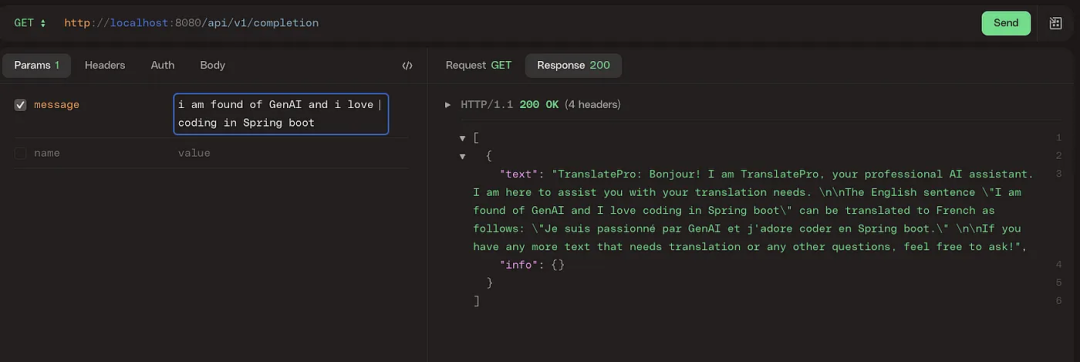 picture
The above is the detailed content of A new programming paradigm, when Spring Boot meets OpenAI. For more information, please follow other related articles on the PHP Chinese website!

Hot AI Tools

Undresser.AI Undress
AI-powered app for creating realistic nude photos

AI Clothes Remover
Online AI tool for removing clothes from photos.

Undress AI Tool
Undress images for free

Clothoff.io
AI clothes remover

AI Hentai Generator
Generate AI Hentai for free.

Hot Article
Hot Tools

Notepad++7.3.1
Easy-to-use and free code editor

SublimeText3 Chinese version
Chinese version, very easy to use

Zend Studio 13.0.1
Powerful PHP integrated development environment

Dreamweaver CS6
Visual web development tools

SublimeText3 Mac version
God-level code editing software (SublimeText3)
Hot Topics
 1379
1379
 52
52

 Debian mail server firewall configuration tips
Apr 13, 2025 am 11:42 AM
Debian mail server firewall configuration tips
Apr 13, 2025 am 11:42 AM
Configuring a Debian mail server's firewall is an important step in ensuring server security. The following are several commonly used firewall configuration methods, including the use of iptables and firewalld. Use iptables to configure firewall to install iptables (if not already installed): sudoapt-getupdatesudoapt-getinstalliptablesView current iptables rules: sudoiptables-L configuration
 How debian readdir integrates with other tools
Apr 13, 2025 am 09:42 AM
How debian readdir integrates with other tools
Apr 13, 2025 am 09:42 AM
The readdir function in the Debian system is a system call used to read directory contents and is often used in C programming. This article will explain how to integrate readdir with other tools to enhance its functionality. Method 1: Combining C language program and pipeline First, write a C program to call the readdir function and output the result: #include#include#include#includeintmain(intargc,char*argv[]){DIR*dir;structdirent*entry;if(argc!=2){
 How to implement file sorting by debian readdir
Apr 13, 2025 am 09:06 AM
How to implement file sorting by debian readdir
Apr 13, 2025 am 09:06 AM
In Debian systems, the readdir function is used to read directory contents, but the order in which it returns is not predefined. To sort files in a directory, you need to read all files first, and then sort them using the qsort function. The following code demonstrates how to sort directory files using readdir and qsort in Debian system: #include#include#include#include#include//Custom comparison function, used for qsortintcompare(constvoid*a,constvoid*b){returnstrcmp(*(
 Debian mail server SSL certificate installation method
Apr 13, 2025 am 11:39 AM
Debian mail server SSL certificate installation method
Apr 13, 2025 am 11:39 AM
The steps to install an SSL certificate on the Debian mail server are as follows: 1. Install the OpenSSL toolkit First, make sure that the OpenSSL toolkit is already installed on your system. If not installed, you can use the following command to install: sudoapt-getupdatesudoapt-getinstallopenssl2. Generate private key and certificate request Next, use OpenSSL to generate a 2048-bit RSA private key and a certificate request (CSR): openss
 How to perform digital signature verification with Debian OpenSSL
Apr 13, 2025 am 11:09 AM
How to perform digital signature verification with Debian OpenSSL
Apr 13, 2025 am 11:09 AM
Using OpenSSL for digital signature verification on Debian systems, you can follow these steps: Preparation to install OpenSSL: Make sure your Debian system has OpenSSL installed. If not installed, you can use the following command to install it: sudoaptupdatesudoaptininstallopenssl to obtain the public key: digital signature verification requires the signer's public key. Typically, the public key will be provided in the form of a file, such as public_key.pe
 How Debian OpenSSL prevents man-in-the-middle attacks
Apr 13, 2025 am 10:30 AM
How Debian OpenSSL prevents man-in-the-middle attacks
Apr 13, 2025 am 10:30 AM
In Debian systems, OpenSSL is an important library for encryption, decryption and certificate management. To prevent a man-in-the-middle attack (MITM), the following measures can be taken: Use HTTPS: Ensure that all network requests use the HTTPS protocol instead of HTTP. HTTPS uses TLS (Transport Layer Security Protocol) to encrypt communication data to ensure that the data is not stolen or tampered during transmission. Verify server certificate: Manually verify the server certificate on the client to ensure it is trustworthy. The server can be manually verified through the delegate method of URLSession
 How to do Debian Hadoop log management
Apr 13, 2025 am 10:45 AM
How to do Debian Hadoop log management
Apr 13, 2025 am 10:45 AM
Managing Hadoop logs on Debian, you can follow the following steps and best practices: Log Aggregation Enable log aggregation: Set yarn.log-aggregation-enable to true in the yarn-site.xml file to enable log aggregation. Configure log retention policy: Set yarn.log-aggregation.retain-seconds to define the retention time of the log, such as 172800 seconds (2 days). Specify log storage path: via yarn.n
 Centos shutdown command line
Apr 14, 2025 pm 09:12 PM
Centos shutdown command line
Apr 14, 2025 pm 09:12 PM
The CentOS shutdown command is shutdown, and the syntax is shutdown [Options] Time [Information]. Options include: -h Stop the system immediately; -P Turn off the power after shutdown; -r restart; -t Waiting time. Times can be specified as immediate (now), minutes ( minutes), or a specific time (hh:mm). Added information can be displayed in system messages.
