


Some friends are using EV screen recording to record desktop selections and find that the resolution is inappropriate. They want to adjust it, but they don’t know how to adjust the resolution of selections in EV recording. For this reason, the editor will give you a detailed introduction. Let’s take a look at how to adjust the selection resolution in EV screen recording. If you are interested, you can take a look.
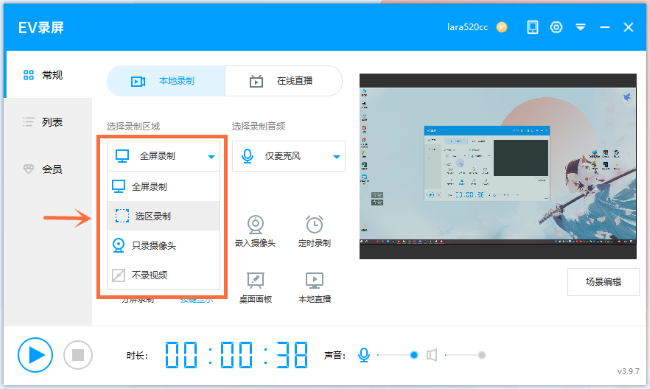
1. Double-click to open the software, find "Select Recording Area", click the drop-down button, and select "Selected Recording" in the option list.
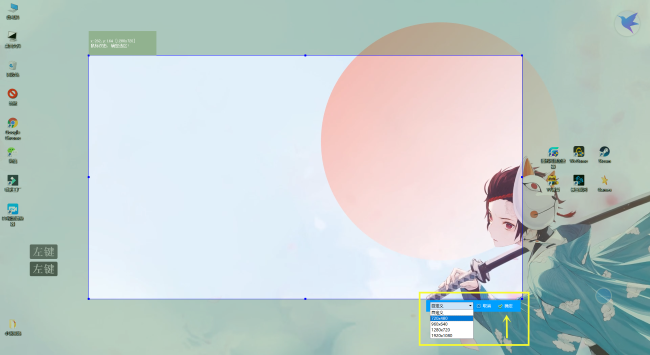
2. Then select the appropriate screen size in the interface, or manually customize the size of the option box, and click OK.
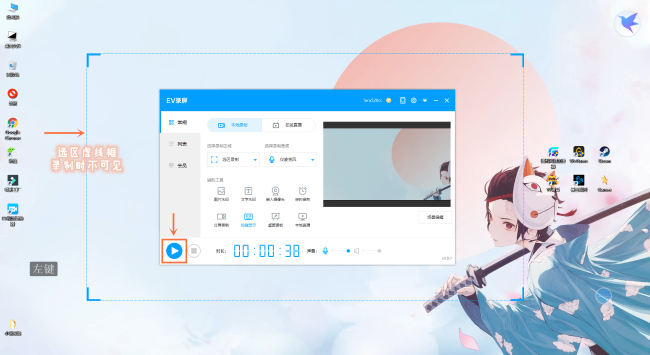
3. Finally, click the Start Recording button.
The above is the detailed content of How to adjust the resolution of EV screen recording selection?. For more information, please follow other related articles on the PHP Chinese website!
 length function usage
 Configure HOSTS file
 How to use btbook magnetic search
 Introduction to the usage of MySQL ELT function
 How to obtain the serial number of a physical hard disk under Windows
 What are the definitions of arrays?
 Usage of ppf function in Python
 The difference between xdata and data





















![[Web front-end] Node.js quick start](https://img.php.cn/upload/course/000/000/067/662b5d34ba7c0227.png)



