


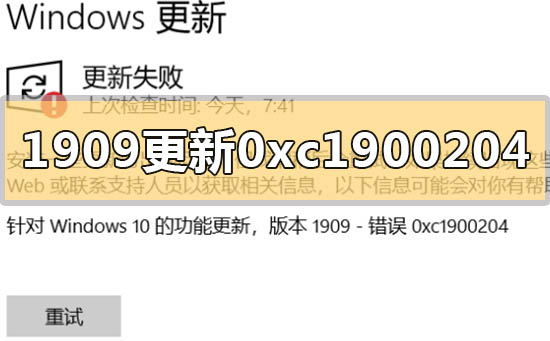
How to solve win10 version 1909 update error code 0xc1900204

If we install the win101909 version of the system when using the win10 operating system and want to upgrade, the editor thinks that the update error code 0xc1900204 appears during the upgrade process. It may be because we are updating. Sometimes there is a conflict in the system, which can be repaired in the services.msc service. Let’s take a look at what the editor said for details~ I hope it can help you.
How to solve win10 version 1909 update error code 0xc1900204
1. Turn off the Windows Update service. ——Search for "Services" in the search box or Cortana
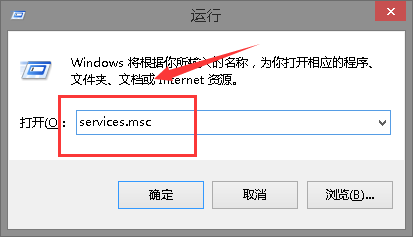
2. Or enter services.msc, press Enter, open the "Services" application, find "Windows Update", right-click and select "Stop".
3. Delete the update file. ——Delete all files under the path C:\Windows\SoftwareDistribution\DataStore
4. and C:\Windows\SoftwareDistribution\Download.
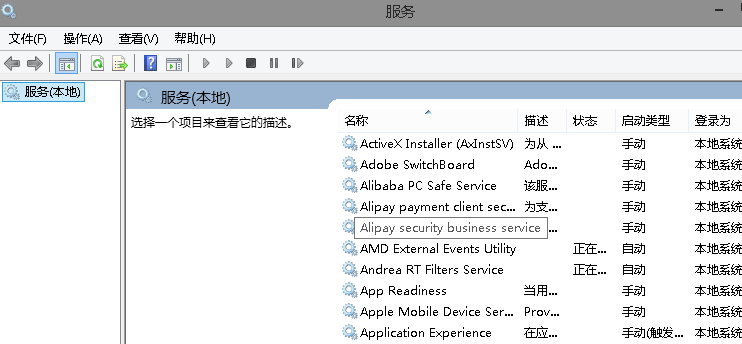
5. Restart the Windows Update service. ——Open the "Services" application, right-click "Windows Update" and select "Start"
6. Try checking and installing updates again.
The above is the detailed content of How to solve win10 version 1909 update error code 0xc1900204. For more information, please follow other related articles on the PHP Chinese website!

Hot AI Tools

Undress AI Tool
Undress images for free

Undresser.AI Undress
AI-powered app for creating realistic nude photos

AI Clothes Remover
Online AI tool for removing clothes from photos.

Clothoff.io
AI clothes remover

Video Face Swap
Swap faces in any video effortlessly with our completely free AI face swap tool!

Hot Article
Hot Tools

Notepad++7.3.1
Easy-to-use and free code editor

SublimeText3 Chinese version
Chinese version, very easy to use

Zend Studio 13.0.1
Powerful PHP integrated development environment

Dreamweaver CS6
Visual web development tools

SublimeText3 Mac version
God-level code editing software (SublimeText3)
Hot Topics


 Error code 22: How to fix graphics device driver Try updating graphics driver or clearing CMOS
May 19, 2023 pm 01:43 PM
Error code 22: How to fix graphics device driver Try updating graphics driver or clearing CMOS
May 19, 2023 pm 01:43 PM
What does graphics device error code 22 mean and what causes it? When you encounter error code 22, you will always see the error message This device is disabled. (Code 22). You can view more details about this graphics device driver error code 22 by going to the Device Status area in the device properties. We also discussed Error code 11 in Windows 43. You can also check out our guide on how to fix graphics device error code 31 on your PC. Device is actually disabled: The device in question may throw you this error code 22 and is actually disabled. There are driver issues: Incompatible or corrupted driver files can also cause multiple issues with the device program. Drivers are not the most
 How to Fix Steam Error Code 118
Feb 19, 2024 pm 05:56 PM
How to Fix Steam Error Code 118
Feb 19, 2024 pm 05:56 PM
Steam is a world-renowned gaming platform that allows users to purchase, download and play games. However, sometimes users may encounter some problems when using Steam, such as error code 118. In this article, we will explore this problem and how to solve it. First, let’s understand what error code 118 means. Error code 118 appears when you try to log into Steam, which means your computer cannot connect to the Steam servers. This may be due to network issues, firewall settings, proxy settings, or
 How to solve steam error code E20
Feb 19, 2024 pm 09:17 PM
How to solve steam error code E20
Feb 19, 2024 pm 09:17 PM
When using Steam to download, update or install games, you often encounter various error codes. Among them, a common error code is E20. This error code usually means that the Steam client is having trouble trying to update the game. Fortunately, though, it's not that difficult to fix this problem. First, we can try the following solutions to fix error code E20. 1. Restart the Steam client: Sometimes, directly restarting the Steam client can solve this problem. In the Steam window
 0x800700c1: How to fix this Windows Update error code
May 14, 2023 pm 05:31 PM
0x800700c1: How to fix this Windows Update error code
May 14, 2023 pm 05:31 PM
Microsoft releases new Windows updates and patches to help fix bugs and improve performance. However, our readers reported error 0x800700c1 during update installation. Therefore, this article will discuss how to fix the error on Windows 11. Also, you might be interested in our guide on Windows update error 0x8007045b and some of its fixes. What causes Windows update error 0x800700c1? Some noteworthy factors that can cause window update error 0x800700c1 on your PC are: Faulty Windows update components – The installation process requires certain services to run on your PC. If these services are not functioning properly
 How to Fix Error Code 1132 in Zoom on Windows PC
May 30, 2023 am 11:08 AM
How to Fix Error Code 1132 in Zoom on Windows PC
May 30, 2023 am 11:08 AM
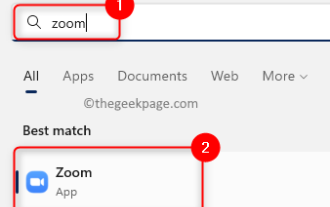
Zoom's video conferencing capabilities have made it popular among users while working from home. Many Zoom desktop client users have reported seeing error code 1132 along with an “Unknown error has occurred” message on their Windows PCs. Usually, this error code pops up when users try to log into their account and join any meeting in Zoom. In the error window, the user has the option to open a browser and join the meeting. However, some users reported that they were unable to open the meeting even on the browser. Windows firewall settings, outdated Zoom installation, or Zoom blacklisting your account could be some of the possible reasons for this error. Are you encountering an error code while using the Zoom app
 Detailed explanation of how to solve win11 error code 0x800f0950
Dec 26, 2023 pm 05:46 PM
Detailed explanation of how to solve win11 error code 0x800f0950
Dec 26, 2023 pm 05:46 PM
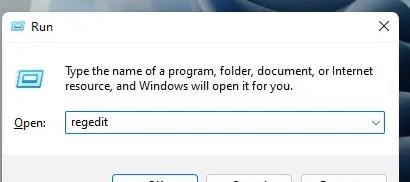
Since the win11 system is the English version, many users choose to add the Chinese language pack after successful installation. The error code 0x800f0950 can be prompted during installation. Here is the solution to the win11 error code 0x800f0950. Quickly Let’s see how it works. How to solve win11 error code 0x800f0950: 1. First press the shortcut key "Win+R" to open the run, and then enter: Regedit to open the registry. 2. Enter "ComputerHKEY_LOCAL_MACHINESOFTWAREPoliciesMicrosoftWindowsDefender" in the search box. 3. Select
![HRESULT 0x800A03EC Exception error occurred in Excel [Fixed]](https://img.php.cn/upload/article/000/887/227/170834257118628.jpg?x-oss-process=image/resize,m_fill,h_207,w_330) HRESULT 0x800A03EC Exception error occurred in Excel [Fixed]
Feb 19, 2024 pm 07:36 PM
HRESULT 0x800A03EC Exception error occurred in Excel [Fixed]
Feb 19, 2024 pm 07:36 PM
If you encounter error code 0x800A03EC in Microsoft Excel, here are some solutions. Usually this error code appears when trying to export an Excel file. Error is: System.Runtime.InteropServices.COMException(0x800A03EC): Exception from HRESULT: 0x800A03EC This problem may be caused by typos in the code, invalid methods, or incompatible data formats. Additionally, the file exceeding the limit of Excel or the file is corrupted may also cause this issue. Whatever the case, we will guide you on how to solve the problem. Would love to help you find answers
 0x800b0101 Error Code: 4 Fixes
May 12, 2023 pm 11:19 PM
0x800b0101 Error Code: 4 Fixes
May 12, 2023 pm 11:19 PM
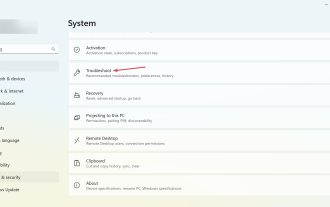
Updates are essential for your PC to run efficiently, whether it's Windows or installed applications. The latest computers offer faster performance and better protection against threats. But many users reported receiving 0x800b0101 update error. The error code affects the computer's ability to install Windows updates through Settings, using the MSU standalone installer, and when downloading apps from the Microsoft Store. So let's find out how to get up and running in these situations. What is installation failure 0x800b0101? You encounter this error when you try to install missing updates from a standalone installer downloaded from the Microsoft Update Catalog. Usually, when the operating system cannot be updated properly
