


Five IntelliJ IDEA plug-ins to write code efficiently

Artificial Intelligence AI is currently a widely recognized future trend and development direction. Although some people worry that AI may replace all jobs, in fact it will only replace those jobs that are highly repetitive and low-output. Therefore, we should learn to work smarter rather than harder.
This article introduces 5 AI-driven Intellij plug-ins. These plug-ins can help you improve productivity, reduce tedious repetitive work, and make your work more efficient and convenient.
1 Github Copilot
Github Copilot, an AI code assistance tool developed by OpenAI and GitHub. Predict and generate new code by analyzing code context using OpenAI’s GPT model. The goal of this tool is to improve developers' coding efficiency, reduce repetitive and tedious work, and increase productivity and developer coding satisfaction.
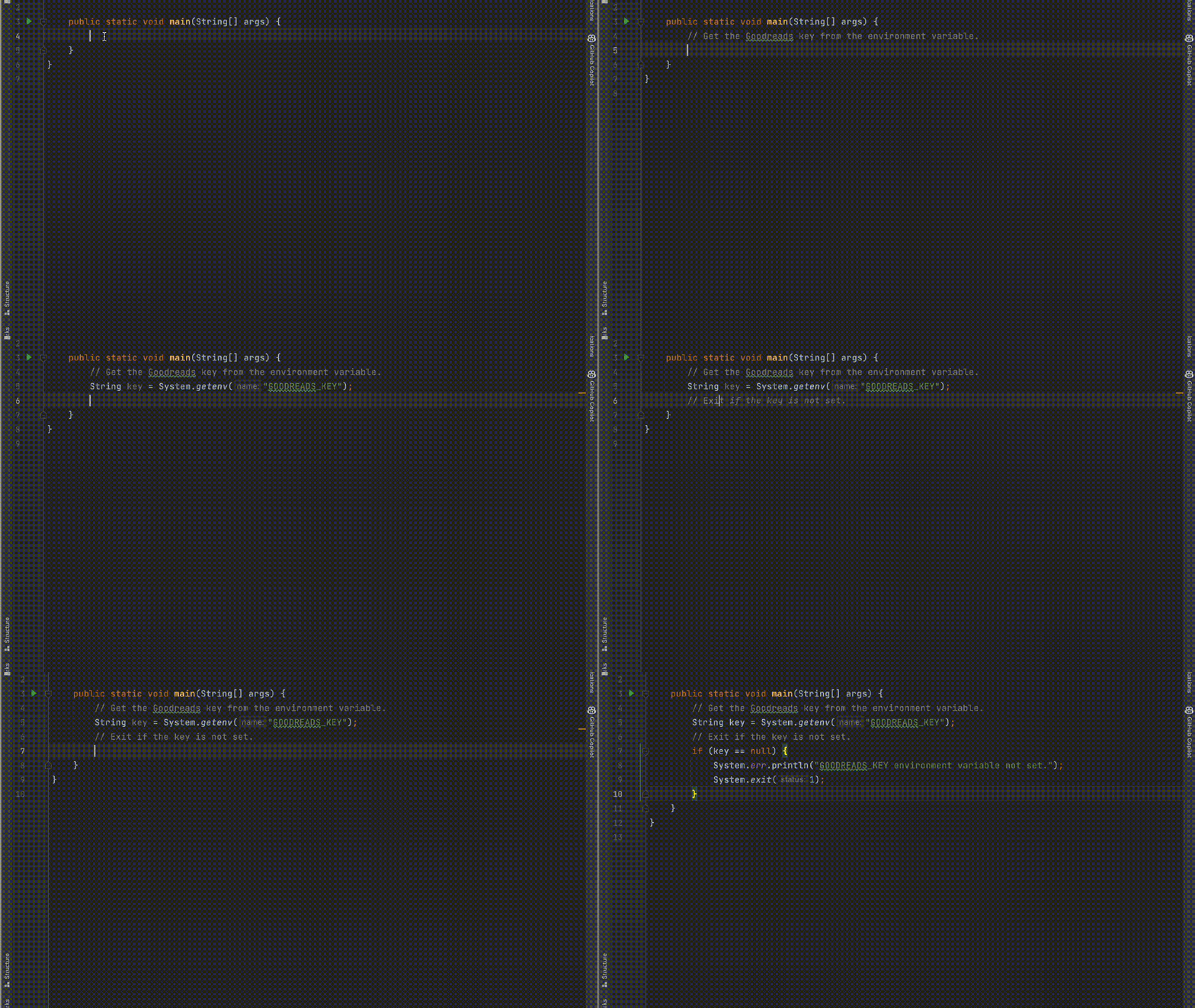
#Github Copilot has the function of generating multi-language code snippets, functions, classes and even entire programs. It autocompletes code in the code editor and provides suggestions for code snippets. With Github Copilot, developers can generate comments and documentation to better understand the code.
According to internal information, millions of developers are already using Github Copilot. This tool revolutionizes software development methods, brings more opportunities and potential to developers, and promotes the progress and innovation of human society.
Powered by OpenAI
This tool is powered by OpenAI Codex, works in real time, and can be run directly in your editor.
Unlike other code assistants, Github Copilot provides recommendations based on models built by OpenAI from billions of lines of open source code, so it has higher intelligence and more accurate code generation. ability. Whether it is code snippets, functions, classes, or even entire programs, Github Copilot can provide developers with accurate and efficient suggestions, greatly improving coding efficiency.
2 SonarLint
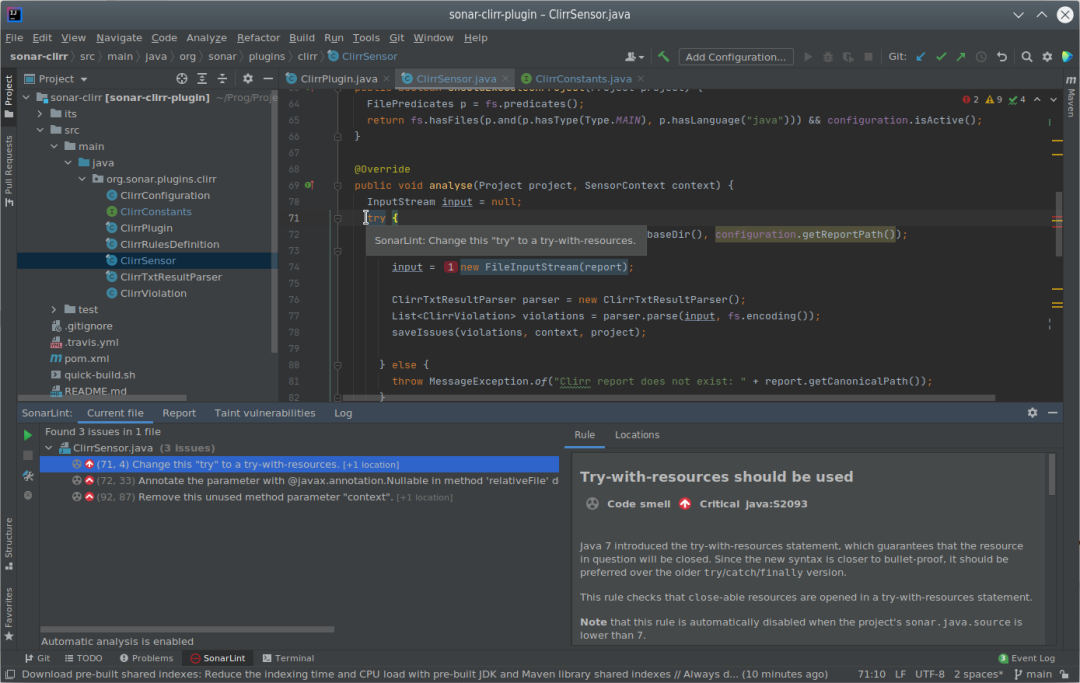
SonarLint is an AI-powered code quality plug-in that detects and fixes errors in code at the early stages of code writing through static code analysis technology issues to improve code quality and security. SonarLint can be integrated with various IDEs and editors and supports multiple programming languages, such as Java, JavaScript, C#, Python, etc., making it very suitable for developers to use in various environments.
SonarLint works by analyzing your code in real time to detect common problems such as vulnerabilities, code smells, security risks, duplications, etc., and provides explanations and examples for each problem to help developers better understand Understand why this issue is important and how to avoid this situation in the future.
SonarLint can be configured and expanded according to the needs of the team, and is highly customizable and scalable. In addition, SonarLint can also be integrated with code quality management tools such as SonarQube to facilitate the team's more comprehensive management and monitoring of code quality.
SonarLint is free to use.
3 Tabnine AI Code Completion
Tabnine is an application designed to help programmers complete code writing more efficiently and quickly. Artificial Intelligence Coding Assistant. It increases your development speed with real-time code execution capabilities and support for all common programming languages and IDEs.
You can call Tabnine AI Code Completion using many different terms, such as IntelliSense, intelliCode, auto-complete, AI-assisted code completion, AI-driven code completion, AI co-pilot, AI code snippet, code suggestion , code prediction, code hints, or content assistance. These terms describe the coding assistance features provided by Tabnine AI Code Completion, which can help programmers complete code writing more efficiently and quickly.
With its adaptive learning capabilities, Tabnine can provide precise code suggestions based on your programming style and context. In addition, it automatically adapts learning based on your code base to provide more accurate recommendations.
Tabnine has a 14-day free trial.
4 Code with Me
Code with Me is a collaborative development tool based on JetBrains IDE, which allows multiple developers to edit and debug together at the same time Code to improve team collaboration efficiency. Using Code with Me, you can share your IDE sessions with other developers, allowing them to directly participate in your code writing, testing and debugging process, thereby speeding up project development.
Main functions include:
- Edit simultaneously: discuss issues, review code, and work together in real time.
- Follow Mode: Team members can summon others from anywhere, track where other participants are in the code, and track their activities with one click.
- Full Sync Mode: Helps you synchronize with session participants and start navigating between files and actions simultaneously.
- Audio and Video Calls: Use it out of the box, no need for additional apps to communicate with others.
- Smart Code Insights: Includes code auto-completion, navigation and other code insights features while working in a shared session.
- Permission management settings: Define what others can edit and run in your project, what content can only be viewed as read-only, and what content is completely invisible to your visitors.
- Diff Preview: Lets you track changes made by other session participants in your project, review them, safely roll back and commit them.
- Code With Me On-premises (on-premises version) allows you to set up and run Code With Me on your own private network to ensure higher security or comply with compliance requirements.
Code with Me supports multiple programming languages and JetBrains IDE, including Java, Kotlin, Python, PHP, Ruby, WebStorm, PyCharm, IntelliJ IDEA, etc. It provides real-time voice and chat functions to facilitate communication and discussion between developers. In addition, Code with Me also has a variety of security features to ensure the security and privacy of your code.
Code with Me is a free tool that allows you to easily collaborate with other developers.
5 AI Coding Assistant
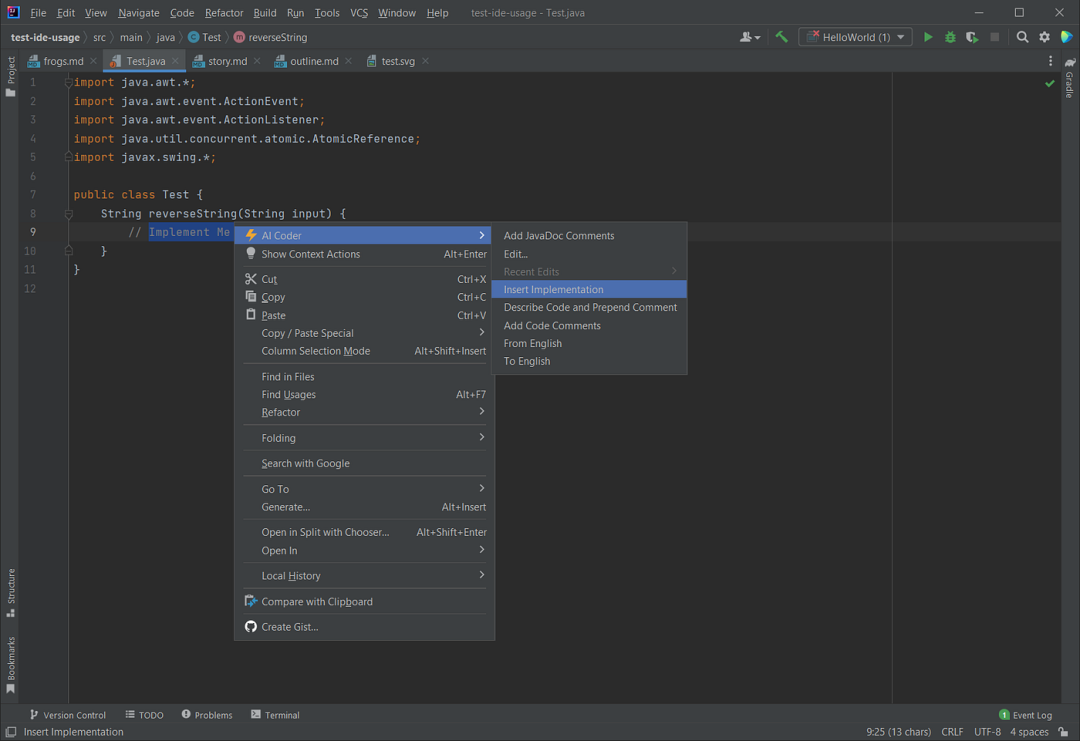
AI Coding Assistant is a compelling tool that leverages OpenAI’s superior capabilities to make the coding process more efficient and streamlined. It is compatible with popular autocomplete-based AI plugins (such as GitHub Copilot and AWS CodeWhisperer) and can be conveniently invoked through the context menu. To use the AI Coding Assistant, you need to have an OpenAI access token. This token gives you access to a variety of features, including:
- Text: You can append, insert, replace, edit, or dictate text using natural language or ad hoc commands.
- Code: You can generate, refactor, optimize, interpret, or document code using natural language or ad hoc instructions.
- Markdown: You can create or edit Markdown files using natural language or ad-hoc instructions.
 Picture
Finally, I hope readers can gain some new knowledge about IntelliJ IDEA’s AI-driven plug-ins from this article. Using these plug-ins can speed up and improve the efficiency of coding, and help you write smarter and easier by providing functions such as smart tips, transformations and insights. Not only do these tools improve code quality, readability, and performance, they also make your coding efforts more efficient and accurate.
The above is the detailed content of Five IntelliJ IDEA plug-ins to write code efficiently. For more information, please follow other related articles on the PHP Chinese website!

Hot AI Tools

Undresser.AI Undress
AI-powered app for creating realistic nude photos

AI Clothes Remover
Online AI tool for removing clothes from photos.

Undress AI Tool
Undress images for free

Clothoff.io
AI clothes remover

AI Hentai Generator
Generate AI Hentai for free.

Hot Article
Hot Tools

Notepad++7.3.1
Easy-to-use and free code editor

SublimeText3 Chinese version
Chinese version, very easy to use

Zend Studio 13.0.1
Powerful PHP integrated development environment

Dreamweaver CS6
Visual web development tools

SublimeText3 Mac version
God-level code editing software (SublimeText3)
Hot Topics
 1379
1379
 52
52

 Debian mail server firewall configuration tips
Apr 13, 2025 am 11:42 AM
Debian mail server firewall configuration tips
Apr 13, 2025 am 11:42 AM
Configuring a Debian mail server's firewall is an important step in ensuring server security. The following are several commonly used firewall configuration methods, including the use of iptables and firewalld. Use iptables to configure firewall to install iptables (if not already installed): sudoapt-getupdatesudoapt-getinstalliptablesView current iptables rules: sudoiptables-L configuration
 How debian readdir integrates with other tools
Apr 13, 2025 am 09:42 AM
How debian readdir integrates with other tools
Apr 13, 2025 am 09:42 AM
The readdir function in the Debian system is a system call used to read directory contents and is often used in C programming. This article will explain how to integrate readdir with other tools to enhance its functionality. Method 1: Combining C language program and pipeline First, write a C program to call the readdir function and output the result: #include#include#include#includeintmain(intargc,char*argv[]){DIR*dir;structdirent*entry;if(argc!=2){
 How to implement file sorting by debian readdir
Apr 13, 2025 am 09:06 AM
How to implement file sorting by debian readdir
Apr 13, 2025 am 09:06 AM
In Debian systems, the readdir function is used to read directory contents, but the order in which it returns is not predefined. To sort files in a directory, you need to read all files first, and then sort them using the qsort function. The following code demonstrates how to sort directory files using readdir and qsort in Debian system: #include#include#include#include#include//Custom comparison function, used for qsortintcompare(constvoid*a,constvoid*b){returnstrcmp(*(
 Debian mail server SSL certificate installation method
Apr 13, 2025 am 11:39 AM
Debian mail server SSL certificate installation method
Apr 13, 2025 am 11:39 AM
The steps to install an SSL certificate on the Debian mail server are as follows: 1. Install the OpenSSL toolkit First, make sure that the OpenSSL toolkit is already installed on your system. If not installed, you can use the following command to install: sudoapt-getupdatesudoapt-getinstallopenssl2. Generate private key and certificate request Next, use OpenSSL to generate a 2048-bit RSA private key and a certificate request (CSR): openss
 How to perform digital signature verification with Debian OpenSSL
Apr 13, 2025 am 11:09 AM
How to perform digital signature verification with Debian OpenSSL
Apr 13, 2025 am 11:09 AM
Using OpenSSL for digital signature verification on Debian systems, you can follow these steps: Preparation to install OpenSSL: Make sure your Debian system has OpenSSL installed. If not installed, you can use the following command to install it: sudoaptupdatesudoaptininstallopenssl to obtain the public key: digital signature verification requires the signer's public key. Typically, the public key will be provided in the form of a file, such as public_key.pe
 How Debian OpenSSL prevents man-in-the-middle attacks
Apr 13, 2025 am 10:30 AM
How Debian OpenSSL prevents man-in-the-middle attacks
Apr 13, 2025 am 10:30 AM
In Debian systems, OpenSSL is an important library for encryption, decryption and certificate management. To prevent a man-in-the-middle attack (MITM), the following measures can be taken: Use HTTPS: Ensure that all network requests use the HTTPS protocol instead of HTTP. HTTPS uses TLS (Transport Layer Security Protocol) to encrypt communication data to ensure that the data is not stolen or tampered during transmission. Verify server certificate: Manually verify the server certificate on the client to ensure it is trustworthy. The server can be manually verified through the delegate method of URLSession
 How to do Debian Hadoop log management
Apr 13, 2025 am 10:45 AM
How to do Debian Hadoop log management
Apr 13, 2025 am 10:45 AM
Managing Hadoop logs on Debian, you can follow the following steps and best practices: Log Aggregation Enable log aggregation: Set yarn.log-aggregation-enable to true in the yarn-site.xml file to enable log aggregation. Configure log retention policy: Set yarn.log-aggregation.retain-seconds to define the retention time of the log, such as 172800 seconds (2 days). Specify log storage path: via yarn.n
 Centos shutdown command line
Apr 14, 2025 pm 09:12 PM
Centos shutdown command line
Apr 14, 2025 pm 09:12 PM
The CentOS shutdown command is shutdown, and the syntax is shutdown [Options] Time [Information]. Options include: -h Stop the system immediately; -P Turn off the power after shutdown; -r restart; -t Waiting time. Times can be specified as immediate (now), minutes ( minutes), or a specific time (hh:mm). Added information can be displayed in system messages.
