


How to install mysql default configuration file location in Linux


The solution is as follows:
1. Check the installation location of mysql through which mysqld command

2 .View the default path of the configuration file used by mysql through the /usr/local/mysql/bin/mysqld –verbose –help |grep -A 1 ‘Default options’ command. (Note that the red mark is the command passed in step 1. Obtained mysql installation directory path)

As shown in the above figure, we can see that the order and location of mysql reading configuration file paths, first check /etc/mysql /Does the my.cnf configuration file exist below? If not, we can get a configuration file under /etc. So where does the configuration file come from?
4. Get the my.cnf configuration file

As shown in the picture above, we first switch to the support-files directory of the mysql installation directory and view the following file information through the ll command
Through cp -r /usr /local/mysql/support-files/my-default.cnf /etc/ Copy the configuration file to /etc
Switch to the /etc directory and copy the file through mv my-default.cnf my.cnf Change the name
5. Edit my.cnf, specify the mysql installation path and the mysql data file storage path. The following figure also configures bin-log. When configuring bin-log, you need to specify server_id
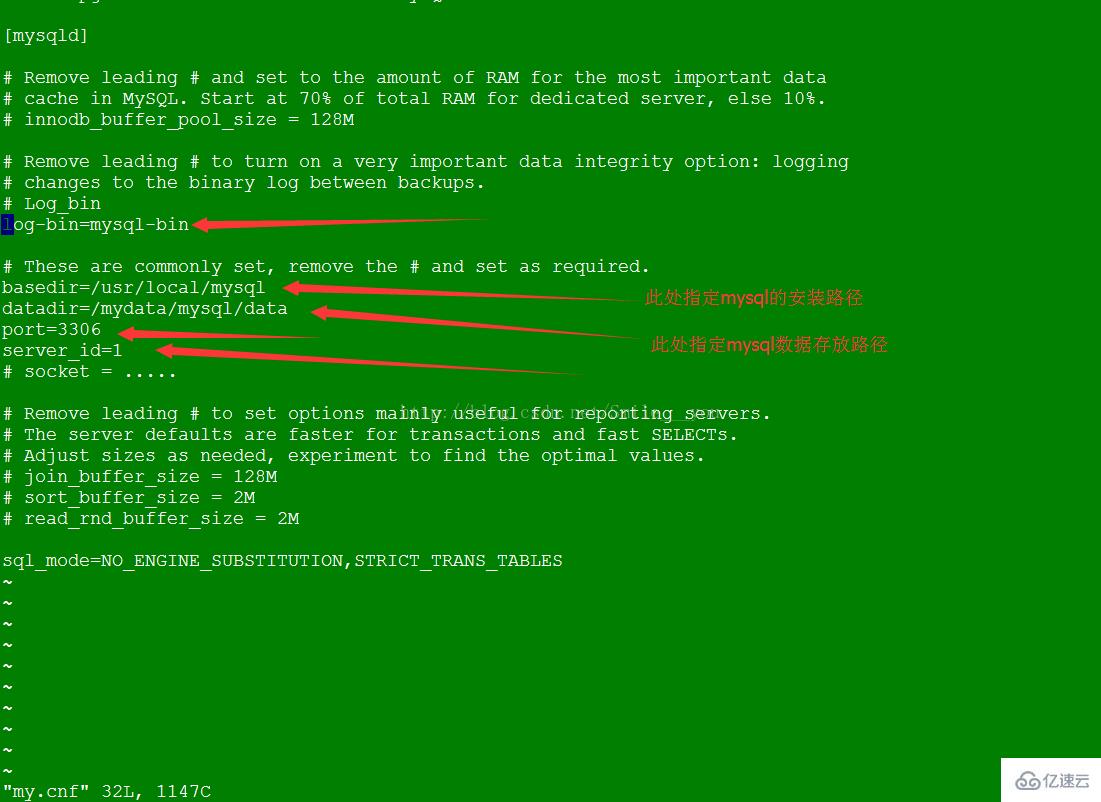
6. At this point, our mysql configuration file has been sorted out. You can open bin-log and restart mysql to check whether the configuration takes effect. If it takes effect, the above configuration is successful. If it cannot be started after modifying my.cnf, you can check the error message as follows

The above is the detailed content of How to install mysql default configuration file location in Linux. For more information, please follow other related articles on the PHP Chinese website!

Hot AI Tools

Undress AI Tool
Undress images for free

Undresser.AI Undress
AI-powered app for creating realistic nude photos

AI Clothes Remover
Online AI tool for removing clothes from photos.

Clothoff.io
AI clothes remover

Video Face Swap
Swap faces in any video effortlessly with our completely free AI face swap tool!

Hot Article
Hot Tools

Notepad++7.3.1
Easy-to-use and free code editor

SublimeText3 Chinese version
Chinese version, very easy to use

Zend Studio 13.0.1
Powerful PHP integrated development environment

Dreamweaver CS6
Visual web development tools

SublimeText3 Mac version
God-level code editing software (SublimeText3)


 How to change the GROUP_CONCAT separator in MySQL
Aug 22, 2025 am 10:58 AM
How to change the GROUP_CONCAT separator in MySQL
Aug 22, 2025 am 10:58 AM
You can customize the separator by using the SEPARATOR keyword in the GROUP_CONCAT() function; 1. Use SEPARATOR to specify a custom separator, such as SEPARATOR'; 'The separator can be changed to a semicolon and plus space; 2. Common examples include using the pipe character '|', space'', line break character '\n' or custom string '->' as the separator; 3. Note that the separator must be a string literal or expression, and the result length is limited by the group_concat_max_len variable, which can be adjusted by SETSESSIONgroup_concat_max_len=10000; 4. SEPARATOR is optional
 How to clean up your Linux system
Aug 22, 2025 am 07:42 AM
How to clean up your Linux system
Aug 22, 2025 am 07:42 AM
Removeunusedpackagesanddependencieswithsudoaptautoremove,cleanpackagecacheusingsudoaptcleanorautoclean,andremoveoldkernelsviasudoaptautoremove--purge.2.Clearsystemlogswithsudojournalctl--vacuum-time=7d,deletearchivedlogsin/var/log,andempty/tmpand/var
 How to use IFNULL() in MySQL?
Aug 22, 2025 pm 02:00 PM
How to use IFNULL() in MySQL?
Aug 22, 2025 pm 02:00 PM
IFNULL()inMySQLreturnsthefirstexpressionifitisnotNULL,otherwisereturnsthesecondexpression,makingitidealforreplacingNULLvalueswithdefaults;forexample,IFNULL(middle_name,'N/A')displays'N/A'whenmiddle_nameisNULL,IFNULL(discount,0)ensurescalculationslike
 How to use the LIKE operator in MySQL
Aug 22, 2025 am 12:23 AM
How to use the LIKE operator in MySQL
Aug 22, 2025 am 12:23 AM
TheLIKEoperatorinMySQLisusedtosearchforpatternsintextdatausingwildcards;1.Use%tomatchanysequenceofcharactersandtomatchasinglecharacter;2.Forexample,'John%'findsnamesstartingwithJohn,'%son'findsnamesendingwithson,'%ar%'findsnamescontainingar,'\_\_\_\_
 An In-Depth Guide to Systemd for modern Linux Systems
Aug 23, 2025 pm 12:02 PM
An In-Depth Guide to Systemd for modern Linux Systems
Aug 23, 2025 pm 12:02 PM
Systemdisthefirstprocess(PID1)inmodernLinuxsystems,replacingolderinitsystemslikeSysVinitandUpstart,responsibleforbooting,managingservices,devices,logs,andusersessionsthroughasuiteofintegratedtools.2.Itusesunitfiles(.service,.timer,.socket,etc.)todefi
 How to get the table size in MySQL?
Aug 21, 2025 am 10:02 AM
How to get the table size in MySQL?
Aug 21, 2025 am 10:02 AM
To check the size of the MySQL table, you can get it by querying information_schema.tables; the specific method is to use a SELECT statement to combine the data_length and index_length fields and convert it into MB units. You can view the data and index sizes for a single table, all tables, or separately. This method is suitable for most cases, but the values are approximate. There may be differences for InnoDB tables. The most common and standard way is to query the tables table in the information_schema database to get the results.
 How to enable or disable the event scheduler in MySQL
Aug 22, 2025 am 09:59 AM
How to enable or disable the event scheduler in MySQL
Aug 22, 2025 am 09:59 AM
Tochecktheeventschedulerstatus,useSHOWVARIABLESLIKE'event_scheduler';.2.Toenableordisabletemporarily,useSETGLOBALevent_scheduler=ONorOFF,whichremainseffectiveuntilthenextrestart.3.Toenableordisablepermanently,addevent_scheduler=ONorOFFunder[mysqld]in
 How to handle deadlocks in MySQL?
Aug 22, 2025 am 04:25 AM
How to handle deadlocks in MySQL?
Aug 22, 2025 am 04:25 AM
DeadlocksinMySQLoccurwhentransactionsblockeachotherbyholdingneededlocks,butcanbemanagedeffectivelythroughprevention,handling,andmonitoring.1.Minimizedeadlocksbyaccessingrowsinaconsistentorder,keepingtransactionssmallandfast,usinglowerisolationlevelsl
