


How to solve nginx cannot start php

Solution to nginx being unable to start php: 1. Find the nginx configuration file; 2. Add the content "fastcgi_param SCRIPT_FILENAME $document_root$fastcgi_script_name;"; 3. Restart nginx.
nginx installation is complete and cannot parse php solution
After nginx is installed, it is found that php code cannot be parsed. The current solution is as follows
Method 1
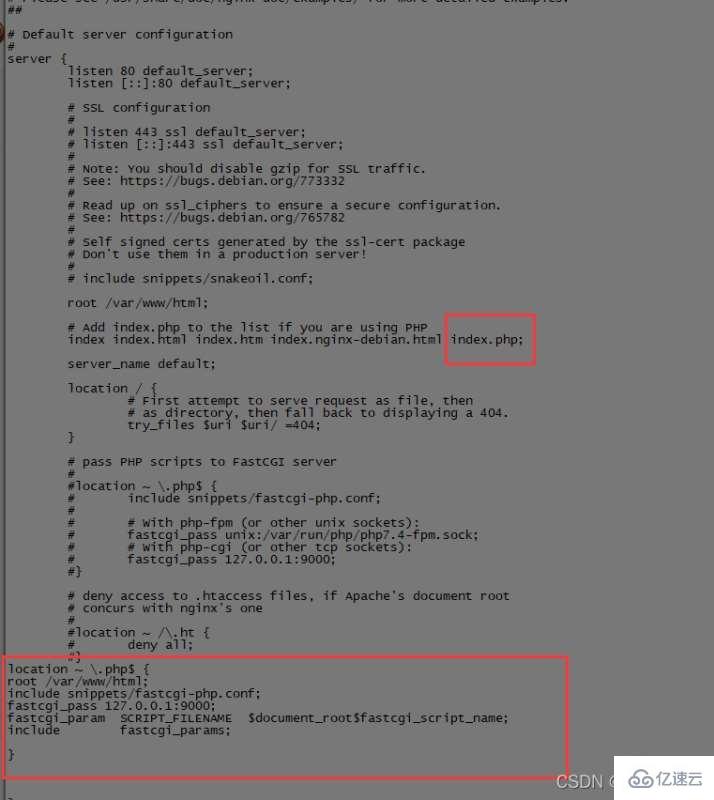
Find the nginx configuration file, add the configuration as shown below (shown in the screenshot), the location of my configuration file is /etc/nginx/sites-available/default
location ~ \.php$ {
root /var/www/html;
include snippets/fastcgi-php.conf;
fastcgi_pass 127.0.0.1:9000;
fastcgi_param  SCRIPT_FILENAME  $document_root$fastcgi_script_name;
include        fastcgi_params;
}
After modifying the nginx configuration file, restart nginx to take effect
/etc/init.d/nginx restart
Method 2
nginx php fpm implementation
Install php7.4-fpm
sudo apt-get install php7.4-fpm
Check whether php-fpm is turned on
ps -ef|grep php

Find php7.4-fpm.sock
Go back to the root directory and execute find ./ -name php7.4-fpm.sock
Find php7.4-fpm.sock The location, as shown in the following directory, is the location of php7.4-fpm.sock. We copy the location of php7.4-fpm.sock and modify the nginx configuration file.
/run/php/php7.4-fpm.sock
Configure the following screenshot unix:php7.4-fpm.sock path location
fastcgi_pass unix:/run/php/php7.4-fpm.sock;
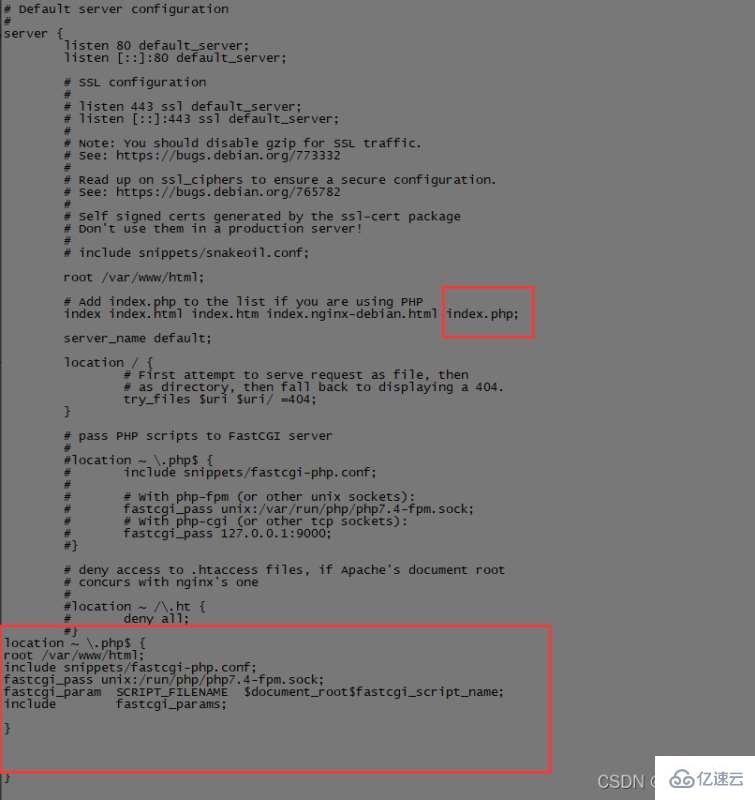
After modifying the nginx configuration file, restart nginx to take effect
/etc/init.d/nginx restart
Restart or start php7.4-fpm as follows
/etc/init.d/php7.4-fpm restart
/etc/init.d/php7.4-fpm start
The above is the detailed content of How to solve nginx cannot start php. For more information, please follow other related articles on the PHP Chinese website!

Hot AI Tools

Undress AI Tool
Undress images for free

Undresser.AI Undress
AI-powered app for creating realistic nude photos

AI Clothes Remover
Online AI tool for removing clothes from photos.

Clothoff.io
AI clothes remover

Video Face Swap
Swap faces in any video effortlessly with our completely free AI face swap tool!

Hot Article
Hot Tools

Notepad++7.3.1
Easy-to-use and free code editor

SublimeText3 Chinese version
Chinese version, very easy to use

Zend Studio 13.0.1
Powerful PHP integrated development environment

Dreamweaver CS6
Visual web development tools

SublimeText3 Mac version
God-level code editing software (SublimeText3)


 How to read a CSV file in PHP?
Aug 29, 2025 am 08:06 AM
How to read a CSV file in PHP?
Aug 29, 2025 am 08:06 AM
ToreadaCSVfileinPHP,usefopen()toopenthefile,fgetcsv()inalooptoreadeachrowasanarray,andfclose()tocloseit;handleheaderswithaseparatefgetcsv()callandspecifydelimitersasneeded,ensuringproperfilepathsandUTF-8encodingforspecialcharacters.
 How to use AJAX with php
Aug 29, 2025 am 08:58 AM
How to use AJAX with php
Aug 29, 2025 am 08:58 AM
AJAXwithPHPenablesdynamicwebappsbysendingasynchronousrequestswithoutpagereloads.1.CreateHTMLwithJavaScriptusingfetch()tosenddata.2.BuildaPHPscripttoprocessPOSTdataandreturnresponses.3.UseJSONforcomplexdatahandling.4.Alwayssanitizeinputsanddebugviabro
 What is the difference between isset and empty in php
Aug 27, 2025 am 08:38 AM
What is the difference between isset and empty in php
Aug 27, 2025 am 08:38 AM
isset()checksifavariableexistsandisnotnull,returningtrueevenforzero,false,oremptystringvalues;2.empty()checksifavariableisnull,false,0,"0","",orundefined,returningtrueforthese"falsy"values;3.isset()returnsfalsefornon-exi
 Edit bookmarks in chrome
Aug 27, 2025 am 12:03 AM
Edit bookmarks in chrome
Aug 27, 2025 am 12:03 AM
Chrome bookmark editing is simple and practical. Users can enter the bookmark manager through the shortcut keys Ctrl Shift O (Windows) or Cmd Shift O (Mac), or enter through the browser menu; 1. When editing a single bookmark, right-click to select "Edit", modify the title or URL and click "Finish" to save; 2. When organizing bookmarks in batches, you can hold Ctrl (or Cmd) to multiple-choice bookmarks in the bookmark manager, right-click to select "Move to" or "Copy to" the target folder; 3. When exporting and importing bookmarks, click the "Solve" button to select "Export Bookmark" to save as HTML file, and then restore it through the "Import Bookmark" function if necessary.
 How to configure SMTP for sending mail in php
Aug 27, 2025 am 08:08 AM
How to configure SMTP for sending mail in php
Aug 27, 2025 am 08:08 AM
Answer: Using the PHPMailer library to configure the SMTP server can enable sending mails through SMTP in PHP applications. PHPMailer needs to be installed, set up SMTP host, port, encryption method and authentication credentials of Gmail, write code to set sender, recipient, topic and content, enable 2FA and use application password to ensure that the server allows SMTP connection, and finally call the send method to send email.
 How to get the current date and time in PHP?
Aug 31, 2025 am 01:36 AM
How to get the current date and time in PHP?
Aug 31, 2025 am 01:36 AM
Usedate('Y-m-dH:i:s')withdate_default_timezone_set()togetcurrentdateandtimeinPHP,ensuringaccurateresultsbysettingthedesiredtimezonelike'America/New_York'beforecallingdate().
 How to create an object in php
Aug 27, 2025 am 08:45 AM
How to create an object in php
Aug 27, 2025 am 08:45 AM
To create a PHP object, you need to define the class first, and then instantiate it with the new keyword. For example, after defining the Car class and setting properties and constructing methods, create an object through $myCar=newCar("red","Toyota"), and then use -> to access its properties and methods, such as $myCar->color and $myCar->showInfo(). Each object has independent data and can create multiple instances.
 What are the benefits of using Nginx as an API gateway?
Aug 31, 2025 am 09:17 AM
What are the benefits of using Nginx as an API gateway?
Aug 31, 2025 am 09:17 AM
As an API gateway, Nginx has the advantages of high performance, low latency, load balancing, and security control. 1. Adopt an event-driven architecture, supports high concurrency and low resource consumption, and improves API response speed; 2. Supports multiple load balancing strategies and health checks to ensure high availability of services; 3. Can route and rewrite URLs based on rules such as paths and domain names to facilitate API version management; 4. Provide security mechanisms such as current limiting, IP control, JWT verification and SSL termination to prevent malicious requests; 5. Support response caching, reduces back-end pressure, and improves read-intensive API performance; 6. Customizes log formats to facilitate integration with monitoring systems such as ELK and Grafana; 7. Supports HTTP/2, HTTP/3 and WebSocket.
