


Because we are using Vite Ts to develop the Vue3 component library, we need to install typescript and vue3. At the same time, the project will use Less to manage the component library style
pnpm add vue@next typescript less -D -w
Use pnpm if you want to install it at the project root directory, you need to add-w
Executenpx tsc --initin the root directory, and then ts will be automatically generated The configuration filetsconfig.json, and then we will make a replacement
{ "compilerOptions": { "baseUrl": ".", "jsx": "preserve", "strict": true, "target": "ES2015", "module": "ESNext", "skipLibCheck": true, "esModuleInterop": true, "moduleResolution": "Node", "lib": ["esnext", "dom"] } }
tsconfig.jsonWe will make such a configuration for the time being, and there may be certain adjustments in the future.
Because what we want to develop is a Vue3 component library, we definitely need a Vue3 project to test our component library, so here we will build a vue3 project based on Vite Vue3 project to debug components. Therefore, we create a new folder called play in the root directory and initializepnpm init. Subsequent component debugging will be carried out under this project. Next we will start building a Vue3 Vite project
We need to installviteandvitejs/plugin-vueplug-ins,@vitejs/plugin-vueThe plug-in is for parsing files with the suffix.vue. Execute
pnpm add vite @vitejs/plugin-vue -D
Newvite.config.tsConfiguration file
import { defineConfig } from "vite"; import vue from "@vitejs/plugin-vue"; export default defineConfig({ plugins: [vue()], });
##@vitejs/plugin-vuewill load the index.html under play by default
play
scripttag Need to addtype="module"
app.vuefile
启动测试
main.ts
import { createApp } from "vue"; import App from "./app.vue"; const app = createApp(App); app.mount("#app");
package.jsonConfigurationscriptsScript
{ "name": "play", "version": "1.0.0", "description": "", "main": "index.js", "scripts": { "dev": "vite" }, "keywords": [], "author": "", "license": "ISC", "devDependencies": { "@vitejs/plugin-vue": "^4.0.0", "vite": "^4.1.1" } }
pnpm-workspace.yamlfile
packages: - "packages/**" - "play"
pnpm run dev, we can start our play project
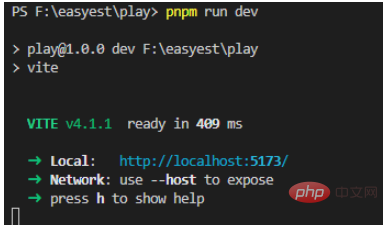 ##But there is a problem that ts cannot recognize the
file, so the compiler will report red
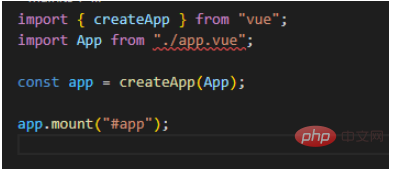 At this time we need to create a new declaration file
to let ts know the file*.vue
declare module '*.vue' { import type { DefineComponent } from "vue"; const component: DefineComponent<{}, {}, any> }Copy after login
The error message disappears at this time.The above is the detailed content of How to configure the environment of Vue3 component library. For more information, please follow other related articles on the PHP Chinese website!
Related labels:
source:yisu.com
Previous article:How to use mockjs to randomly simulate data in Vue3+Vite project
Next article:How to use hooks in Vue3 projects
Statement of this Website
The content of this article is voluntarily contributed by netizens, and the copyright belongs to the original author. This site does not assume corresponding legal responsibility. If you find any content suspected of plagiarism or infringement, please contact admin@php.cn
Latest Articles by Author
-
2024-08-19 20:35:03
-
2024-08-19 20:32:08
-
2024-08-19 20:32:03
-
2024-08-19 20:31:50
-
2024-08-19 20:31:39
-
2024-08-19 20:31:30
-
2024-08-19 20:31:15
-
2024-08-19 20:01:50
-
2024-08-19 20:01:14
-
2024-08-19 19:42:40
Latest Issues













