


How to encapsulate input components and unified form data in vue3

Preparation
Use vue create example to create the project. The parameters are roughly as follows:
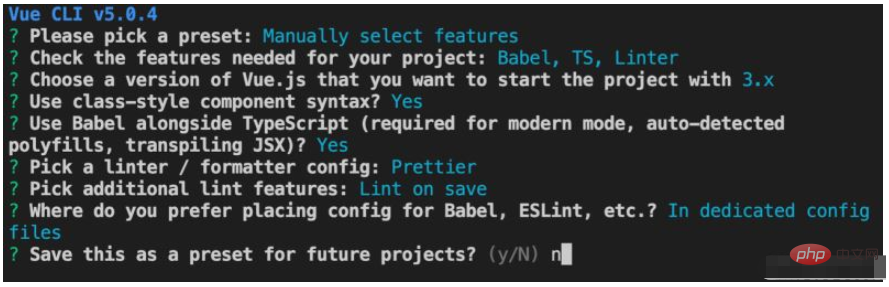
Use native input
Native input is mainly value and change. Data needs to be synchronized when changing.
App.tsx is as follows:
import { ref } from 'vue';

export default {
  setup() {
    // username就是数据
    const username = ref('张三');
    // 输入框变化的时候,同步数据
    const onInput = ;
    return () => (
      <div>
        <input type="text"
            value={username.value}
            onInput={(e: any) => { username.value = e.target.value; }} />
        <div>input的值:{username.value}</div>
      </div>
    );
  },
};
Encapsulating Input
The benefits of encapsulating input are that it can pass values directly, reduce logic, and no additional e.target# is needed. ##, prepare for subsequent encapsulation.
// Input.tsx
import { defineComponent, ref } from 'vue';

// defineComponent定义组件,有props
const Input = defineComponent({
  props: {
    value: {
      required: true,
      type: String,
    },
    onChange: {
      required: true,
      type: Function,
    },
  },
  // 渲染用到props,需要在这里传参
  setup(props) {
    // 值变化 的时候  调用传过来的onChange从而同步父组件的 数据
    const onInput = (e: any) => {
      props.onChange && props.onChange(e.target.value);
    };
    return () => <input type="text" value={props.value} onInput={onInput} />;
  },
});
Use Input componentimport { ref } from 'vue';
import Input from './components/Input';
export default {
setup() {
// 数据
const username: any = ref('张三');
return () => (
<div>
{/* 使用组件,传value和onChange */}
<Input
value={username.value}
onChange={(value: string) => (username.value = value)} // 直接在这同步数据
/>
<div>input的值:{username.value}</div>
</div>
);
},
};Encapsulate form dataForm data often needs to assign and obtain values. Here you can use classes to handle them uniformly, and assign attributes to subsequent components. extremely convenient. The essence of useForm is proxy, which returns field data when accessing attributes, which can be used simply in form components. /* eslint-disable @typescript-eslint/explicit-module-boundary-types */
/* eslint-disable @typescript-eslint/no-explicit-any */
import { ref, Ref } from "vue";
export class FormData<T> {
private data: Ref<any>;
constructor(data: T) {
this.data = ref(data || null);
}
// 设置某个字段的值
setValue(name: string, val: any): void {
const next = { ...this.data.value, [name]: val };
this.data.value = next;
}
// 获取某个字段的值
getValue(name: string): any {
return this.data.value[name];
}
// 获取整个值
getValues() {
return this.data.value;
}
// 设置整个值
setValues(values: T) {
this.data.value = values;
}
// 获取field,字段和字段的修改事件
getField(name: string) {
return {
value: this.data.value[name],
onChange: (v: any) => {
this.setValue(name, v);
},
};
}
}
type FormDataProxy<T> = {
[P in keyof T]: T[P];
};
export function useForm<T extends Record<string, any>>(data: T) {
const form = new FormData(data);
const ver = ref(0);
const proxy = new Proxy(form, {
// 写proxy的目的是:form.username的时候,直接返回 form.getField(username)
get(target, name) {
switch (name) {
case "getValues":
return form.getValues.bind(form);
case "setValues":
return form.setValues.bind(form);
default:
return form.getField(name as string);
}
},
// 写form.username = xx 直接返回 form.setValue('username',xx)
set(target, name, value) {
switch (name) {
case "getValues":
case "setValues":
break;
default:
form.setValue(name as string, value);
}
return true;
},
}) as any as FormDataProxy<T> & {
setValues: (val: T) => void;
getValues: () => Ref<T>;
};
return { form: proxy, ver };
}Using form dataThe Input component works well with the form. import Input from './components/Input';
import { useForm } from './hooks/useForm';
// 使用组件
export default {
setup() {
// 数据
const { form, ver } = useForm({ username: '张三', age: 33 });
console.log(123, form, ver);
return () => (
<div>
{/* 这里的form.username,实际是proxy返回的{value:xxx,onChange:fn} */}
{/* 多表单组件的时候 这样就非常方便了 */}
<Input {...form.username} />
<Input {...form.age} />
<button
onClick={() => {
console.log(form.getValues());
}}
>
提交
</button>
</div>
);
},
};
The above is the detailed content of How to encapsulate input components and unified form data in vue3. For more information, please follow other related articles on the PHP Chinese website!

Hot AI Tools

Undress AI Tool
Undress images for free

Undresser.AI Undress
AI-powered app for creating realistic nude photos

AI Clothes Remover
Online AI tool for removing clothes from photos.

Clothoff.io
AI clothes remover

Video Face Swap
Swap faces in any video effortlessly with our completely free AI face swap tool!

Hot Article
Hot Tools

Notepad++7.3.1
Easy-to-use and free code editor

SublimeText3 Chinese version
Chinese version, very easy to use

Zend Studio 13.0.1
Powerful PHP integrated development environment

Dreamweaver CS6
Visual web development tools

SublimeText3 Mac version
God-level code editing software (SublimeText3)
Hot Topics
 1793
1793
 16
1736
56
1587
29
267
587
16
1736
56
1587
29
267
587

 How to refresh partial content of the page in Vue3
May 26, 2023 pm 05:31 PM
How to refresh partial content of the page in Vue3
May 26, 2023 pm 05:31 PM
To achieve partial refresh of the page, we only need to implement the re-rendering of the local component (dom). In Vue, the easiest way to achieve this effect is to use the v-if directive. In Vue2, in addition to using the v-if instruction to re-render the local dom, we can also create a new blank component. When we need to refresh the local page, jump to this blank component page, and then jump back in the beforeRouteEnter guard in the blank component. original page. As shown in the figure below, how to click the refresh button in Vue3.X to reload the DOM within the red box and display the corresponding loading status. Since the guard in the component in the scriptsetup syntax in Vue3.X only has o
 How Vue3 parses markdown and implements code highlighting
May 20, 2023 pm 04:16 PM
How Vue3 parses markdown and implements code highlighting
May 20, 2023 pm 04:16 PM
Vue implements the blog front-end and needs to implement markdown parsing. If there is code, it needs to implement code highlighting. There are many markdown parsing libraries for Vue, such as markdown-it, vue-markdown-loader, marked, vue-markdown, etc. These libraries are all very similar. Marked is used here, and highlight.js is used as the code highlighting library. The specific implementation steps are as follows: 1. Install dependent libraries. Open the command window under the vue project and enter the following command npminstallmarked-save//marked to convert markdown into htmlnpmins
 vue3+vite: How to solve the error when using require to dynamically import images in src
May 21, 2023 pm 03:16 PM
vue3+vite: How to solve the error when using require to dynamically import images in src
May 21, 2023 pm 03:16 PM
vue3+vite:src uses require to dynamically import images and error reports and solutions. vue3+vite dynamically imports multiple images. If vue3 is using typescript development, require will introduce image errors. requireisnotdefined cannot be used like vue2 such as imgUrl:require(' .../assets/test.png') is imported because typescript does not support require, so import is used. Here is how to solve it: use awaitimport
 How to use tinymce in vue3 project
May 19, 2023 pm 08:40 PM
How to use tinymce in vue3 project
May 19, 2023 pm 08:40 PM
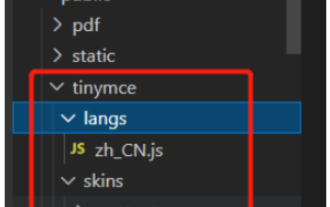
tinymce is a fully functional rich text editor plug-in, but introducing tinymce into vue is not as smooth as other Vue rich text plug-ins. tinymce itself is not suitable for Vue, and @tinymce/tinymce-vue needs to be introduced, and It is a foreign rich text plug-in and has not passed the Chinese version. You need to download the translation package from its official website (you may need to bypass the firewall). 1. Install related dependencies npminstalltinymce-Snpminstall@tinymce/tinymce-vue-S2. Download the Chinese package 3. Introduce the skin and Chinese package. Create a new tinymce folder in the project public folder and download the
 How to select an avatar and crop it in Vue3
May 29, 2023 am 10:22 AM
How to select an avatar and crop it in Vue3
May 29, 2023 am 10:22 AM
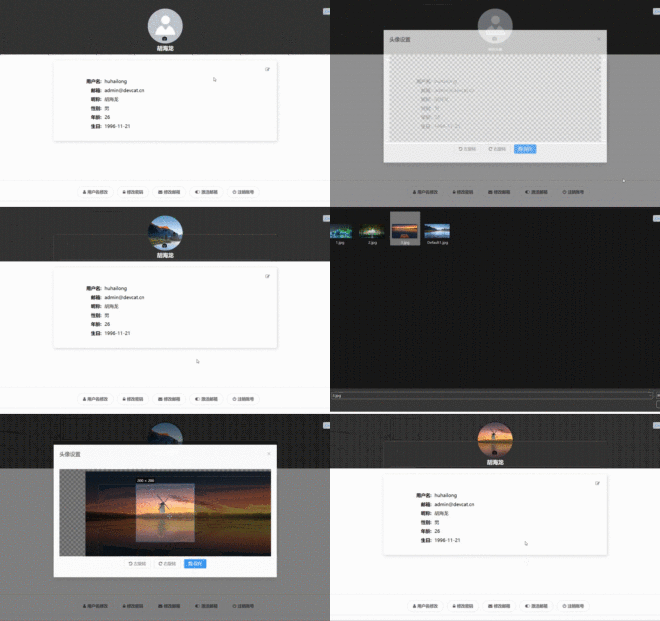
The final effect is to install the VueCropper component yarnaddvue-cropper@next. The above installation value is for Vue3. If it is Vue2 or you want to use other methods to reference, please visit its official npm address: official tutorial. It is also very simple to reference and use it in a component. You only need to introduce the corresponding component and its style file. I do not reference it globally here, but only introduce import{userInfoByRequest}from'../js/api' in my component file. import{VueCropper}from'vue-cropper&
 How to use vue3+ts+axios+pinia to achieve senseless refresh
May 25, 2023 pm 03:37 PM
How to use vue3+ts+axios+pinia to achieve senseless refresh
May 25, 2023 pm 03:37 PM
vue3+ts+axios+pinia realizes senseless refresh 1. First download aiXos and pinianpmipinia in the project--savenpminstallaxios--save2. Encapsulate axios request-----Download js-cookienpmiJS-cookie-s//Introduce aixosimporttype{AxiosRequestConfig ,AxiosResponse}from"axios";importaxiosfrom'axios';import{ElMess
 How to use Vue3 reusable components
May 20, 2023 pm 07:25 PM
How to use Vue3 reusable components
May 20, 2023 pm 07:25 PM
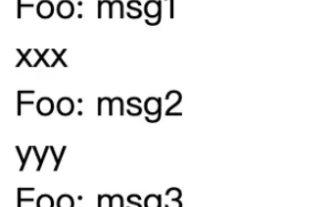
Preface Whether it is vue or react, when we encounter multiple repeated codes, we will think about how to reuse these codes instead of filling a file with a bunch of redundant codes. In fact, both vue and react can achieve reuse by extracting components, but if you encounter some small code fragments and you don’t want to extract another file, in comparison, react can be used in the same Declare the corresponding widget in the file, or implement it through renderfunction, such as: constDemo:FC=({msg})=>{returndemomsgis{msg}}constApp:FC=()=>{return(
 How to use vueup/vue-quill rich text in vue3 and limit the number of input characters
May 20, 2023 pm 04:16 PM
How to use vueup/vue-quill rich text in vue3 and limit the number of input characters
May 20, 2023 pm 04:16 PM
1. Effect display 2. npmnpminstall@vueup/vue-quill@alpha--save 3. Main.js introduces import{QuillEditor}from'@vueup/vue-quill'import'@vueup/vue-quill/dist/vue- quill.snow.css';app.component('QuillEditor',QuillEditor) 4. Page usage{{TiLe
