


How to implement git automated deployment of php scripts

How to implement git automated deployment of php scripts: 1. Install git; 2. Clone the warehouse code; 3. Change linux permissions and modify the configuration; 4. Add the www user to sudoers; 5. Generate a key; 6 , fill in the webhook domain name and upload the php script.

The operating environment of this article: linux5.9.8 system, Git version 2.30.0, DELL G3 computer
git automated deployment php script How to implement?
git php deploys webhook automation script to achieve code synchronization
##This article will introduce the git php deployment webhook automated script to achieve code synchronization Git with webhook automated deployment is not a sophisticated technology, but there were many detours in the first deployment, mainly I am considered a novice in Linux. This article records the problems that are easy to make mistakes and the pitfalls encountered.
Preparation Deploy accessible web domain names and server-side php scripts in lnmp environment. Warehouse code cloud gitee
First create a warehouse on gitee code cloud
Use the ssh protocol to communicate with the warehouse locally For communication, my local computer is windows. I will not introduce how to generate the ssh public key here. I will introduce it below under Linux
yum install git2. Clone the warehouse code. "Note that you must Use the ssh protocol, and the rest are based on ssh》
git initgit clone git@gitee.com:zhuyanbin/HiAdmin.git3. Change the linux permissions and modify the configuration
Because our webhook notifies the server that it is an external access, the administrator user here defaults to the www user. Therefore, www must be given sufficient permissions.
vim /etc/passwd
添加下面的一行
www:x:1001:1001::/home/www:/bin/bash
1001 is the id of the user group. Use the following command to view the id of user www.
cat /etc/groupAdd the www user to sudoers and execute it without a password. shell#(1)Add permission to write sudoers to the current user
chmod u+w /etc/sudoers#(2)Edit sudoers
vim /etc/sudoers#(3)Search for Allow root to run any commands anywhere, write the following content under the corresponding line of the root user:
www ALL=(ALL) NOPASSWD:/usr/bin/git#(4) Take back the write permission to sudoers
chmod u-w /etc/sudoers
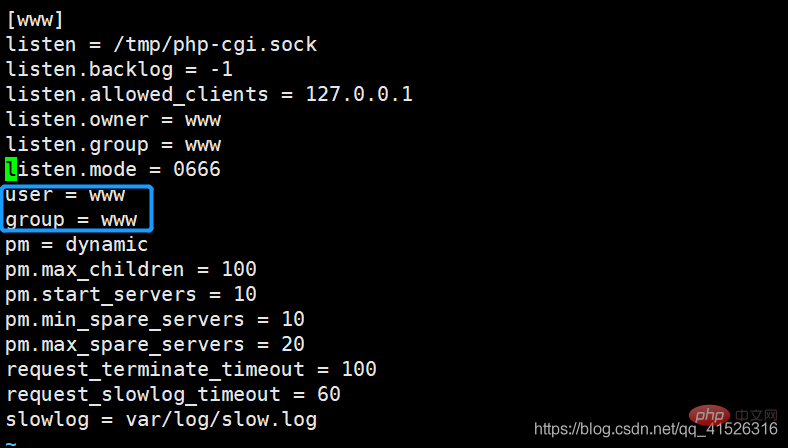
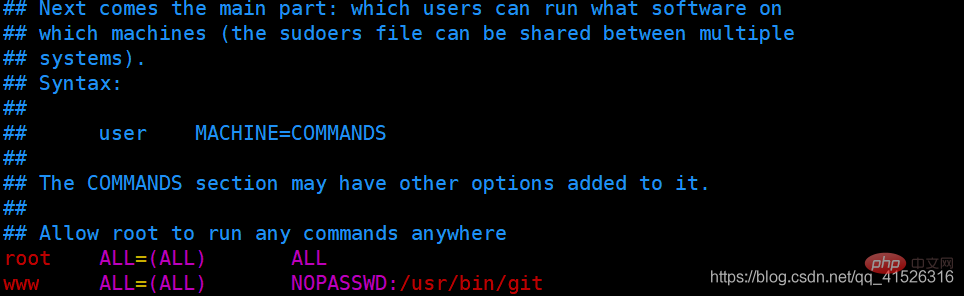 Modify php-fpm. conf configuration sets the visitor, my here is www, which is the default configuration of php
 4. Finally generate the key (this step must be the www user to generate the key, ps: in This place has been stuck for two days. I have been using the root administrator account to generate it. I tried Baidu for several days and tried various methods. Then I switched to the www user to generate the key and everything was ok)
mkdir -p /home/www/.ssh
chown -R www.www /home/www/.ssh
ssh-keygen -t rsaView the public key
cat /home/www/.ssh/id_rsa.pubCopy the generated public key to the gitee code cloud warehouse public key filling place
https://gitee.com/profile/sshkeys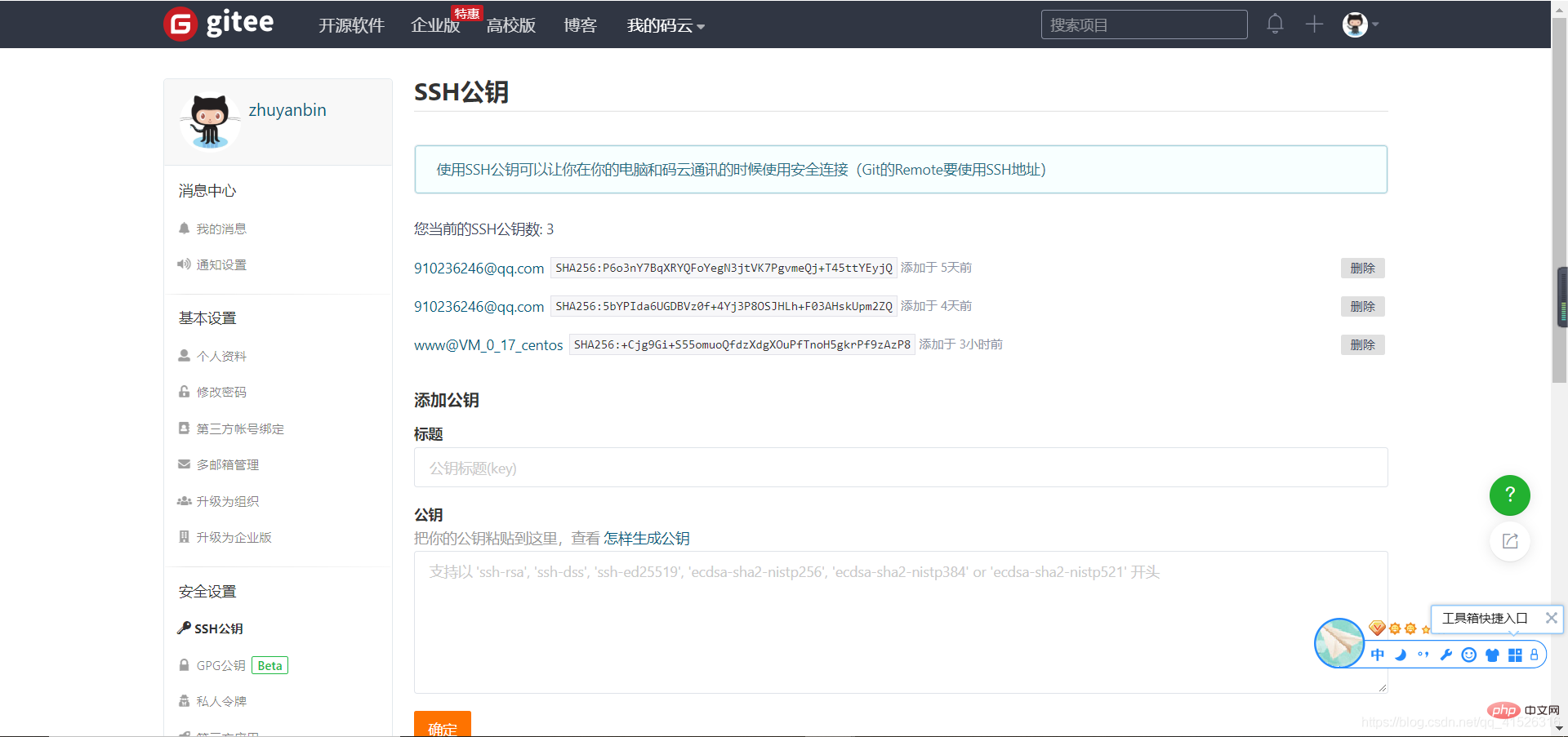 Supplement: There are two places for gitee to fill in the public key. One is the public key of the warehouse. If you fill in the public key of the warehouse, the server git permission will only have pull permissions, and the other is the public key of the account. Key, if you fill in the public key of your personal account, you will have pull, push and other permissions. The personal account public key I use directly here
5. Finally fill in the webhook domain name and run the php script
Fill in the webhook notification address domain name (The password setting is empty. There is no password verification in PHP later. If you consider security, please set the password later) 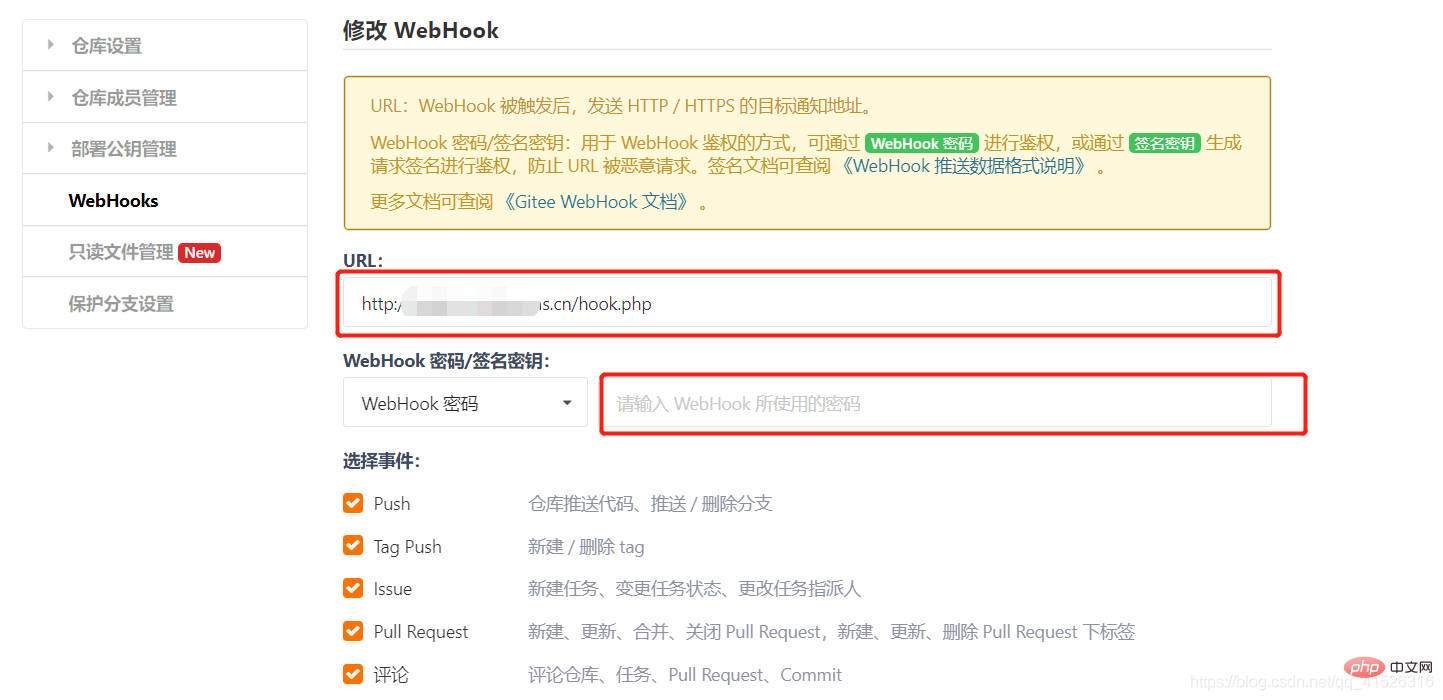 Go to PHP script handler hook.php (execute linux command)
    chdir("/home/wwwroot/default/HiAdmin");
    exec("git pull origin master 2>&1", $out);
    foreach($out as $v)
    {
        echo iconv( 'GB2312','UTF-8', $v)."<br>";
    }
At this point, after configuring the above server code, it can be automatically synchronized to complete the automated deployment
Problems occur
1.php script does not execute Reason php. Many php functions in ini are not turned on by default, including executing linux script functions exec(), shell_exec(), etc.
Find php.ini, find the disable_functions line and delete the corresponding function, or comment out the entire line
 2. Unable to execute git pull command
fatal: Could not read from remote repository.
Please make sure you have the correct access rights
and the repository exists.
归根结底还是因为linux权限的问题,我遇到的是出现一下问题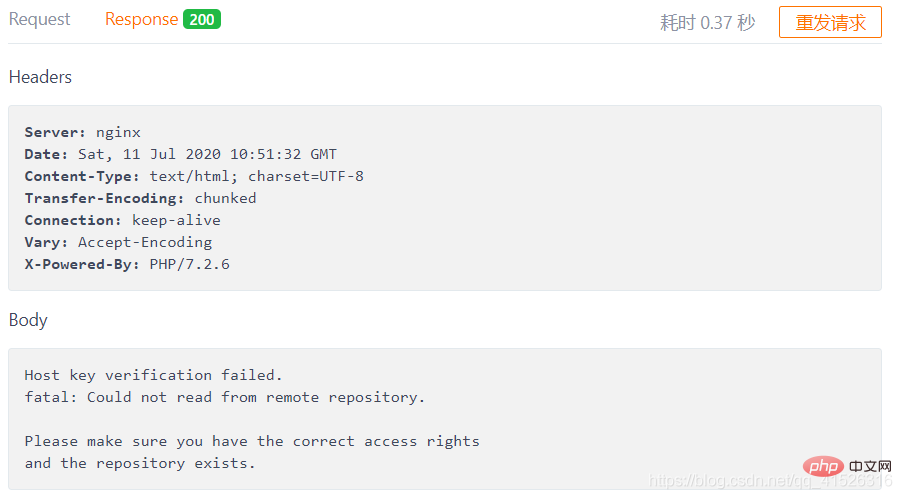
到这里的原因是因为root生成git公钥密钥,而切换到www后生成公钥密钥后就成功了(上述第四小步生成公钥,一定使用www生成公钥密钥)
问题二
error: insufficient permission for adding an object to repository database .git/objects
fatal: failed to write object
fatal: unpack-objects failed
这个还是没有权限执行git命令,只需要执行以下
第一步:cd .git/objects  定位到git下的objects文件下
第二步: ls -al 查看git库的所有者(git用户 git组)
第三步: chown -R yourname:yourgrounp * 或者sudo chmod 777 -R .git/objects 提交
最后解决完以上问题,大功告成,上一张成功的截图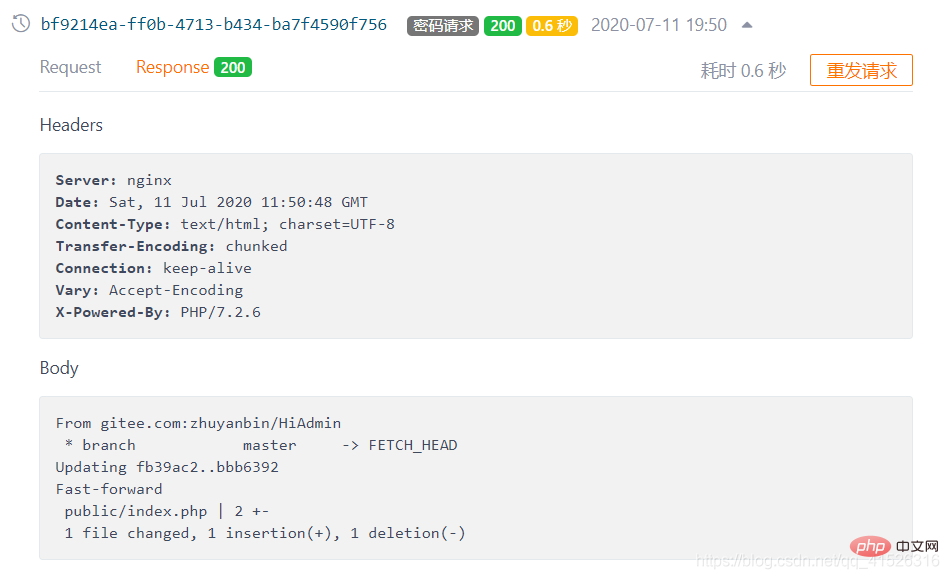
自己的后端语言是php,这里可以用多种方式去实现执行linux脚本,nodejs,python等等
推荐学习:《PHP视频教程》
The above is the detailed content of How to implement git automated deployment of php scripts. For more information, please follow other related articles on the PHP Chinese website!

Hot AI Tools

Undress AI Tool
Undress images for free

Undresser.AI Undress
AI-powered app for creating realistic nude photos

AI Clothes Remover
Online AI tool for removing clothes from photos.

Clothoff.io
AI clothes remover

Video Face Swap
Swap faces in any video effortlessly with our completely free AI face swap tool!

Hot Article
Hot Tools

Notepad++7.3.1
Easy-to-use and free code editor

SublimeText3 Chinese version
Chinese version, very easy to use

Zend Studio 13.0.1
Powerful PHP integrated development environment

Dreamweaver CS6
Visual web development tools

SublimeText3 Mac version
God-level code editing software (SublimeText3)


 How to read a CSV file in PHP?
Aug 29, 2025 am 08:06 AM
How to read a CSV file in PHP?
Aug 29, 2025 am 08:06 AM
ToreadaCSVfileinPHP,usefopen()toopenthefile,fgetcsv()inalooptoreadeachrowasanarray,andfclose()tocloseit;handleheaderswithaseparatefgetcsv()callandspecifydelimitersasneeded,ensuringproperfilepathsandUTF-8encodingforspecialcharacters.
 How to use AJAX with php
Aug 29, 2025 am 08:58 AM
How to use AJAX with php
Aug 29, 2025 am 08:58 AM
AJAXwithPHPenablesdynamicwebappsbysendingasynchronousrequestswithoutpagereloads.1.CreateHTMLwithJavaScriptusingfetch()tosenddata.2.BuildaPHPscripttoprocessPOSTdataandreturnresponses.3.UseJSONforcomplexdatahandling.4.Alwayssanitizeinputsanddebugviabro
 Edit bookmarks in chrome
Aug 27, 2025 am 12:03 AM
Edit bookmarks in chrome
Aug 27, 2025 am 12:03 AM
Chrome bookmark editing is simple and practical. Users can enter the bookmark manager through the shortcut keys Ctrl Shift O (Windows) or Cmd Shift O (Mac), or enter through the browser menu; 1. When editing a single bookmark, right-click to select "Edit", modify the title or URL and click "Finish" to save; 2. When organizing bookmarks in batches, you can hold Ctrl (or Cmd) to multiple-choice bookmarks in the bookmark manager, right-click to select "Move to" or "Copy to" the target folder; 3. When exporting and importing bookmarks, click the "Solve" button to select "Export Bookmark" to save as HTML file, and then restore it through the "Import Bookmark" function if necessary.
 What is the difference between isset and empty in php
Aug 27, 2025 am 08:38 AM
What is the difference between isset and empty in php
Aug 27, 2025 am 08:38 AM
isset()checksifavariableexistsandisnotnull,returningtrueevenforzero,false,oremptystringvalues;2.empty()checksifavariableisnull,false,0,"0","",orundefined,returningtrueforthese"falsy"values;3.isset()returnsfalsefornon-exi
 How to configure SMTP for sending mail in php
Aug 27, 2025 am 08:08 AM
How to configure SMTP for sending mail in php
Aug 27, 2025 am 08:08 AM
Answer: Using the PHPMailer library to configure the SMTP server can enable sending mails through SMTP in PHP applications. PHPMailer needs to be installed, set up SMTP host, port, encryption method and authentication credentials of Gmail, write code to set sender, recipient, topic and content, enable 2FA and use application password to ensure that the server allows SMTP connection, and finally call the send method to send email.
 How to get the current date and time in PHP?
Aug 31, 2025 am 01:36 AM
How to get the current date and time in PHP?
Aug 31, 2025 am 01:36 AM
Usedate('Y-m-dH:i:s')withdate_default_timezone_set()togetcurrentdateandtimeinPHP,ensuringaccurateresultsbysettingthedesiredtimezonelike'America/New_York'beforecallingdate().
 How to create an object in php
Aug 27, 2025 am 08:45 AM
How to create an object in php
Aug 27, 2025 am 08:45 AM
To create a PHP object, you need to define the class first, and then instantiate it with the new keyword. For example, after defining the Car class and setting properties and constructing methods, create an object through $myCar=newCar("red","Toyota"), and then use -> to access its properties and methods, such as $myCar->color and $myCar->showInfo(). Each object has independent data and can create multiple instances.
 How to use the spaceship operator () in PHP?
Aug 29, 2025 am 06:31 AM
How to use the spaceship operator () in PHP?
Aug 29, 2025 am 06:31 AM
PHP's spaceship operator is used to compare two values, returning -1, 0 or 1: when the left operand is smaller than the right operand, return -1, when equal to 0, and when greater than 1. It supports types such as numbers and strings, and is often used in sorting scenarios such as usort, making the multi-level sorting logic more concise and clear, and is available since PHP7.0.
