


 Operation and Maintenance
Windows Operation and Maintenance
How to turn off bios secure boot in win10
Operation and Maintenance
Windows Operation and Maintenance
How to turn off bios secure boot in win10
How to turn off bios secure boot in win10

How to turn off BIOS secure boot in win10: 1. Restart the computer, press and hold the DEL or F2 key to enter the BIOS interface, select the "security" option, find and select the "secure Boot" option; 2. Change the "Secure Boot" option Change the value of "Boot" to "Disabled".

The operating environment of this tutorial: Windows 10 system, Dell G3 computer.
How to turn off BIOS secure boot in win10:
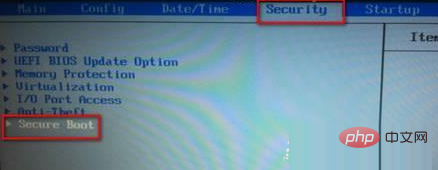
1. Restart the computer, hold down the DEL or F2 key to enter Bios, select the security option, and find secure Boot.
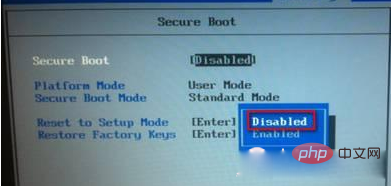
2. Turn off UEFI secure boot and change Secure Boot to "Disabled"
Recommended tutorial: "windows tutorial》
The above is the detailed content of How to turn off bios secure boot in win10. For more information, please follow other related articles on the PHP Chinese website!

Hot AI Tools

Undress AI Tool
Undress images for free

Undresser.AI Undress
AI-powered app for creating realistic nude photos

AI Clothes Remover
Online AI tool for removing clothes from photos.

Clothoff.io
AI clothes remover

Video Face Swap
Swap faces in any video effortlessly with our completely free AI face swap tool!

Hot Article
Hot Tools

Notepad++7.3.1
Easy-to-use and free code editor

SublimeText3 Chinese version
Chinese version, very easy to use

Zend Studio 13.0.1
Powerful PHP integrated development environment

Dreamweaver CS6
Visual web development tools

SublimeText3 Mac version
God-level code editing software (SublimeText3)


 Ventoy secure boot settingsSecure Boot
Jun 18, 2024 pm 09:00 PM
Ventoy secure boot settingsSecure Boot
Jun 18, 2024 pm 09:00 PM
Ventoy is a USB boot tool that can directly boot ISO/WIM/IMG/VHD(x)/EFI and other types of files in the USB flash drive. It is very easy to use. Laptops have secure boot turned on by default. If they are not turned off or cannot be turned off, they cannot be booted from a USB device. Ventoy also supports secure boot. The principle is to inject a GRUB installation certificate into the current computer. As long as your computer After being injected once, any USB disk PE booted based on grub can pass. The official description of Ventoy is a GIF image. The playback speed is too fast and you may not be able to remember it. The editor has divided the GIF image to make it easier to understand. Ventoy secure boot has EnrollKey and Enro
 Acer laptop disables secure boot and removes password in Bios
Jun 19, 2024 am 06:49 AM
Acer laptop disables secure boot and removes password in Bios
Jun 19, 2024 am 06:49 AM
I repaired an Acer laptop and had to turn off secure boot when entering PE. I recorded how to turn off secure boot and remove the password from Bios. Turn on the computer and when the screen is not on, keep pressing the F2 key to enter the BIOS. On Acer laptops, turn off Secure Boot and press the arrow keys to switch to Boot. If SecureBoot is gray and unclickable, switch to the Security page, select SetSupervisorPassword and press Enter to set the password. Then switch to Boot, SecureBoot can be selected as Disabled, and press F10 to save. Modify and clear the BIOS password on your Acer notebook. Switch to the Security menu and select SetSupervisorPasswo.
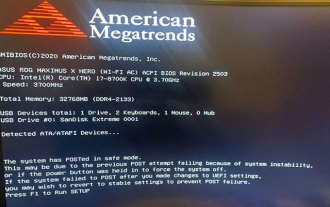 The system has posted in safe mode ASUS motherboard
Jun 19, 2024 am 07:35 AM
The system has posted in safe mode ASUS motherboard
Jun 19, 2024 am 07:35 AM
After the computer is turned on, it prompts The system has posted in safe mode. You can set it in the BIOS to ignore the F1 error. Although it does not prompt, it directly enters the BIOS when it is turned on. Sometimes F1 is useless every time it is turned on. Then you need to restart the BIOS, and then exit the BIOS to enter the system. . thesystemhaspostedinsafemode=The system is in safe mode. This problem is relatively common on ASUS motherboards. As long as you turn off the XMP of the memory and adjust the memory frequency back to normal, you can boot normally without the thesystemhaspostedinsafemode error. Updating the latest motherboard BIOS should be OK.
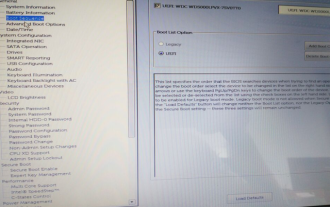 Dell computer bios interface to set USB disk startup items
Feb 10, 2024 pm 10:09 PM
Dell computer bios interface to set USB disk startup items
Feb 10, 2024 pm 10:09 PM
How do you set up a USB drive if your computer is a Dell laptop? Many friends have found that Dell laptops will not display the USB disk option by pressing the boot hotkey, so they need to enter the BIOS to set up the USB disk boot, so what if they don't know how to operate it? Now follow the editor’s steps to demonstrate how to set up a USB flash drive on a Dell laptop. Many friends assemble Dell computers, but don't know how to use the USB boot tool after entering the USBPE interface. Many friends don't know that they need to enter the BIOS interface to set up USB boot, so pressing the boot hotkey will not appear. what should we do? Let’s see how Dell sets up USB boot! Set up Dell laptop to reinstall system bootable from USB disk
 windows10 activation key list latest 2024
Mar 19, 2024 pm 03:45 PM
windows10 activation key list latest 2024
Mar 19, 2024 pm 03:45 PM
Obtaining a Windows 10 activation key is key to fully experiencing its capabilities. The legal way is to purchase a genuine key and then activate it through the "Activate" option in the system settings. Using illegal or pirated keys can pose security risks and is a violation of intellectual property rights. This article will guide you through legal means to obtain and activate a Windows 10 activation key, ensuring the security of your computer and supporting the work of software developers.
 windows10 installation failed
Mar 12, 2024 pm 05:09 PM
windows10 installation failed
Mar 12, 2024 pm 05:09 PM
Solutions to failed Windows 10 installation: 1. Check the hardware; 2. Update the driver; 3. Use reliable installation media; 4. Clean the existing system; 5. Check the system requirements; 6. Adjust BIOS/UEFI settings; 7. Clear Virus.
![Windows PC keeps booting into BIOS [Fix]](https://img.php.cn/upload/article/000/887/227/171012121854600.jpg?x-oss-process=image/resize,m_fill,h_207,w_330) Windows PC keeps booting into BIOS [Fix]
Mar 11, 2024 am 09:40 AM
Windows PC keeps booting into BIOS [Fix]
Mar 11, 2024 am 09:40 AM
If your Windows PC frequently enters the BIOS interface, this may cause difficulty in use. I'm stuck with the BIOS screen every time I turn on my computer, and restarting doesn't help. If you are facing this problem, then the solutions provided in this article will help you. Why does my computer keep booting in BIOS? Your computer's frequent restarts in BIOS mode may be caused by a variety of reasons, such as improper boot sequence settings, damaged SATA cables, loose connections, BIOS configuration errors, or hard drive failures, etc. Fix Windows PC Keeps Booting into BIOS If your Windows PC keeps booting into BIOS, use the fix below. Check your boot order and re-plug the
 How to enable secure boot in ASUS win11
Jan 09, 2024 pm 08:01 PM
How to enable secure boot in ASUS win11
Jan 09, 2024 pm 08:01 PM
ASUS is a very well-known computer brand with many users. Because the latest win11 system must turn on secure boot before it can be installed, many ASUS users want to turn on their own secure boot, but don't know how to start it. In fact, they only need to enter the bios settings. Let's take a look. How to enable ASUS win11 secure boot 1. First restart the computer, and then use "F8" to enter the bios settings. 2. Enter the bios settings, click the upper left corner to switch the language to Chinese, and then press "F7" on the keyboard to enter the advanced settings. 3. Then select "Secure Boot Menu" in the advanced settings. 4. After entering the secure boot settings, select "Key Management". 5. Then click "Install Default Secure Boot Key"
