


How to compare and filter out the same data from two tables?

Method: 1. Open two excel tables and select a cell area with more data; 2. Click the "Advanced" button in the "Data" tab; 3. In the "List Area" of the pop-up window Automatically identify the selected cell range, set the "Conditional Range" to the corresponding cell range in another table, and click "OK".

#How to quickly filter out the same data in two tables?
Method:
1 First select a cell range with more data and click the "Advanced" button in the "Data" tab;
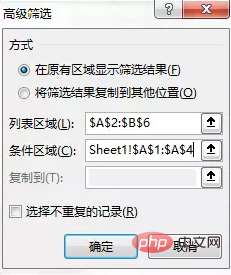
2 Automatically identify the selected cell range in the "List Range" text box of the "Advanced Filter" dialog box that opens;
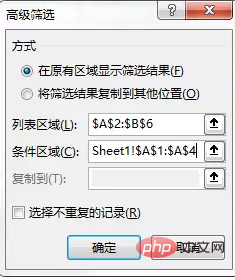
3 Then set the "conditional area" to the corresponding cell area in another table, and then click the "OK" button to filter out the same data in the two tables
Recommended tutorial: "excel tutorial"
The above is the detailed content of How to compare and filter out the same data from two tables?. For more information, please follow other related articles on the PHP Chinese website!

Hot AI Tools

Undress AI Tool
Undress images for free

Undresser.AI Undress
AI-powered app for creating realistic nude photos

AI Clothes Remover
Online AI tool for removing clothes from photos.

Clothoff.io
AI clothes remover

Video Face Swap
Swap faces in any video effortlessly with our completely free AI face swap tool!

Hot Article
Hot Tools

Notepad++7.3.1
Easy-to-use and free code editor

SublimeText3 Chinese version
Chinese version, very easy to use

Zend Studio 13.0.1
Powerful PHP integrated development environment

Dreamweaver CS6
Visual web development tools

SublimeText3 Mac version
God-level code editing software (SublimeText3)

