


How to repair the language bar in win7?
Method Steps
1. Open Notepad and enter the following content;
Windows Registry Editor Version 5.00 [HKEY_LOCAL_MACHINESOFTWAREMicrosoftWindowsCurrentVersionRun] “ctfmon.exe”=“C:/Windows/System32/ctfmon.exe”
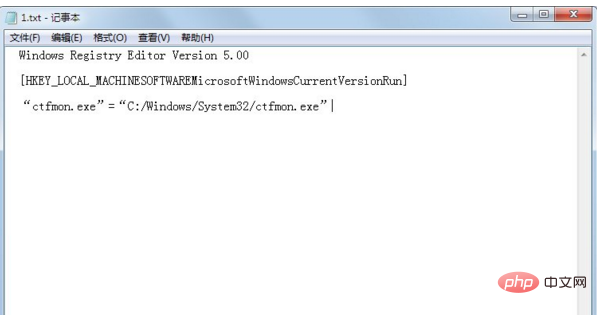
2. Press ctrl S to save the file file, the file name is: xfyyl.reg, please note that the following extension ".reg" must be entered, so that it can be automatically imported into the registry after double-clicking;

3. Double-click A dialog box will appear for xfyyl.reg. Click "Yes" to add it to the registry. After restarting the computer, you can find that the language bar has returned to normal. In addition, if the language bar is occasionally lost, you can press [Win R] to open the run box, enter ctfmon, and click "OK".
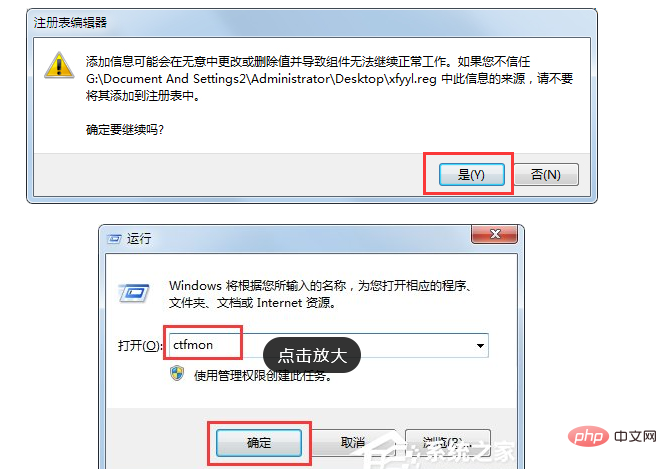
The above is the method that the editor shared with you on how to repair the language bar by yourself under the Win7 system. I believe that after following the above steps, the language bar will return to normal immediately.
The above is the detailed content of How to fix the language bar in win7. For more information, please follow other related articles on the PHP Chinese website!
 How to create virtual wifi in win7
 How to change file type in win7
 How to set up hibernation in Win7 system
 How to open Windows 7 Explorer
 How to solve the problem of not being able to create a new folder in Win7
 Solution to Win7 folder properties not sharing tab page
 Win7 prompts that application data cannot be accessed. Solution
 The difference between win7 32-bit and 64-bit





















![[Web front-end] Node.js quick start](https://img.php.cn/upload/course/000/000/067/662b5d34ba7c0227.png)



