



Find the Notepad icon on the desktop and click to open it (Recommended learning: notepad )

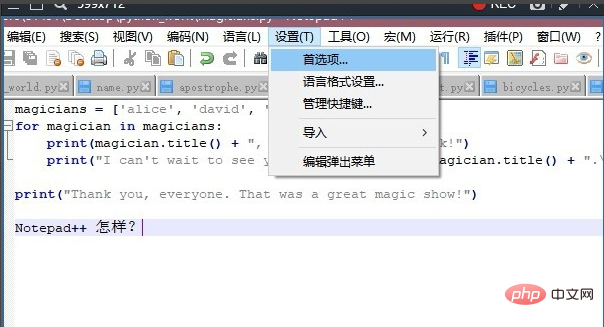
Find Settings in the menu bar at the top of the page, click to open

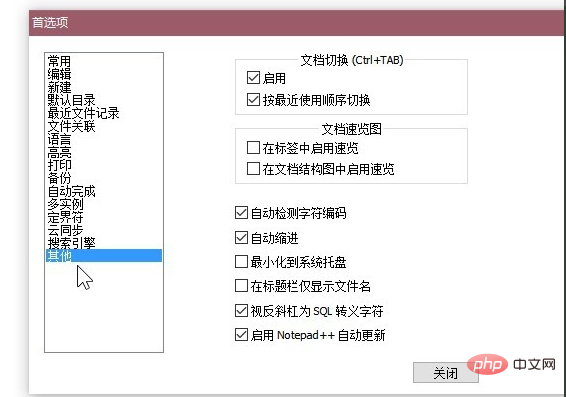
On the opened Settings tab, click on the list on the left Other settings in
In the list on the right side of the page, we find the document overview
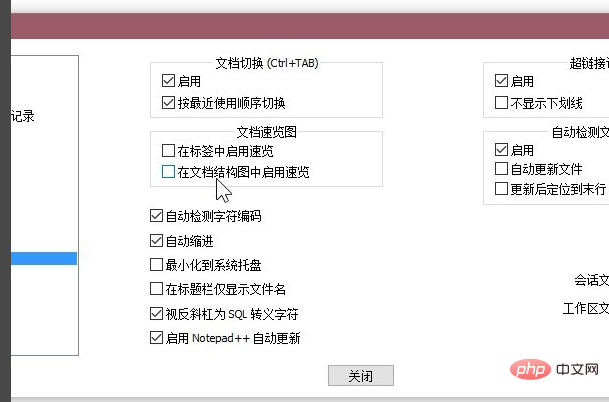
Then check Enable speed browsing in the label, so enable speed browsing in the selected document structure diagram
The above is the detailed content of How to enable document tag overview in Notepad++?. For more information, please follow other related articles on the PHP Chinese website!
 notepad++ official website
 The fatal flaw of blade servers
 How to switch cities on Douyin
 HOW TO INSTALL LINUX
 How to read macro control data in javascript
 How to use averageifs function
 What are the core technologies necessary for Java development?
 Where should I fill in my place of birth: province, city or county?




















![[Web front-end] Node.js quick start](https://img.php.cn/upload/course/000/000/067/662b5d34ba7c0227.png)



