


The file manager of the Pagoda Linux panel has its own compression and decompression functions. The following column will introduce you to the method of compressing files in the Pagoda Linux panel from the Pagoda usage tutorial column. I hope you can Help those in need!

Pagoda Linux panel compression file steps
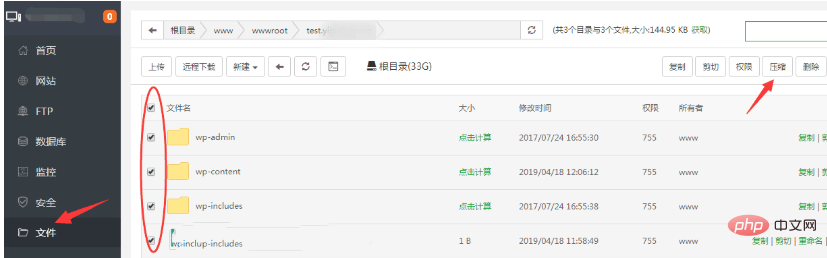
1. Log in to the Pagoda Linux panel>> Click the "File" menu on the left >> Enter the upper-level directory of the file you want to compress. For example, if I want to compress all the files in the domain name folder, just check the file name above to select all files, and then click the "Compress" button in the upper right corner. For details As shown in the figure below:
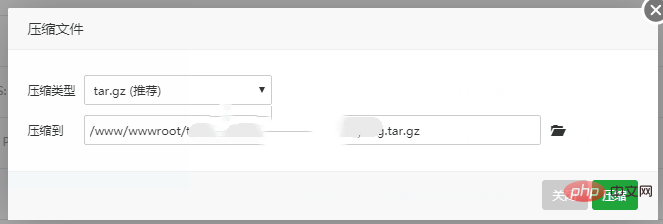
2. In the "Compressed File" interface that appears, select the compression type and the compressed saving path, and then click the [Compress] button. Wait a moment for successful compression.
The above is the detailed content of Pagoda linux panel compressed file. For more information, please follow other related articles on the PHP Chinese website!
 Why can't the Himalayan connect to the Internet?
 The difference between bond0 and bond1
 How to open jsp
 How to configure default gateway
 What is the role of kafka consumer group
 What does write refer to in python?
 Why is there no response when headphones are plugged into the computer?
 The difference between k8s and docker





















![[Web front-end] Node.js quick start](https://img.php.cn/upload/course/000/000/067/662b5d34ba7c0227.png)



