


How to backup WordPress


WordPress File Backup
To obtain a backup file for WordPress, you need to install FileZilla Client on your system.
Here are the simple steps for file backup operations in WordPress –
Step (1) – Open the FileZilla client as shown in the screenshot below.
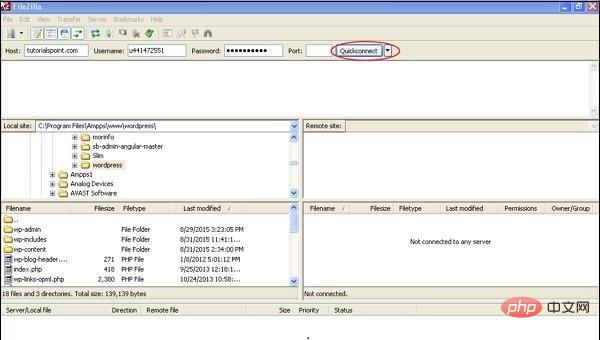
Step (2) – Enter the host, username, password and port you use to log into cPanel.
After filling in all fields, click the Quickconnect button.
Step (3) – You will see all the files and folders of your WordPress website on the right side as shown in the screen below.
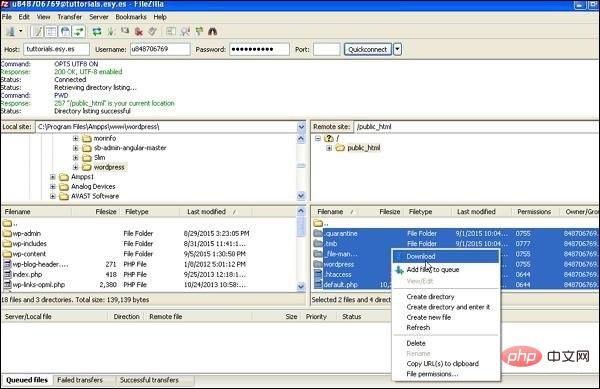
Step (4) – Select all files and folders, right-click the mouse and click Download.
After downloading the WordPress file from cPanel, it will be saved on your system.
WordPress Database Backup
The following are simple steps for database backup in WordPress –
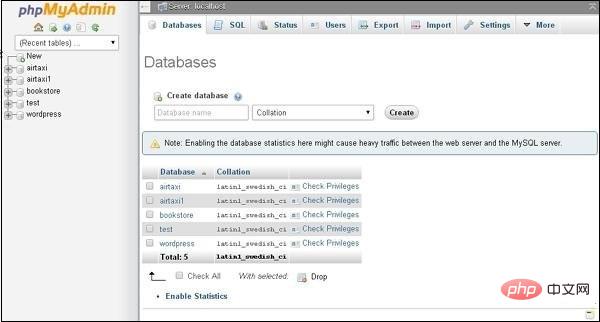
Step (1) – Enter the path in the browser http://localhost/phpmyadmin. You will get the following screen.
Step (2) – Click on the database name “wordpress” you created for WordPress.
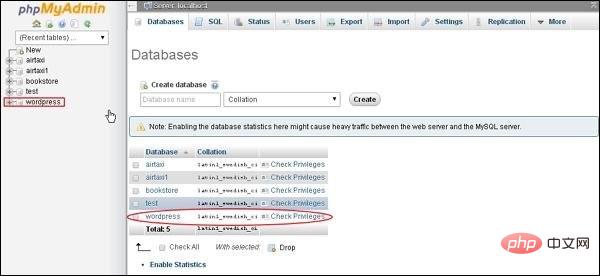
Step (3) – After clicking on the database wordpress, the following page will open. Click the Export tab.
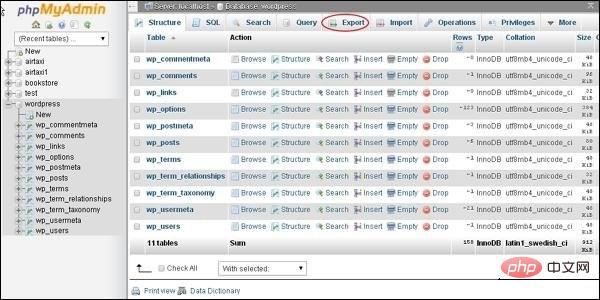
Step (4) – You will get two methods to export the database, namely Quick and Custom. Choose any method and click the Go button.
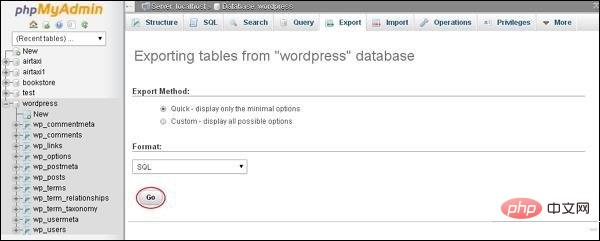
After exporting the database file, it will be saved on your system.
For more wordpress related technical articles, please visit the wordpress tutorial column to learn!
The above is the detailed content of How to backup WordPress. For more information, please follow other related articles on the PHP Chinese website!

Hot AI Tools

Undress AI Tool
Undress images for free

Undresser.AI Undress
AI-powered app for creating realistic nude photos

AI Clothes Remover
Online AI tool for removing clothes from photos.

Clothoff.io
AI clothes remover

Video Face Swap
Swap faces in any video effortlessly with our completely free AI face swap tool!

Hot Article
Hot Tools

Notepad++7.3.1
Easy-to-use and free code editor

SublimeText3 Chinese version
Chinese version, very easy to use

Zend Studio 13.0.1
Powerful PHP integrated development environment

Dreamweaver CS6
Visual web development tools

SublimeText3 Mac version
God-level code editing software (SublimeText3)


 How to exclude categories from the loop
Aug 07, 2025 am 08:45 AM
How to exclude categories from the loop
Aug 07, 2025 am 08:45 AM
There are three ways to exclude specific categories in WordPress: use query_posts(), use the pre_get_posts hook, or use the plug-in. First, use query_posts() to directly modify the main loop query in the template file, such as query_posts(array('category__not_in'=>array(3,5))), which is suitable for temporary adjustment but may affect paging; second, it is safer to add functions in functions.php through the pre_get_posts hook. For example, excluding the specified classification ID when judging the home page main loop, it will not affect other page logic; finally, WPCate can be used
 How to display custom user fields
Aug 05, 2025 am 06:43 AM
How to display custom user fields
Aug 05, 2025 am 06:43 AM
To realize the display of custom user fields on forums, CMS or user management platforms, the following steps must be followed: 1. Confirm whether the platform supports custom user fields. For example, WordPress can be implemented through plug-ins, Discourse through background settings, and Django through custom models; 2. Add fields and configure display permissions, such as setting field types and visibility in WordPress to ensure that privacy data is only authorized to view by users; 3. Call field values in front-end templates, such as using PHP function get_user_meta() or Django template syntax {{user.profile.city}}; 4. Test the field display effect, verify the access permissions of different roles, and the mobile terminal
 How to protect wp-admin with password
Aug 05, 2025 am 04:04 AM
How to protect wp-admin with password
Aug 05, 2025 am 04:04 AM
There are three ways to protect the WordPress backend: 1. Use .htpasswd and .htaccess to add server-layer passwords. By creating encrypted credential files and configuring access control, you cannot enter even if you know the login address and account number; 2. Change the default login address and use plug-ins such as WPSHideLogin to customize the login URL to reduce the risk of being automated attacks; 3. In combination with the IP whitelist restricting access sources, set to allow only specific IPs to access wp-login.php in the server configuration to prevent login attempts at unauthorized locations.
 How to revert theme update
Aug 23, 2025 am 11:01 AM
How to revert theme update
Aug 23, 2025 am 11:01 AM
If there is any problem after updating WordPress theme, you can roll back the old version to resolve. Method 1: Manually install the old version of the theme. You need to download the corresponding .zip file and upload it to the background to activate. Pay attention to backup settings in advance. Method 2: Use plug-ins such as WPDowngrade to manage the version, which supports direct switching and viewing of logs in the background, but some old versions still need to bring their own links. Notes include: be sure to back up website data, confirm the compatibility of the old version, prioritize operation in the test environment, and retain the current file reference modification content.
 How to optimize WordPress database performance
Aug 05, 2025 am 06:51 AM
How to optimize WordPress database performance
Aug 05, 2025 am 06:51 AM
When WordPress databases run slowly, you can improve performance by regularly cleaning up junk data, optimizing table structure and indexing, enabling caching mechanisms, and adjusting database server configuration. 1. Regularly clean up spam data, such as article revisions, drafts, spam comments, etc. You can use plug-ins or manually execute SQL statements to delete it. It is recommended to once a month. 2. Optimize the database table structure and index, add indexes to high-frequency query fields (such as wp_postmeta's meta_key) to improve query efficiency, but avoid excessive indexing affecting write performance. 3. Enable the cache mechanism, such as object cache (Redis/Memcached) or use the cache plug-in (W3TotalCache/WPSuperCache), and cooperate with C
 How to modify the main WordPress query
Aug 06, 2025 am 04:26 AM
How to modify the main WordPress query
Aug 06, 2025 am 04:26 AM
To modify WordPress main query, it is recommended to use the pre_get_posts hook to adjust query conditions. For example, check is_home() and is_main_query() to ensure that only the main query of the homepage is affected; avoid using query_posts() to avoid breaking pagination; for advanced filtering, you can use parse_query hook; if you need to add extra loops to the template, you should use WP_Query or get_posts() and use wp_reset_postdata() to reset the global variables. 1. Use pre_get_posts to modify the main query; 2. Avoid query_posts(); 3. Use parse_q
 How to use security keys and salts in wp-configphp
Aug 07, 2025 am 06:29 AM
How to use security keys and salts in wp-configphp
Aug 07, 2025 am 06:29 AM
The security key and salt value are random strings used by WordPress to encrypt user sessions and enhance password security. It includes eight values: AUTH_KEY, SECURE_AUTH_KEY, LOGGED_IN_KEY, NONCE_KEY, AUTH_SALT, SECURE_AUTH_SALT, LOGGED_IN_SALT, NONCE_SALT; their function is to provide additional randomness and encryption strength for sensitive information. It is recommended to obtain strong random strings to replace the default value through the official generator https://api.wordpress.org/secret-key/1.1/salt/ to avoid using examples or simple words.
 How to fetch posts using the WordPress REST API
Aug 22, 2025 am 03:55 AM
How to fetch posts using the WordPress REST API
Aug 22, 2025 am 03:55 AM
TofetchpostsusingtheWordPressRESTAPI,usethebasicendpointhttps://your-wordpress-site.com/wp-json/wp/v2/posts.1.Filterpostsusingqueryparameterslikeper_page,orderby,andordertocustomizeresults.2.Usethe_embedparametertoincluderelateddatasuchasfeaturedimag
