


What is the shortcut key for copy, paste and cut?


What is the shortcut key for copy, paste and cut?
The shortcut keys for copy, paste, and cut are: Ctrl C (copy); Ctrl V (paste); Ctrl X (cut).
The following is a summary of commonly used shortcut keys:
Ctrl A Select all
Ctrl B Organize favorites
Ctrl C Copy
Ctrl D Delete/Add Favorites
Ctrl E Search Assistant
Ctrl F Find
Ctrl H History
Ctrl I Favorites
Ctrl J Source in IE7.0
Ctrl L =Ctrl O Open
Ctrl M OK in the web search box (equal to Enter)
Ctrl N New window
Ctrl P Print
Ctrl R Refresh
Ctrl S Save
Ctrl T IE7.0Open new tab
Ctrl V Paste
Ctrl W Close the current window
Ctrl X Cut
Ctrl Z Undo
F1 Help
F2 Rename
F3 Search
F4 Address bar
F5 Refresh
F6 Switch element
F7 Special function under DoS
F8 Windows startup options
F9 Calculation formulas in Excel
F10 Activate menu bar
F11 Switch to full screen
F12 Save as in Word Document
Windows key to open the Start menu
Windows key D to display the desktop
Windows key E to open the Explorer
Windows key F to find all files
Windows key L Switch user
Windows key M Minimize all windows
Windows key R Run command
Windows key U Accessibility tools
DELETE Delete.
Shift Delete permanently deletes the selected item without placing it in the Recycle Bin.
Press CTRL while dragging an item to copy the selected item.
Press CTRL SHIFT while dragging an item to create a shortcut key for the selected item.
F2 Rename the selected item.
CTRL Right Arrow Key Moves the insertion point to the beginning of the next word.
CTRL left arrow key moves the insertion point to the beginning of the previous word.
CTRL down arrow key moves the insertion point to the beginning of the next paragraph.
CTRL Up Arrow Key Moves the insertion point to the beginning of the previous paragraph.
CTRL SHIFT Arrow keys Highlight a piece of text.
SHIFT arrow keys Select multiple items on the window or desktop, or select text in a document.
Ctrl A selects all content.
F3 Search for files or folders.
Alt Enter to view the properties of the selected item. /Switch to full screen
Alt F4 Close the current project or shut down the computer
Alt Spacebar Open the shortcut menu for the current window.
Ctrl F4 Closes the current document in a program that allows multiple documents to be opened at the same time.
Alt Tab switches between open projects.
Alt Esc Cycles through the order in which projects are opened.
F6 cycles through screen elements in the window or desktop.
F4 displays the "Address" column list in "My Computer" and "Windows Explorer".
Shift F10 displays the shortcut menu of the selected item.
Shift left-click the window super connection to open the specified connection in a new window
Alt Space bar displays the "System" menu of the current window.
Ctrl Esc displays the Start menu.
ALT The underlined letter in the menu name displays the corresponding menu.
The underlined letters in the command names displayed on the opened menu execute the corresponding command.
F10 activates the menu bar in the current program.
Right arrow key opens the next menu on the right or opens a submenu.
Left arrow key opens the next menu on the left or closes the submenu.
F5 refreshes the current window.
BackSpace View the upper folder in "My Computer" or "Windows Explorer".
Esc cancels the current task.
Prevent the disc from playing automatically by pressing the SHIFT key when inserting the disc into the CD-ROM drive.
Dialog shortcut keys
Ctrl Tab moves forward between tabs.
Ctrl Shift Tab Move backward between tabs.
ctrl left mouse button can temporarily allow pop-up window programs
Tab to move forward between options.
Shift Tab moves backward between options.
ALT Underlined letters execute the corresponding command or select the corresponding option.
Enter executes the command corresponding to the activity or button.
Spacebar If the active option is a checkbox, selects or clears the checkbox and adds a space to the original position of the document.
Direction keys When the active option is a group of option buttons, please select a button.
F1 displays help.
F4 displays the items in the current list.
The above is the detailed content of What is the shortcut key for copy, paste and cut?. For more information, please follow other related articles on the PHP Chinese website!

Hot AI Tools

Undress AI Tool
Undress images for free

Undresser.AI Undress
AI-powered app for creating realistic nude photos

AI Clothes Remover
Online AI tool for removing clothes from photos.

Clothoff.io
AI clothes remover

Video Face Swap
Swap faces in any video effortlessly with our completely free AI face swap tool!

Hot Article
Hot Tools

Notepad++7.3.1
Easy-to-use and free code editor

SublimeText3 Chinese version
Chinese version, very easy to use

Zend Studio 13.0.1
Powerful PHP integrated development environment

Dreamweaver CS6
Visual web development tools

SublimeText3 Mac version
God-level code editing software (SublimeText3)


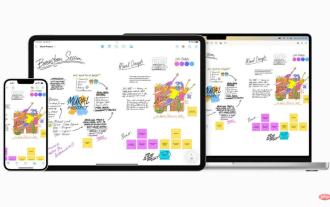 Clipboard on iPhone: How to access it?
May 16, 2023 am 10:46 AM
Clipboard on iPhone: How to access it?
May 16, 2023 am 10:46 AM
Where is the clipboard on iPhone? Since iOS is a closed ecosystem, the clipboard is an internal feature stored in virtual memory. By default, users cannot view the clipboard contents or edit them in any way. However, there are some ways to access the clipboard on iPhone. You can paste the clipboard into the Notes application (or any other text editor) and keep multiple copies of the clipboard there, editing them as needed. Alternatively, you can use the Shortcuts app to create a shortcut that displays the clipboard. Finally, you can use a third-party application such as Paste. How to access the clipboard on iPhone? Whether you prefer to use the built-in Notes app,
 How to copy lyrics from QQ Music How to copy lyrics
Mar 12, 2024 pm 08:22 PM
How to copy lyrics from QQ Music How to copy lyrics
Mar 12, 2024 pm 08:22 PM
We users should be able to understand the diversity of some functions when using this platform. We know that the lyrics of some songs are very well written. Sometimes we even listen to it several times and feel that the meaning is very profound. So if we want to understand the meaning of it, we want to copy it directly and use it as copywriting. However, if we want to use it, we still need to You just need to learn how to copy lyrics. I believe that everyone is familiar with these operations, but it is indeed a bit difficult to operate on a mobile phone. So in order to give you a better understanding, today the editor is here to help you. A good explanation of some of the above operating experiences. If you also like it, come and take a look with the editor. Don’t miss it.
 PS copy layer shortcut key
Feb 23, 2024 pm 02:34 PM
PS copy layer shortcut key
Feb 23, 2024 pm 02:34 PM
In the PS copy layer shortcut keys, we can know that if you want to copy a layer when using PS, you can use the shortcut key [Ctrl+J] for quick copying. This introduction to the shortcut keys for copying layers can tell you the specific operation method. The following is the detailed content, so take a look. PS copy layer shortcut key answer: [Ctrl+J] Specific method: 1. Open the image in PS and select the layer that needs to be copied. 2. Press [Ctrl+J] on the keyboard at the same time to complete the copy of the layer. Other copying methods: 1. After opening the image, press and hold the layer and move the [New Layer] icon downwards. 2. After moving to the icon, let go. 3. The layer copy is completed.
 What is the shortcut key for copying?
Mar 10, 2023 pm 02:00 PM
What is the shortcut key for copying?
Mar 10, 2023 pm 02:00 PM
The shortcut key for copying is "Ctrl+c", and the corresponding paste key is "Ctrl+v"; on the computer, use the mouse to drag and select text, hold down Ctrl, and then click the C key to complete the copy; A shortcut key refers to completing an operation through certain specific keys, key sequences, or key combinations.
 How to copy and move drag-and-drop elements in Vue?
Jun 25, 2023 am 08:35 AM
How to copy and move drag-and-drop elements in Vue?
Jun 25, 2023 am 08:35 AM
Vue is a popular JavaScript framework that provides a convenient drag-and-drop function, allowing us to easily copy and move elements. Next, let's take a look at how to copy and move drag-and-drop elements in Vue. 1. Basic implementation of drag-and-drop elements To copy and move drag-and-drop elements in Vue, you first need to implement the basic drag-and-drop function of the element. The specific implementation method is as follows: Add the elements that need to be dragged in the template: <divclass="drag-elem"
 How to copy a table in Excel and keep the original format?
Mar 21, 2024 am 10:26 AM
How to copy a table in Excel and keep the original format?
Mar 21, 2024 am 10:26 AM
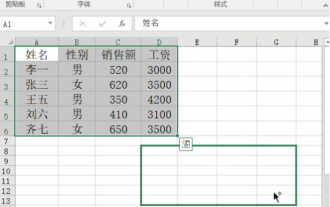
We often use Excel to process multiple table data. After copying and pasting the set table, the original format returns to the default, and we have to reset it. In fact, there is a way to make the Excel copy table retain the original format. The editor will explain the specific method to you below. 1. Ctrl key dragging and copying operation steps: Use the shortcut key [Ctrl+A] to select all table contents, then move the mouse cursor to the edge of the table until the moving cursor appears. Press and hold the [Ctrl] key, and then drag the table to the desired position to complete the movement. It should be noted that this method only works on a single worksheet and cannot be moved between different worksheets. 2. Steps for selective pasting: Press the [Ctrl+A] shortcut key to select all tables, and press
 How to back up CMS DreamWeaver database files?
Mar 13, 2024 pm 06:09 PM
How to back up CMS DreamWeaver database files?
Mar 13, 2024 pm 06:09 PM
How to back up CMS DreamWeaver database files? In the process of using CMS to build a website, it is very important to ensure the security of database files to prevent data loss or damage. Backing up database files is an essential operation. The following will introduce how to back up CMS DreamWeaver database files and attach specific code examples. 1. Use phpMyAdmin for backup. phpMyAdmin is a commonly used database management tool through which you can easily back up the database. The following is using phpMyAdm
 What should I add to the copy shortcut key ctrl?
Mar 15, 2024 am 09:57 AM
What should I add to the copy shortcut key ctrl?
Mar 15, 2024 am 09:57 AM
On Windows, the shortcut key for copying is Ctrl C; on Apple, the shortcut key for copying is Command C; on Linux, the shortcut key for copying is Ctrl Shift C. Knowing these shortcut keys can improve the user's work efficiency and facilitate text or file copy operations.