


How to set the font color of HTML5 canvas? (code example)

In the HTML5 canvas, we can use the fillStyle attribute to set the font color of the text. It can accept a color code value, such as #cc0000, or an English word of a color, such as red. Let’s take a look at it below, hoping it will be helpful to everyone. [Video tutorial recommendation: HTML tutorial]

First we need to create a canvas using the canvas tag in the HTML page and set its id value to myCanvas.
<canvas id="myCanvas"></canvas>
Then use JavaScript to draw text graphics in the canvas
1. Get the canvas control
var canvas = document.getElementById("myCanvas");// 查找画布元素2. Use the getContext() method to configure the drawing environment and create the drawing object
var ctx = canvas.getContext("2d");3. Use the fillText method to write text in the canvas. The parameters are the text content and the location of the text.
We can also use the font attribute to set the font size and font type of the text.
ctx .font="20px 微软雅黑";
ctx .fillText('PHP中文网',20,20,200);
Rendering:
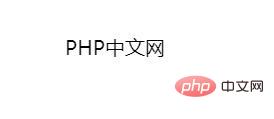
You can see that the text displayed on the page is the default black text.
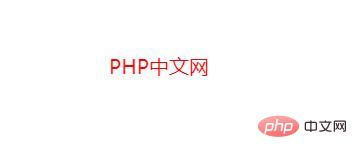
3. If you want to set the font color of text, you need to use the fillStyle attribute. This attribute can accept a color code value, such as #cc0000, or an English word of a color, such as red.
ctx .fillStyle="red";
Complete js code:
<canvas id="myCanvas"></canvas>
Rendering:
The above is the entire content of this article, I hope it can be helpful to everyone Learning helps. For more exciting content, you can pay attention to the relevant tutorial columns of the PHP Chinese website! ! !
The above is the detailed content of How to set the font color of HTML5 canvas? (code example). For more information, please follow other related articles on the PHP Chinese website!

Hot AI Tools

Undress AI Tool
Undress images for free

Undresser.AI Undress
AI-powered app for creating realistic nude photos

AI Clothes Remover
Online AI tool for removing clothes from photos.

Clothoff.io
AI clothes remover

Video Face Swap
Swap faces in any video effortlessly with our completely free AI face swap tool!

Hot Article
Hot Tools

Notepad++7.3.1
Easy-to-use and free code editor

SublimeText3 Chinese version
Chinese version, very easy to use

Zend Studio 13.0.1
Powerful PHP integrated development environment

Dreamweaver CS6
Visual web development tools

SublimeText3 Mac version
God-level code editing software (SublimeText3)


 What is the aside element for in HTML5?
Aug 12, 2025 pm 04:37 PM
What is the aside element for in HTML5?
Aug 12, 2025 pm 04:37 PM
Theelementshouldbeusedforcontenttangentiallyrelatedtothemaincontent,suchassidebars,pullquotes,definitions,advertisements,orrelatedlinks;2.Itcanbeplacedinsideoroutsideanarticledependingoncontext;3.ItisasemanticelementthatenhancesaccessibilityandSEObyp
 How to create a simple HTML5 webpage
Aug 12, 2025 am 11:51 AM
How to create a simple HTML5 webpage
Aug 12, 2025 am 11:51 AM
To create a simple HTML5 web page, you need to first use the declaration document type, and then build a basic structure containing, and, which sets the character encoding, viewport and title, add visible content such as title, paragraph, link, pictures and lists. Save it as a .html file and open it directly in the browser for viewing, without server support. This is the basis of a complete and effective HTML5 page.
 How do you use the autofocus attribute in HTML5?
Aug 14, 2025 pm 06:47 PM
How do you use the autofocus attribute in HTML5?
Aug 14, 2025 pm 06:47 PM
Theautofocusattributeautomaticallyfocusesaformelementwhenapageloads.2.Itisabooleanattribute,sonovalueisneeded—justincludeautofocusinthetag.3.Onlyoneelementperpageshoulduseittoavoidunpredictablebehavior.4.Itworksoninput,textarea,select,andbuttonelemen
 How to use the nav tag for navigation links in HTML5
Aug 15, 2025 am 05:55 AM
How to use the nav tag for navigation links in HTML5
Aug 15, 2025 am 05:55 AM
ThetaginHTML5isusedtodefineasectionofmajornavigationlinks,providingsemanticstructureandimprovingaccessibilityandSEO;itshouldwrapprimarynavigationelementslikemenusortablesofcontents,noteverylinkonapage,andcanbeenhancedwithARIAlabelssuchasaria-label=&q
 What is a definition list in HTML5?
Aug 20, 2025 pm 02:01 PM
What is a definition list in HTML5?
Aug 20, 2025 pm 02:01 PM
AdefinitionlistinHTML5iscreatedusingtheelementtogroupterms()withtheirdefinitions(),allowingmultipletermstoshareadefinitionoratermtohavemultipledefinitions,makingitidealforFAQs,glossaries,metadata,andcontactdetailswhileimprovingaccessibilityandSEOthro
 How to create a custom checkbox with HTML5
Aug 16, 2025 am 07:05 AM
How to create a custom checkbox with HTML5
Aug 16, 2025 am 07:05 AM
To create a custom checkbox, you must first use an HTML structure with label to ensure accessibility; 2. Hide the default checkbox through CSS but retain its functionality; 3. Use pseudo-elements and pseudo-classes to draw the selected state on the custom .checkmark elements; 4. Add hover, focus and select styles to enhance interactive feedback; 5. Keep native inputs present to support keyboard navigation and screen readers, and ultimately achieve beautiful and accessible custom checkboxes.
 What is the figure element and how is it used with figcaption in HTML5?
Aug 20, 2025 pm 02:06 PM
What is the figure element and how is it used with figcaption in HTML5?
Aug 20, 2025 pm 02:06 PM
TheelementinHTML5isusedtomarkupself-containedcontentlikeimages,diagrams,orcodesnippetsthatcanstandindependentlywithinadocument.Itcanbepairedwiththeoptionalelementtoprovideacaptionortitle,whichmayappearasthefirstorlastchildinside.Thiscombinationenhanc
 How to preload content with rel='preload' in HTML5?
Aug 20, 2025 pm 04:12 PM
How to preload content with rel='preload' in HTML5?
Aug 20, 2025 pm 04:12 PM
rel="preload" is used to load key resources in advance to improve page performance. 1. Use syntax and specify the as attribute; 2. Preload key resources such as fonts, style sheets, scripts, pictures, etc., and the font needs to be added crossorigin; 3. It can be loaded according to conditions in combination with media attributes; 4. Follow best practices such as loading only key resources on the first screen, avoiding excessive use, and correctly setting type and crossorigin; 5. Modern browsers widely support it, and can dynamically add or perform gradual enhancement processing through JavaScript to ensure that the page still works normally when it is not supported.
