


 Web Front-end
JS Tutorial
The road to Vue activity creation project starts with design and navigation bar development
Web Front-end
JS Tutorial
The road to Vue activity creation project starts with design and navigation bar development
The road to Vue activity creation project starts with design and navigation bar development

This article mainly introduces the design of the Vue activity creation project and the development of the navigation bar. It has a certain reference value. Now I share it with you. Friends in need can refer to it.
Let’s get started directly Project, I skipped basic operations like introducing Element-ui here
Division of project components
Based on the analysis of the project, I created the following new components. 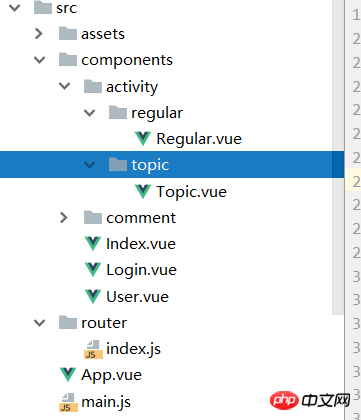
vue-router routing design
After the component is created, let’s set the routing
src/router/index.js
import Vue from 'vue'
import Router from 'vue-router'
import Index from 'components/Index'
import Login from 'components/Login'
import Regular from 'components/activity/regular/Regular'
import Topic from 'components/activity/topic/Topic'

Vue.use(Router)

export default new Router({
  routes: [
    {
      path: '/',
      name: 'index',
      component: Index
    },
    {
      path: '/login',
      component: Login
    },
    {
      path: '/Topic',
      component: Topic
    },
    {
      path: '/regular',
      component: Regular
    }
  ]
})
Here What should be noted is that the path of my import is set.
Find the resolve in build/webpack.base.conf.js and set our components to the bits of our components.
In this way, the components will be represented when importing. 'src/components' path
  resolve: {
    extensions: ['.js', '.vue', '.json'],
    alias: {
      'vue$': 'vue/dist/vue.esm.js',
      '@': resolve('src'),
      'components': resolve('src/components'),
    }
  }
nav-menu navigation bar development
Because Muse-ui is used, the navigation bar is copied directly from the document. The code is not included here. How to use it The document is very clear.
Here we will talk about the part involving Vue syntax. The title requirement on the left side of the navigation bar at the top of the project changes with the routing change. There is a watch listener in Vue. We use watch to monitor $route. Change to achieve this effect
Nav.vue
export default {
  name: 'Nav',
  data () {
    return {
      nowRouter: this.$route.name
    }
  },
  watch: {
    $route (to, from) {
      this.nowRouter = this.$route.name
    }
  }
}
Set these and run the command in the consolenpm run devLet’s see the effect
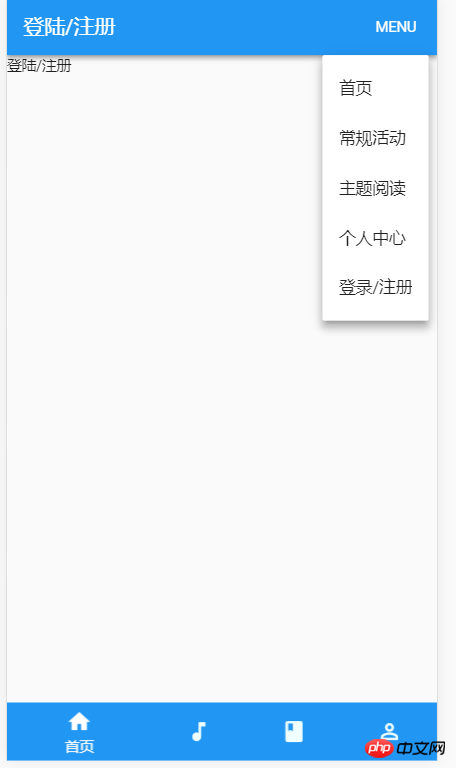
You can see that the prototype of the page has been built
The above is the entire content of this article. I hope it will be helpful to everyone's learning. For more related content, please pay attention to the PHP Chinese website!
Related recommendations:
The above is the detailed content of The road to Vue activity creation project starts with design and navigation bar development. For more information, please follow other related articles on the PHP Chinese website!

Hot AI Tools

Undress AI Tool
Undress images for free

Undresser.AI Undress
AI-powered app for creating realistic nude photos

AI Clothes Remover
Online AI tool for removing clothes from photos.

Clothoff.io
AI clothes remover

Video Face Swap
Swap faces in any video effortlessly with our completely free AI face swap tool!

Hot Article
Hot Tools

Notepad++7.3.1
Easy-to-use and free code editor

SublimeText3 Chinese version
Chinese version, very easy to use

Zend Studio 13.0.1
Powerful PHP integrated development environment

Dreamweaver CS6
Visual web development tools

SublimeText3 Mac version
God-level code editing software (SublimeText3)


 How to use Vue and Element-UI to implement lazy loading of images
Jul 22, 2023 pm 04:05 PM
How to use Vue and Element-UI to implement lazy loading of images
Jul 22, 2023 pm 04:05 PM
How to use Vue and Element-UI to implement lazy loading of images Lazy loading (Lazyloading) is a technology that delays loading of images, which can effectively increase page loading speed, save bandwidth and improve user experience. In the Vue project, we can use Element-UI and some plug-ins to implement the image lazy loading function. This article will introduce how to use Vue and Element-UI to implement lazy loading of images, and attach corresponding code examples. 1. Install the necessary dependencies before starting
 How to implement calendar and date selection functions using Vue and Element-UI
Jul 22, 2023 pm 05:30 PM
How to implement calendar and date selection functions using Vue and Element-UI
Jul 22, 2023 pm 05:30 PM
Introduction to how to use Vue and Element-UI to implement calendar and date selection functions: In front-end development, calendar and date selection functions are one of the very common requirements. Vue and Element-UI are a pair of very powerful development tools. Combining them can easily implement calendar and date selection functions. This article will introduce how to use Vue and Element-UI to create a simple calendar and date selection function, and provide code examples to help readers understand the specific steps and methods of implementation. Preparation: at the beginning
 Vue.js vs. React: Project-Specific Considerations
Apr 09, 2025 am 12:01 AM
Vue.js vs. React: Project-Specific Considerations
Apr 09, 2025 am 12:01 AM
Vue.js is suitable for small and medium-sized projects and fast iterations, while React is suitable for large and complex applications. 1) Vue.js is easy to use and is suitable for situations where the team is insufficient or the project scale is small. 2) React has a richer ecosystem and is suitable for projects with high performance and complex functional needs.
 How to use Vue and Element-UI to group and summarize data
Jul 21, 2023 pm 02:37 PM
How to use Vue and Element-UI to group and summarize data
Jul 21, 2023 pm 02:37 PM
How to use Vue and Element-UI to group and summarize data. In front-end development, we often encounter situations where we need to group and summarize data. Vue is a very popular JavaScript framework, and Element-UI is a component library based on Vue. It provides a rich set of UI components that can help us quickly build pages. This article will introduce how to use Vue and Element-UI to group and summarize data, and illustrate it with code examples. Preparatory work
 How to use Vue and Element-UI to implement data filtering and search functions
Jul 21, 2023 pm 08:40 PM
How to use Vue and Element-UI to implement data filtering and search functions
Jul 21, 2023 pm 08:40 PM
How to use Vue and Element-UI to implement data filtering and search functions. In modern web development, data filtering and search functions are very common and important requirements. Vue and Element-UI are currently very popular front-end frameworks. They provide many powerful tools and components that can help us easily implement data filtering and search functions. This article will introduce how to use Vue and Element-UI to implement these functions, and provide detailed code examples. First, we need to prepare a
 How to use Vue and Element-UI to implement message notification function
Jul 21, 2023 pm 12:40 PM
How to use Vue and Element-UI to implement message notification function
Jul 21, 2023 pm 12:40 PM
How to use Vue and Element-UI to implement message notification functions. With the continuous development of front-end technology, more and more websites and applications need to implement message notification functions in order to display important information to users in a timely manner. In Vue development, this function can be quickly realized by combining the Element-UI framework. This article will introduce in detail how to use Vue and Element-UI to implement the message notification function, and provide relevant code examples. 1. Preparation work is implemented using Vue and Element-UI
 Is vue.js hard to learn?
Apr 04, 2025 am 12:02 AM
Is vue.js hard to learn?
Apr 04, 2025 am 12:02 AM
Vue.js is not difficult to learn, especially for developers with a JavaScript foundation. 1) Its progressive design and responsive system simplify the development process. 2) Component-based development makes code management more efficient. 3) The usage examples show basic and advanced usage. 4) Common errors can be debugged through VueDevtools. 5) Performance optimization and best practices, such as using v-if/v-show and key attributes, can improve application efficiency.
 How to use Vue and Element-UI to implement auto-completion function
Jul 21, 2023 pm 02:53 PM
How to use Vue and Element-UI to implement auto-completion function
Jul 21, 2023 pm 02:53 PM
Overview of how to use Vue and Element-UI to implement the auto-completion function: Auto-completion is a very practical function that can provide relevant completion options based on user input and improve user experience. In the Vue framework, combined with the Element-UI component library, it becomes very simple to implement the automatic completion function. This article will introduce how to use Vue and Element-UI to implement this function, and give corresponding code examples. Step 1: Create a Vue project and introduce the Element-UI library. First,
