


Use of Amap WEB version

I recently learned how to use the web version of the Amap map, and summarized the application of the basic controls of Amap. The Amap map is open source and editable. The method is not difficult. Friends who are interested can try to edit it by themselves. .
I wanted to make a travel navigation project by myself before. I searched the Internet and found the AMAP open platform. I found that Amap can be easily applied to my own project, so I applied immediately. Let’s learn a key and study it carefully. I think it’s quite difficult. I searched online for cases and so on. After these few days, the editor has almost done some basic controls of Amap. The renderings are as shown below. Display:
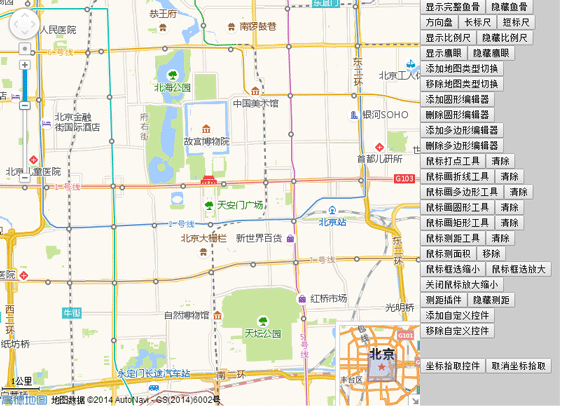
The following is the js code:
<script language="javascript" src="http://webapi.amap.com/maps?v=1.2&key=3c5ca12a5778fde874e9959c7fbdf516">//引入高德地图API</script>
<script language="javascript">
var mapObj;
var scale;
var mapType;
var toolBar;
var overView;
var circleEditor;
var circle;
var polygonEditor;
var polygon;
var homeControl;
var controlUI;
var ruler;
var mousetool;
//刷新页面
function reload(){
location.reload();
}
function mapInit(){
mapObj = new AMap.Map("iCenter",{
center:new AMap.LngLat(116.397728,39.90423), //地图中心点
level:13, //地图显示的比例尺级别
});
mapObj.plugin(["AMap.ToolBar"],function(){ //在地图中添加ToolBar插件
toolBar = new AMap.ToolBar();
mapObj.addControl(toolBar);
});
mapObj.plugin(["AMap.Scale"],function(){ //加载比例尺插件
scale = new AMap.Scale();
mapObj.addControl(scale);
scale.show();
});
mapObj.plugin(["AMap.OverView"],function(){ //在地图中添加鹰眼插件
//加载鹰眼
overView = new AMap.OverView({
visible:true //初始化显示鹰眼
});
mapObj.addControl(overView);
overView.open(); //展开鹰眼
});
mapObj.plugin(["AMap.RangingTool"],function(){
ruler = new AMap.RangingTool(mapObj);
AMap.event.addListener(ruler,"end",function(e){
ruler.turnOff();
});
});
mapObj.plugin(["AMap.MouseTool"],function(){ //鼠标工具插件
mousetool = new AMap.MouseTool(mapObj);
});
}
function Coordinate(){
AMap.event.addListener(mapObj,'click',getLnglat); //点击事件
}
function toolBarShow(){
toolBar.show();
toolBar.showRuler();
toolBar.showDirection();
}
function toolBarDirection(){
toolBar.show();
toolBar.showDirection();
toolBar.hideRuler();
}
function toolBarLong(){
toolBar.show();
toolBar.hideDirection();
toolBar.showRuler();
}
function toolBarShot(){
toolBar.show();
toolBar.hideRuler();
toolBar.hideDirection();
}
function iMapType(){
mapObj.plugin(["AMap.MapType"],function(){ //添加地图类型切换插件
//地图类型切换
mapType= new AMap.MapType({defaultType:1,showRoad:true});
mapObj.addControl(mapType);
});
}
function removeMapType(){
mapObj.removeControl(mapType);
}
function iCircleEditor(){ //圆形编辑器
circle = new AMap.Circle({ //圆形编辑器的样式
map: mapObj,
center:new AMap.LngLat("116.40332221984863","39.90025505675715"),
radius:1000,
strokeColor: "#F33",
strokeOpacity: 1,
strokeWeight: 3,
fillColor: "ee2200",
fillOpacity: 0.35
});
mapObj.plugin(["AMap.CircleEditor"],function(){
circleEditor = new AMap.CircleEditor(mapObj,circle); //创建圆形编辑器对象
circleEditor.open(); //打开圆形编辑器
});
}
function removeCicleEditor(){ //关闭圆形编辑器,隐藏圆形
circleEditor.close();
circle.hide();
}
function iPloygonEditor(){ //编辑多边形
var arr=new Array();//经纬度坐标数组
arr.push(new AMap.LngLat("116.403322","39.920255"));
arr.push(new AMap.LngLat("116.410703","39.897555"));
arr.push(new AMap.LngLat("116.402292","39.892353"));
arr.push(new AMap.LngLat("116.389846","39.891365"));
polygon = new AMap.Polygon({
path:arr, //设置多边形轮廓的节点数组
strokeColor:"#0000ff",
strokeOpacity:0.2,
strokeWeight:3,
fillColor: "#f5deb3",
fillOpacity: 0.35
});
//地图上添加多边形
mapObj.addOverlays(polygon);
//构造多边形编辑对象,并开启多边形的编辑状态
mapObj.plugin(["AMap.PolyEditor"],function(){
polygonEditor = new AMap.PolyEditor(mapObj,polygon);
polygonEditor.open();
});
}
function removePloygonEditor(){
polygonEditor.close();
polygon.hide();
}
AMap.homeControlp = function(){}
AMap.homeControlp.prototype = {
addTo: function(map, dom){
dom.appendChild(this._getHtmlDom(map));
},
_getHtmlDom:function(map){
this.map=map;
// 创建一个能承载控件的<p>容器
controlUI = document.createElement("p");
controlUI.style.width='80px'; //设置控件容器的宽度
controlUI.style.height='20px'; //设置控件容器的高度
controlUI.style.backgroundColor='white';
controlUI.style.borderStyle='solid';
controlUI.style.borderWidth='2px';
controlUI.style.cursor='pointer';
controlUI.style.textAlign='center';
// 设置控件的位置
controlUI.style.position='absolute';
controlUI.style.left='120px'; //设置控件离地图的左边界的偏移量
controlUI.style.top='5px'; //设置控件离地图上边界的偏移量
controlUI.style.zIndex='300'; //设置控件在地图上显示
// 设置控件字体样式
controlUI.style.fontFamily='Arial,sens-serif';
controlUI.style.fontSize='12px';
controlUI.style.paddingLeft='4px';
controlUI.style.paddingRight='4px';
controlUI.innerHTML="换中心点";
// 设置控件响应点击onclick事件
controlUI.onclick = function(){
map.setCenter(new AMap.LngLat(116.234404, 39.12915));
}
return controlUI;
}
}
AMap.event.trigger(homeControlp,"hide");
AMap.event.addListener(homeControlp,"hide",function(){
controlUI.style.display = 'none';
})
function myControl(){
homeControl = new AMap.homeControlp(mapObj); //新建自定义插件对象
mapObj.addControl(homeControl); //地图上添加插件
}
function removeMyControl(){
homeControl.hide();
//controlUI.style.display='none';
}
function iRangingTool(){
ruler.turnOn();
}
function removeRangingTool(){
ruler.turnOff();
mapObj.clearMap();
//ruler.hide();
//ruler.setMap(null);
//mapObj.removeControl(ruler);
}
function iMarker(){
mousetool.marker(); //使用鼠标工具,在地图上画标记点
}
function iMeasureArea(){
mousetool.measureArea();
}
function iRectZoomIn(){
mousetool.rectZoomIn();
}
function iRectZoomOut(){
mousetool.rectZoomOut();
}
function iPolyline(){
mousetool.polyline();
}
function iPolygon(){
mousetool.polygon();
}
function iCircle(){
mousetool.circle();
}
function iRectangle(){
mousetool.rectangle();
}
function iRule(){
mousetool.rule();
}
function removeMouseTool(){
mousetool.close(true);
}
function geocoder() {
var MGeocoder;
//加载地理编码插件
mapObj.plugin(["AMap.Geocoder"], function() {
MGeocoder = new AMap.Geocoder({
radius: 1000,
extensions: "all"
});
//返回地理编码结果
AMap.event.addListener(MGeocoder, "complete", geocoder_CallBack);
//逆地理编码
MGeocoder.getAddress(lnglatXY);
});
//加点
var marker = new AMap.Marker({
map:mapObj,
icon: new AMap.Icon({
image: "http://api.amap.com/Public/images/js/mark.png",
size:new AMap.Size(58,30),
imageOffset: new AMap.Pixel(-32, -0)
}),
position: lnglatXY,
offset: new AMap.Pixel(-5,-30)
});
// mapObj.setFitView();
}
//回调函数
function geocoder_CallBack(data) {
var address;
//返回地址描述
address = data.regeocode.formattedAddress;
//返回结果拼接输出
document.getElementById("iAddress").innerHTML = address;
}
//鼠标点击,获取经纬度坐标
function getLnglat(e){
mapObj.clearMap();
var x = e.lnglat.getLng();
var y = e.lnglat.getLat();
document.getElementById("lnglat").innerHTML = x + "," + y;
lnglatXY = new AMap.LngLat(x,y);
geocoder();
}
</script>The following is the HTML code:
<body onLoad="mapInit()">
 <p id="iCenter"></p>
 <p id="iControlbox">
		<ul>
			<li><button onclick="javascript:toolBarShow();">显示完整鱼骨</button><button onclick="javascript:toolBar.hide();">隐藏鱼骨</button><button onclick="javascript:toolBarDirection();">方向盘</button><button onclick="javascript:toolBarLong();">长标尺</button><button onclick="javascript:toolBarShot();">短标尺</button></li>
			<li><button onclick="javascript:scale.show();">显示比例尺</button><button onclick="javascript:scale.hide();">隐藏比例尺</button></li>
			<li><button onclick="javascript:overView.show();">显示鹰眼</button><button onclick="javascript:overView.hide();">隐藏鹰眼</button></li>
			<li><button onclick="javascript:iMapType();">添加地图类型切换</button><button onclick="javascript:removeMapType();">移除地图类型切换</button></li>
			<li><button onclick="javascript:iCircleEditor();">添加圆形编辑器</button><button onclick="javascript:removeCicleEditor();">删除圆形编辑器</button></li>
			<li><button onclick="javascript:iPloygonEditor();">添加多边形编辑器</button><button onclick="javascript:removePloygonEditor();">删除多边形编辑器</button></li>
			<li><button onclick="javascript:iMarker();">鼠标打点工具</button><button onclick="javascript:removeMouseTool();">清除</button></li>
			<li><button onclick="javascript:iPolyline();">鼠标画折线工具</button><button onclick="javascript:removeMouseTool();">清除</button></li>
			<li><button onclick="javascript:iPolygon();">鼠标画多边形工具</button><button onclick="javascript:removeMouseTool();">清除</button></li>
			<li><button onclick="javascript:iCircle();">鼠标画圆形工具</button><button onclick="javascript:removeMouseTool();">清除</button></li>
			<li><button onclick="javascript:iRectangle();">鼠标画矩形工具</button><button onclick="javascript:removeMouseTool();">清除</button></li>
			<li><button onclick="javascript:iRule();">鼠标测距工具</button><button onclick="javascript:removeMouseTool();">清除</button></li>
			<li><button onclick="javascript:iMeasureArea();">鼠标测面积</button><button onclick="javascript:removeMouseTool();">移除</button></li>
			<li><button onclick="javascript:iRectZoomIn();">鼠标框选缩小</button><button onclick="javascript:iRectZoomOut();">鼠标框选放大</button><button onclick="javascript:removeRangingTool();">关闭鼠标放大缩小</button></li>
			<li><button onclick="javascript:iRangingTool();">测距插件</button><button onclick="javascript:removeRangingTool();">隐藏测距</button></li>
			<li><button onclick="javascript:myControl();">添加自定义控件</button><button onclick="javascript:removeMyControl();">移除自定义控件</button></li>
			<li><p class="detail"><p><span id="lnglat"> </span></p><p><span id="iAddress"> </span></p></p></li>
			<li><button onclick="javascript:Coordinate();">坐标拾取控件</button><button onclick="javascript:reload();">取消坐标拾取</button></li>


		</ul>
	</p>
</body>
Summary: The above is the entire content of this article, I hope it will be helpful to everyone's study.
Related recommendations:
php HTMLMethods and examples of submitting forms without refreshing
HTML Summary of methods of embedding JS in documents
jQuery implementationHTMLFuzzy matching query for page text box (with code)
The above is the detailed content of Use of Amap WEB version. For more information, please follow other related articles on the PHP Chinese website!

Hot AI Tools

Undresser.AI Undress
AI-powered app for creating realistic nude photos

AI Clothes Remover
Online AI tool for removing clothes from photos.

Undress AI Tool
Undress images for free

Clothoff.io
AI clothes remover

AI Hentai Generator
Generate AI Hentai for free.

Hot Article
Hot Tools

Notepad++7.3.1
Easy-to-use and free code editor

SublimeText3 Chinese version
Chinese version, very easy to use

Zend Studio 13.0.1
Powerful PHP integrated development environment

Dreamweaver CS6
Visual web development tools

SublimeText3 Mac version
God-level code editing software (SublimeText3)
Hot Topics
 1378
1378
 52
52

 How to make Google Maps the default map in iPhone
Apr 17, 2024 pm 07:34 PM
How to make Google Maps the default map in iPhone
Apr 17, 2024 pm 07:34 PM
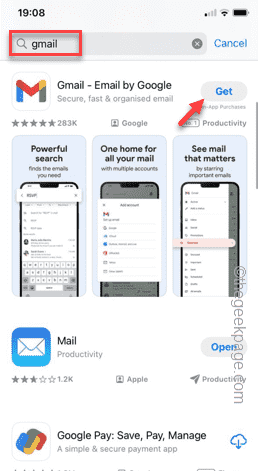
The default map on the iPhone is Maps, Apple's proprietary geolocation provider. Although the map is getting better, it doesn't work well outside the United States. It has nothing to offer compared to Google Maps. In this article, we discuss the feasible steps to use Google Maps to become the default map on your iPhone. How to Make Google Maps the Default Map in iPhone Setting Google Maps as the default map app on your phone is easier than you think. Follow the steps below – Prerequisite steps – You must have Gmail installed on your phone. Step 1 – Open the AppStore. Step 2 – Search for “Gmail”. Step 3 – Click next to Gmail app
 How to use mdf and mds files
Feb 19, 2024 pm 05:36 PM
How to use mdf and mds files
Feb 19, 2024 pm 05:36 PM
How to use mdf files and mds files With the continuous advancement of computer technology, we can store and share data in a variety of ways. In the field of digital media, we often encounter some special file formats. In this article, we will discuss a common file format - mdf and mds files, and introduce how to use them. First, we need to understand the meaning of mdf files and mds files. mdf is the extension of the CD/DVD image file, and the mds file is the metadata file of the mdf file.
 What software is crystaldiskmark? -How to use crystaldiskmark?
Mar 18, 2024 pm 02:58 PM
What software is crystaldiskmark? -How to use crystaldiskmark?
Mar 18, 2024 pm 02:58 PM
CrystalDiskMark is a small HDD benchmark tool for hard drives that quickly measures sequential and random read/write speeds. Next, let the editor introduce CrystalDiskMark to you and how to use crystaldiskmark~ 1. Introduction to CrystalDiskMark CrystalDiskMark is a widely used disk performance testing tool used to evaluate the read and write speed and performance of mechanical hard drives and solid-state drives (SSD). Random I/O performance. It is a free Windows application and provides a user-friendly interface and various test modes to evaluate different aspects of hard drive performance and is widely used in hardware reviews
 How to download foobar2000? -How to use foobar2000
Mar 18, 2024 am 10:58 AM
How to download foobar2000? -How to use foobar2000
Mar 18, 2024 am 10:58 AM
foobar2000 is a software that can listen to music resources at any time. It brings you all kinds of music with lossless sound quality. The enhanced version of the music player allows you to get a more comprehensive and comfortable music experience. Its design concept is to play the advanced audio on the computer The device is transplanted to mobile phones to provide a more convenient and efficient music playback experience. The interface design is simple, clear and easy to use. It adopts a minimalist design style without too many decorations and cumbersome operations to get started quickly. It also supports a variety of skins and Theme, personalize settings according to your own preferences, and create an exclusive music player that supports the playback of multiple audio formats. It also supports the audio gain function to adjust the volume according to your own hearing conditions to avoid hearing damage caused by excessive volume. Next, let me help you
 How to use NetEase Mailbox Master
Mar 27, 2024 pm 05:32 PM
How to use NetEase Mailbox Master
Mar 27, 2024 pm 05:32 PM
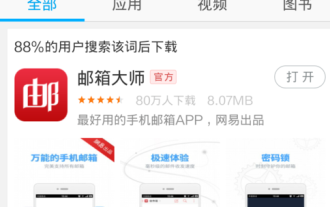
NetEase Mailbox, as an email address widely used by Chinese netizens, has always won the trust of users with its stable and efficient services. NetEase Mailbox Master is an email software specially created for mobile phone users. It greatly simplifies the process of sending and receiving emails and makes our email processing more convenient. So how to use NetEase Mailbox Master, and what specific functions it has. Below, the editor of this site will give you a detailed introduction, hoping to help you! First, you can search and download the NetEase Mailbox Master app in the mobile app store. Search for "NetEase Mailbox Master" in App Store or Baidu Mobile Assistant, and then follow the prompts to install it. After the download and installation is completed, we open the NetEase email account and log in. The login interface is as shown below
 How to use Baidu Netdisk app
Mar 27, 2024 pm 06:46 PM
How to use Baidu Netdisk app
Mar 27, 2024 pm 06:46 PM
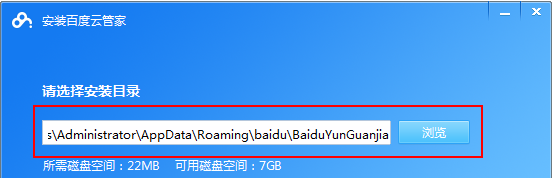
Cloud storage has become an indispensable part of our daily life and work nowadays. As one of the leading cloud storage services in China, Baidu Netdisk has won the favor of a large number of users with its powerful storage functions, efficient transmission speed and convenient operation experience. And whether you want to back up important files, share information, watch videos online, or listen to music, Baidu Cloud Disk can meet your needs. However, many users may not understand the specific use method of Baidu Netdisk app, so this tutorial will introduce in detail how to use Baidu Netdisk app. Users who are still confused can follow this article to learn more. ! How to use Baidu Cloud Network Disk: 1. Installation First, when downloading and installing Baidu Cloud software, please select the custom installation option.
 BTCC tutorial: How to bind and use MetaMask wallet on BTCC exchange?
Apr 26, 2024 am 09:40 AM
BTCC tutorial: How to bind and use MetaMask wallet on BTCC exchange?
Apr 26, 2024 am 09:40 AM
MetaMask (also called Little Fox Wallet in Chinese) is a free and well-received encryption wallet software. Currently, BTCC supports binding to the MetaMask wallet. After binding, you can use the MetaMask wallet to quickly log in, store value, buy coins, etc., and you can also get 20 USDT trial bonus for the first time binding. In the BTCCMetaMask wallet tutorial, we will introduce in detail how to register and use MetaMask, and how to bind and use the Little Fox wallet in BTCC. What is MetaMask wallet? With over 30 million users, MetaMask Little Fox Wallet is one of the most popular cryptocurrency wallets today. It is free to use and can be installed on the network as an extension
 How to use Xiaoai Speaker How to connect Xiaoai Speaker to mobile phone
Feb 22, 2024 pm 05:19 PM
How to use Xiaoai Speaker How to connect Xiaoai Speaker to mobile phone
Feb 22, 2024 pm 05:19 PM
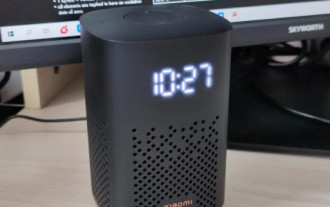
After long pressing the play button of the speaker, connect to wifi in the software and you can use it. Tutorial Applicable Model: Xiaomi 12 System: EMUI11.0 Version: Xiaoai Classmate 2.4.21 Analysis 1 First find the play button of the speaker, and press and hold to enter the network distribution mode. 2 Log in to your Xiaomi account in the Xiaoai Speaker software on your phone and click to add a new Xiaoai Speaker. 3. After entering the name and password of the wifi, you can call Xiao Ai to use it. Supplement: What functions does Xiaoai Speaker have? 1 Xiaoai Speaker has system functions, social functions, entertainment functions, knowledge functions, life functions, smart home, and training plans. Summary/Notes: The Xiao Ai App must be installed on your mobile phone in advance for easy connection and use.
